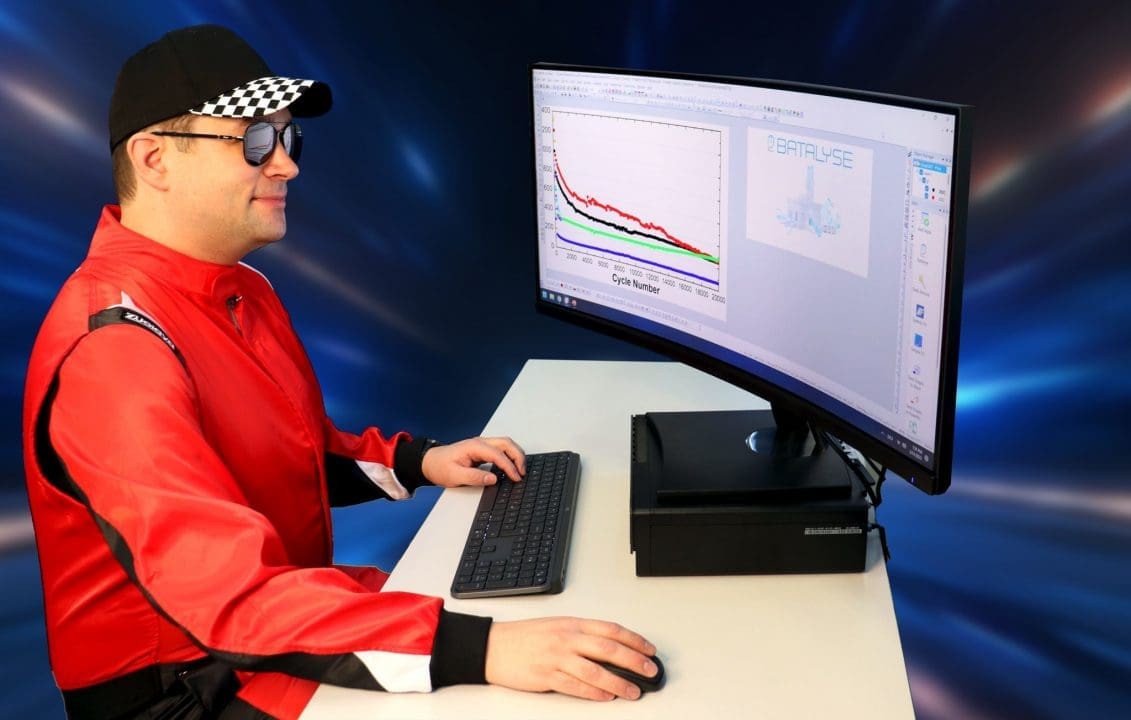
Data Analysis - Save Time & Effort

Evaluate and benchmark your electrochemical test data for any test device, file structure and non-proprietary file format.

Data Analysis

Data Analysis is your solution if you work with electrochemical test files in battery, fuel-cell, electrolysis or redox flow battery (RFB) research. We add any file structure and test system your require for free.
All-in one
All-in one
Evaluate test files from Arbin, AVL, Basytec, Biologic, Ivium, Keysight, Maccor, Neware, PEC, Solartron,...
Benchmark / Compare
Benchmark / Compare
Get information on your test series and also compare test series with each other
Compatible
Compatible
Evaluate files from your local file system, Batalyse Collect database or your own database
Specimen Parameters
Specimen Parameters
Add and load your individual specimen parameters to calculate result tables and diagrams
Automate
Automate
Automate your test data evaluation in combination with Batalyse Collect database
Result graphs
Result graphs
Use 100+ predefined result graphs in 9 different languages and labelled according to your settings
Flexible
Flexible
Modify result graphs as you like and change line colors, axis labeling,...
Confidential and Save
Batalyse has no access to your data and results. You have full control and your data stays in-house
Test options

Test options

Data Analysis can be tested for free and without obligation

  • Download Data Analysis, unzip the archive
  • Install by drag-and-drop to opened Origin window on your computer
  • Sent us a license request. We will contact you when the license is active
  • Batalyse has no access to your test data and results

Requirements

Requirements

Data Analysis requires the graphing and analysis software “Origin” as a platform. It can be installed on any office computer.

  • Requires Origin 2022b or better newer versions
  • Origin Pro is not required

Test Data Analysis now for free

We look forward to starting your demo.

License system - Data Analysis

Data Analysis licenses can be customized for individual users, research groups and whole companies or universities. A license includes access to updates and service.

  • Licenses are bound to specific computers or to a company wide user domain
  • Online and offline licenses abailable
  • Limited or unlimited number of evaluations

Download Data Analysis

Please note that Batalyse requires Origin 2022b or newer\!
Data Analysis installation manual

Change Log

Data Analysis is continuously updated with your and other user’s feedback
2026-04 (updated 2026-07-17)
  • Integrated EIS Analyzer: EIS files from Batalyse Collect are now analysed with the full Batalyse EIS Analyzer
    • Equivalent-circuit fit, DRT and Kramers-Kronig validation
    • Nyquist, Bode and analysis plots are created in Origin, exported as images and uploaded back to Collect
    • A combined Origin project (.opju) export of an EIS analysis, including graph customization, can be requested from Collect
    • Supported on Origin 2022b – 2024b in addition to Origin 2025/2026


  • New “Edit graph curves” dialog: a new toolbar button lists every curve of any graph in your project and lets you change the plot type (line, scatter, line + symbol), line colour, width and style, symbol colour, size and shape, and show or hide individual curves. A bulk-edit row applies a setting to all curves at once and the dialog stays open after Apply.


  • New voltage relaxation (dV/dt) analysis of rest steps: per-rest dV/dt and rest time, fast/slow segmentation and a bi-exponential fit of the rest voltage giving the open-circuit voltage, the fast and slow amplitudes and time constants and the fit quality. Two new graphs show the relaxation curves (one curve per rest, coloured and labelled by SOC) and the time constants versus SOC and cycle.
  • Cumulative energy throughput: new cumulative charge and discharge energy columns and a new “Throughput vs. cycle” graph combining cumulative capacity and cumulative energy.
  • Further new graphs:
    • Cumulative discharge endpoint capacity slippage plot (1.31)
    • CV comparison graphs – areal current density vs. voltage and voltage vs. current density, split into one curve per cycle
    • Graph 4.5 (voltage vs. test capacity) is now plotted per selected cycle
  • Median and median + moving-average noise filters with configurable window size for the differential curves (dQ/dV, dT/dV) and the relaxation curve.
  • Date and time of each cycle start is now available as a Date_Time column in the per-cycle summary export, for KPI exports and partner data exchange.


  • Gamry EXPLAIN (.DTA) files are supported, including the short OCP / corrosion-potential exports that were previously rejected.
  • Files parsed by Collect (BioLogic .mpr, Neware, Maccor, Ivium, Metrohm, Lanhe/Batalyse .cex) are recognised with their Collect column names.


  • Faster installation, updates and analysis: the program code is shipped in a few large bundles instead of dozens of individual files, and the heaviest calculation loops were optimised for very large files.
  • Analysis of large merged files no longer hangs – the DCIR delay search and the rest-step fits were reworked (worst case dropped from 60 s to under a second per fit), and the rest fit now shows a progress bar and can be cancelled.
  • Works behind corporate proxies: the system proxy configuration (including automatic configuration scripts) and Windows integrated authentication are used automatically, and connections through TLS-inspecting proxies no longer fail.
  • 24-hour grace period for the licence check – a temporary connection problem to the licence server no longer reports your licence as expired.
  • Bug reports with screenshots and attachments: paste a screenshot directly into the bug-report dialog, attach files, and save the report as a ZIP file if sending fails.


  • Corrected results. Please note that results recalculated with this version can differ from earlier ones:
    • The average step voltage is time-weighted again; average power and line energy follow from the corrected voltage, and the average current now uses the same method on all Origin versions
    • Corrected specific capacity denominators (coating, electrolyte and separator) and stack volumetric capacity
    • Irreversible loss is now calculated for tests that start with a charge step
    • GITT diffusivity – fit window, physical constants, unit conversion and per-pulse current are handled correctly, and repeated runs give identical results
    • Cumulative energy is now deterministic, and Line_Time uses the step time reported by the device
  • Further fixes: Continue Import for Basytec MySQL databases, Lanhe Excel files that could hang Origin, Excel import without the separate Excel Connector, start and end date/time supplied by Collect, C-rate labels on time-axis graphs, weights entered in g or kg, EIS impedance columns from Collect, and parallel analysis of several Collect files without a Collect Monitor login.
  • A systematic correctness and stability review of the whole analysis removed a large number of latent faults in the cycle, step, pulse, EIS, comparison and graph code – a frequent cause of aborted analyses.


  • Please note: this version of Data Analysis requires Batalyse Collect version 23.07.2026 or newer.
2026-03 (updated 2026-04-24)
  • Sign in to Batalyse Collect directly from Data Analysis. Instead of creating an access token in Collect’s admin area and pasting it in, Data Analysis opens the Collect login page and establishes the connection for you. Expired or invalid access is detected and the login re-opens automatically.
  • Personal access instead of admin access. Each user’s connection is stored under their own name, and a dedicated Monitor User setting lets the Collect Monitor run under a normal user account.
  • Several Collect servers side by side:
    • Access is stored per server, so switching between servers that share a user name no longer overwrites each other
    • The server address field is now a dropdown with your previously used addresses
    • The active server is shown in the dialog titles
    • You can log out directly from the batch monitor


  • Much more informative error reporting in the batch monitor and the Collect Monitor: the error message, the processing step where it happened, a timestamp and the job type are shown in the Errors column. Error rows can be removed, and stalled or silently crashed background jobs are detected instead of hanging at a fixed percentage.


  • Reference-electrode end-of-charge potential: new WE-RE and CE-RE end-of-charge columns with the matching formulas and a new graph, plus a combined WE-CE / WE-RE / CE-RE electrode view.
  • Improved BioLogic BCS support with better extraction of the values from the file header.
  • Adjustable minimum step current for step detection, for cyclers whose zero-current steps carry a small residual current.


  • Uploads and downloads no longer depend on Python. All transfers to and from Batalyse Collect now use a built-in transfer component, which makes transfers more robust on restricted machines.
  • Faster comparisons and graph export – data for nested tests is only downloaded when a selected graph actually needs it.
  • Units are transferred to Collect as proper characters (superscripts, µ, Ohm), so uploaded summary tables read correctly.
  • Better detection of “Info” sheets in Excel-based exports, and step names now include pause steps.
  • Exported graph images carry the plot type in the file name.


  • Fixes:
    • Row capacity is integrated with midpoint interpolation of the current, and discharge energy keeps its sign
    • Combined charge + discharge comparison graphs showed duplicated legend entries and wrong colours and line styles
    • Continue Import silently imported nothing in some cases and produced empty error reports; capacity and all dependent formula columns are now recalculated for the appended rows
    • Access database import, and header lines with an unusual number of columns
    • Background comparisons that stayed at 0 % or reported no error, and comparisons of comparisons that could not find their underlying tests
    • Collect uploads with numeric or boolean metadata values, duplicate column headers and over-long file names
2026-02 (updated 2026-02-09)
  • Fixed the line-end average voltage, which was calculated incorrectly on Origin 2025 and older.
  • Several fixes for direct database imports.
  • Licence retrieval retries automatically instead of failing on a single unsuccessful attempt.
2026-01 (updated 2026-01-25)
  • Better EIS comparison plots for tests with only a single cycle.
  • Fixed that parameters from one file could overwrite another file’s parameters when several files were configured in the same “multiple files” session.
  • Fixed the time column, which was not fully calculated in certain cases on older Origin versions.
  • A confusing cycle-selection error message no longer appears when the selection cannot be matched.
2025-05 (updated 2025-12-19)
  • Full reference-electrode analysis:
    • New WE-RE and CE-RE result columns (average potential, polarization and more)
    • DCIR for reference electrodes and new step polarization graphs
    • Reference-electrode graphs are plotted whenever the corresponding standard graph is selected
  • Counter-electrode potential offset: an offset can be entered in the Parameters dialog and is applied to all single-test graphs, with axis scales rounded accordingly.


  • SOH and further new graphs versus equivalent full cycles.
  • BioLogic BCS files are supported.
  • Already-analysed tests can be merged – the previous analysis is stripped automatically, so a merge of merges is possible, locally or through Batalyse Collect. A “delete original data” option was added when merging into existing results.
  • Uploads to Batalyse Collect are resumable and retry automatically, so large uploads survive a dropped connection.


  • Graph labels are fully translated into 10 languages (English, German, French, Spanish, Portuguese, Russian, Korean, Japanese, Chinese, Turkish) – axis titles, DCIR, SOC/SOH/OCV, electrode designations, efficiency, capacity slippage and differential-analysis labels.
  • Modernised dialogs with a consistent look, and the exact version (including subversion) is now shown in the dialogs.
  • Assign Columns moved into the Parameters dialog, so column mapping is done together with the rest of the test setup.
  • Faster analysis through a series of performance improvements, and the file selection dialog now shows all relevant file types.


  • Fixes:
    • “Continue Import” – importing new data into an already-analysed workbook works again
    • EIS – comparison graphs no longer error out, legends are correct when multiple EIS data sets are shown, and missing cycle ends are detected
    • Merging files from Collect with differing columns, and duplicate upload errors in Collect
    • Safety-test graphs and the safety-test KPI table upload
    • The pulse comparison summary table and its graphs
    • Compatibility with Origin 2026 – incorrect test-SOC results and a calculation error in certain graphs
2025-04 (updated 2025-07-17)
  • Reference electrodes and extra measurement channels from separate files: additional columns recorded in a second file (for example a reference-electrode or sensor file) can now be linked to a test and analysed together with it.
  • Direct import of Maccor and Neware binary files through dedicated connectors, and Arbin Access databases moved to the normal Import button instead of the separate database import.
  • Connectors install themselves automatically (CSV, XLSX and others), and are fetched from Batalyse if the OriginLab download fails.


  • Circle fit for EIS: the semicircle of the Nyquist plot is fitted automatically and its parameters are written to the results.
  • New graphs: CC-CV comparison, CC-CV charge + discharge comparison, additional dQ/dV diagrams including dQ/dV vs. capacity separated into charge and discharge (single test and comparison), and new BST/BTS graphs.
  • “Equivalent full cycle” column added to the step data.
  • Dark mode for all dialogs, following the Windows system setting.
  • Merging of predefined groups from Batalyse Collect, so a group defined in Collect can be analysed as one merged test.


  • More accurate device and step-type recognition: better detection of Neware and Maccor files, BioLogic step recognition when the “MD” column is unusable, more reliable identification when current and voltage barely change, and case-insensitive column matching.
  • More date and time formats are understood, and files with only two columns can now be imported.
  • The licence dialog was reworked, including offline licences.
  • Proxy settings are set to “system” automatically when they were previously “direct”, so connections work on managed company networks.


  • Fixes:
    • Uploads to Collect failed for file IDs above 10 million
    • Step and test SOC were calculated incorrectly when the negative electrode was selected
    • dT/dV columns and the corresponding graphs were wrong
    • Relative capacity was wrong when “Full capacity cycle” was set to 0
    • The Potential-Current-Temperature graph and the current-density right-hand axis
    • Mean values were wrong when only a single column was selected
    • Data Analysis failed to compile on Origin versions older than 2025
2025-03 (updated 2025-04-04)
  • EIS data from Arbin Excel exports is now recognised and analysed.
  • Linking measurement files now happens in the Parameters dialog instead of a separate step, so everything about a test is configured in one place.
  • Better recognition of file structures, so more exports are read correctly on the first attempt.
  • Faster downloads from Batalyse Collect, with more forgiving timeouts on slow connections, improved Collect sign-in handling and a tidier connection dialog.
  • The Basic Parameters section of the Parameters dialog was reworked.


  • Fixes:
    • EIS comparisons of more than 8 tests no longer fail
    • “Set all” in the Parameters dialog now applies the values reliably to every selected file
    • Landt files import correctly again, and LVDT / data-logger files import more reliably
    • The default minimum-difference setting for dQ/dV was corrected
2025-02 (updated 2025-03-03)

    • Data Analysis now automatically installs the proprietary file format connectors for .mpr and .cex files and a python package. You no longer need to manually install or update these connectors when installing or updating Data Analysis. Batalyse plans to add more connectors in collaboration with OriginLab in the coming months.

    • Improved and expanded specimen dialog.

    • Code Optimization – Automated pulse/HPPC fits – faster calculations, especially when handling a large number of measurement points during the pulse.

    • New comparison graph: Discharge and charge capacity for each selected test over the cycle number vs Coulom Efficiency / Voltaic Efficiency / Energy Efficiency.

    • Polarization graphs available for single tests now also added for comparisons.

    • Improved support for supercaps: New result graphs, labelling options and expanded calculation table.

    • The axes of EIS comparison graphs are now uniformly scaled, and the object manager displays the test name.

    • New CV graphs added:

    • We have improved the tooltips in the specimen dialog to be less intrusive. Now, only one tooltip is displayed at a time, preventing multiple active tooltips from blocking your view.

Bug fixes:
– Fixed a bug where specimen parameters from the file header of Biologic/Neware files were not correctly applied during graph calculations.
– Resolved issues causing problems when merging Neware files.
– Hangke formation tester files didn’t show the Excel sheet names in the legend.

2025-01 (updated 2025-02-10)
    • Perform automated pulse / hppc fits and receive insights on electrolyte, concentration and charge transfer resistance. More information: M. Daowd et al., Battery Models Parameter Estimation based on Matlab/Simulink, International Review of Electrical Engineering, 7(4), 4915-4924.

    • New: Analyze Battery Safety Tests! Data Analysis now supports data loggers with multiple channels to record voltage, pressure, and temperature at various cell or module positions. Easily determine onset temperature, emitted gas volume, and maximum temperature. If you conduct safety tests, feel free to contact us!

    •  DCIR – new single and comparison graphs

    • Constant Current – Constant Voltage (CC-CV): Gain deeper insights into the capacity distribution at each stage

    • Enhanced Split Graph Feature: Easily extract individual curves from a graph into separate graph objects. This feature now supports a wider range of graph types.

    • Graphs with an x-axis based on cycle ranges can now be duplicated or multiplied, each with a defined cycle range to focus on specific test sections.

    • EIS graphs can now be selected via the Graph Control tab, and new EIS graphs have been added.


    • Improved support for various test devices e.g. Maccor, Neware, Gamry, Solartron,…
2024.04 (updated 09.10.2024)

To enhance data security, we have replaced passwords with tokens. Tokens are now required to connect Data Analysis, Collect, and Mind, as well as to access the API with your own code or third-party software. After updating Data Analysis, Collect, or Mind, you must create and use tokens. Your Collect and Mind login passwords remain unchanged and are still required.

For general information, please watch the basics video, and for detailed instructions, refer to our tutorial video.


    • Graph calculation formulas are now displayed both in Graph Control – Graph selection and above each created graph

    • New information dialog 

    • WE coating thickness – enry added/linked to Basic Parameters section

    • Comparison graphs: new error display style added. With “None” only the standard deviation is plotted.

      • Curve colors can be edited more easily now (only from Origin2024b)

    • New Graph Control option: Show/hide vertical reference lines

    • New comparison result graph added: Discharge capacity, CE vs. cycle comparison


    • Improves support for various test devices

    • Improved merge feature

2024.04 (updated 03.07.2024)

    • New graph customization option #1:  Select individual color for Voltaic and Energy efficiency and adjust efficiency axis range(s) and increment(s)

    • New graph customization option #2:  (De)Acitvate graph gridlines

    • Coin cells (CR1616 and CR2032) added to the Cell format section

    • File name is now displayed in Collect monitor

    • Password entry in Data Analysis to connect to Collect is by default hidden

    • Improvements and bug fixes with the Data Analysis continue import function in combination with our Collect database software.

    • Improvements for EIS analysis:
        • x/y axis now have the same scaling

        • Curves have different color

        • Resistance is now normalized to electrode area if added in dialog

    • Reference electrodes
        • New reference electrode result dQ/dV graphs
            • WE-RE voltage at x and y axis

            • CE-RE voltage at x and y axis

        • You can now also directly assign your test file columns when working with Biologic mpr files. Please update your mpr connector to the latest version.

    • New support for Galvanostatic intermittent titration technique (GITT) tests

    • Added support for Battery Dynamics test devices

    • Improved support for Neware, Astrol, Ivium, Maccor and Nanocycler test devices

  • Data Analysis v2024-04 uses a Python package to accelerate the upload of results to Batalyse Collect database. This is only relevant for you if you use both Data Analysis and Collect. Please accept the installation of the Python package in that case.

Older versions

2024.02 (updated 18.04.2024)

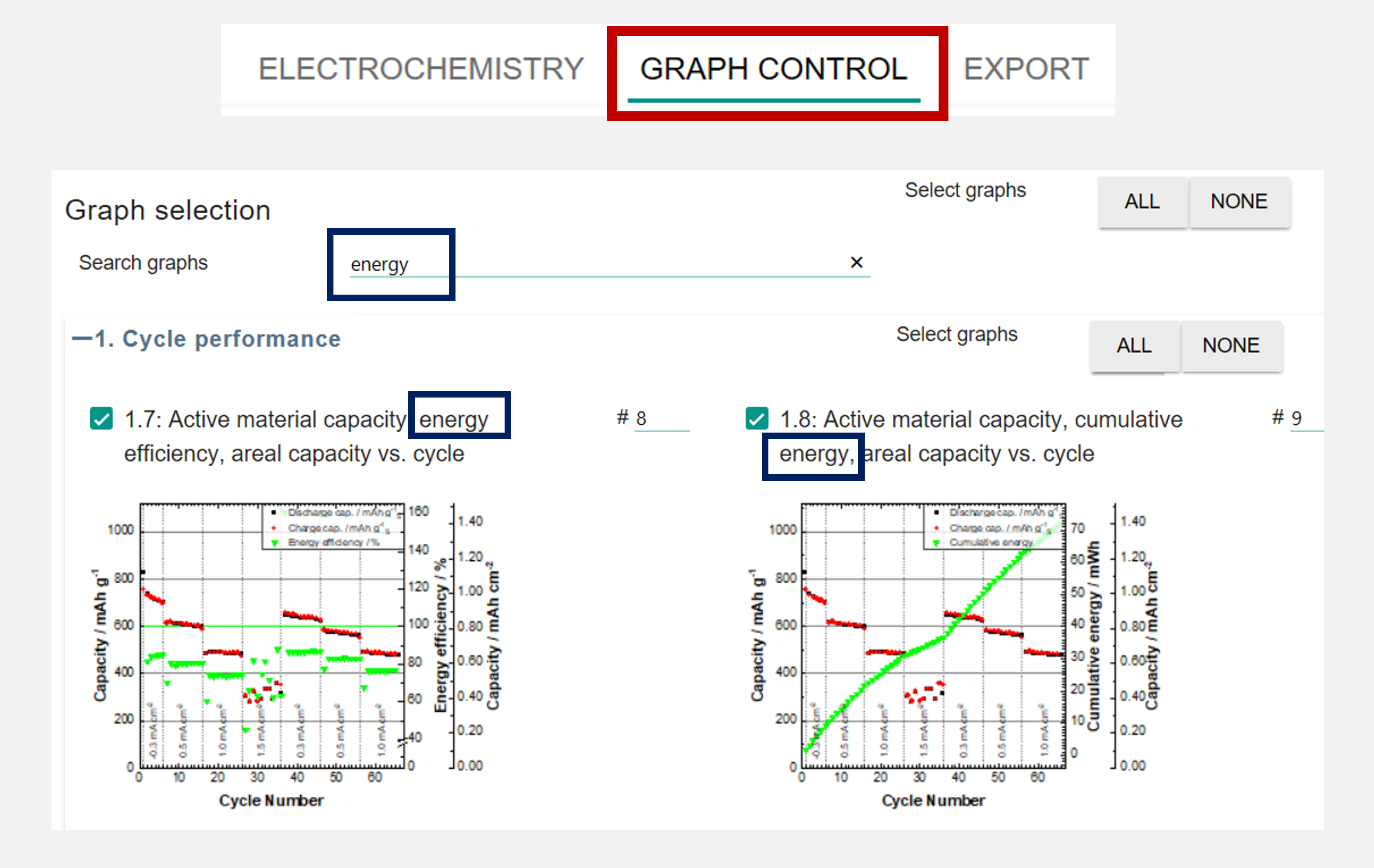
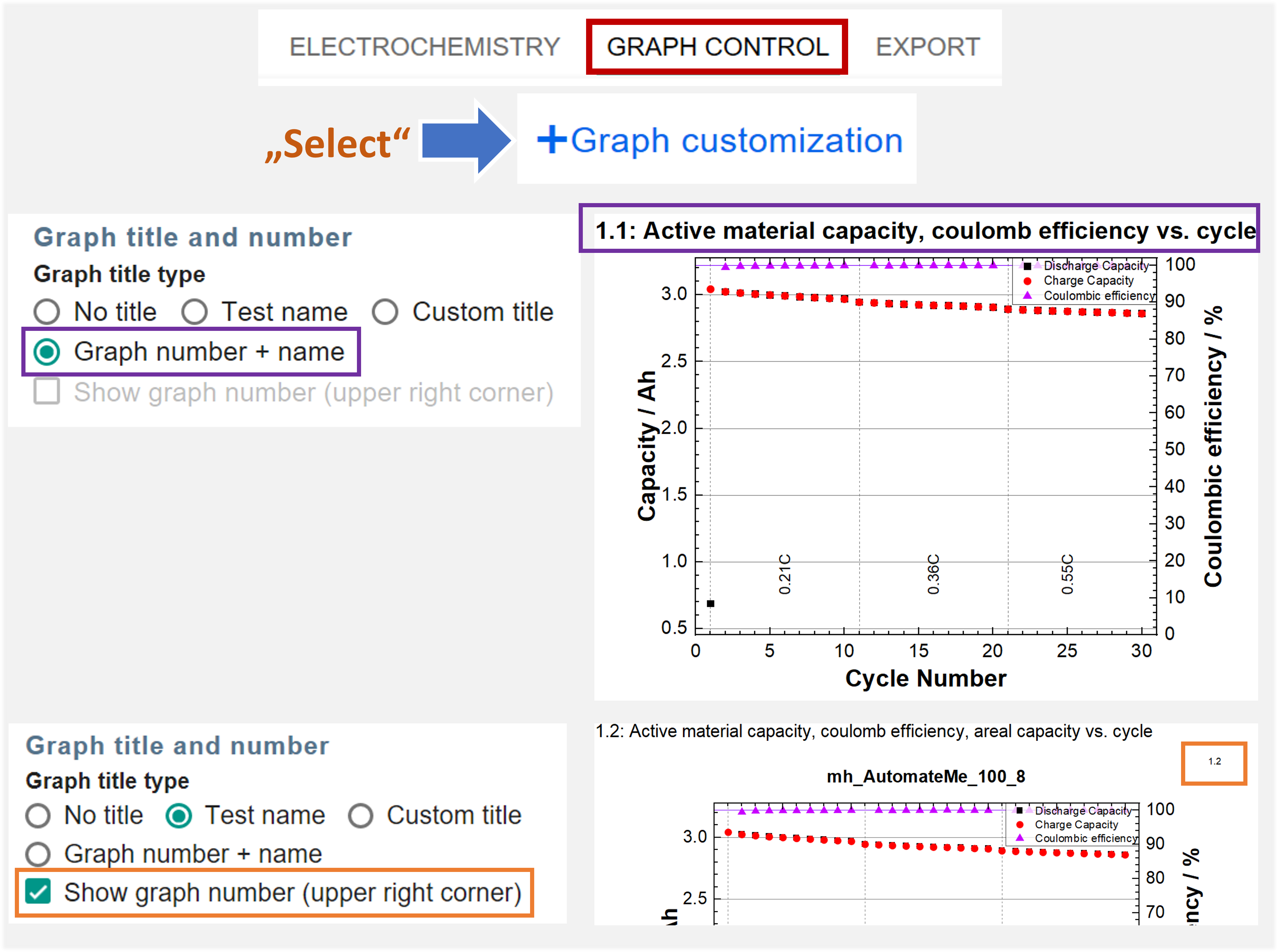
  • Search and filter your result graphs

  • Identify your result graphs easier and faster by the graph number
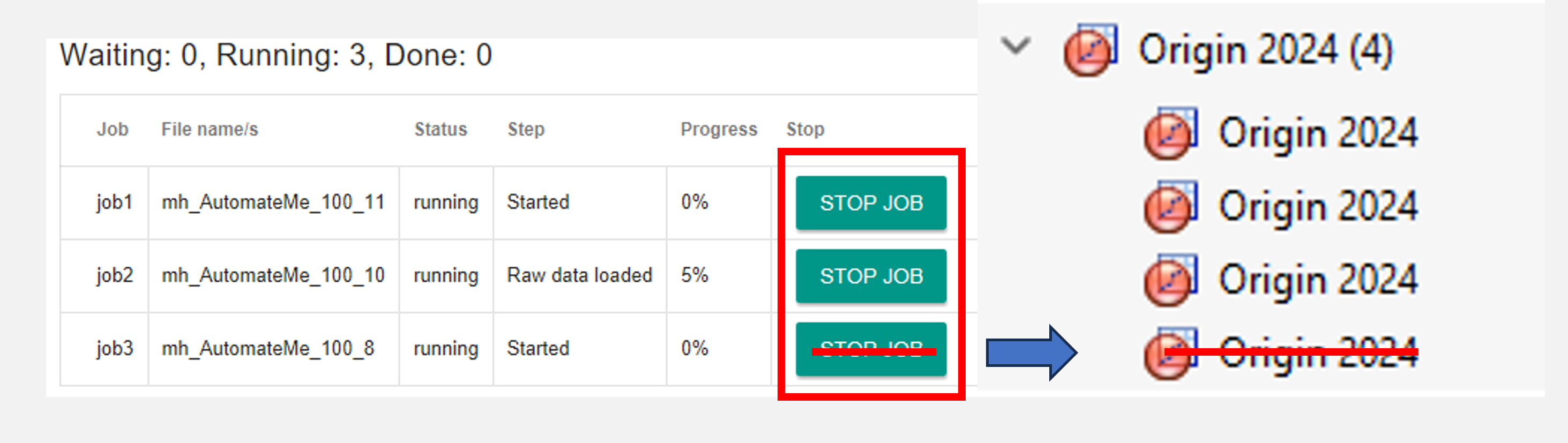
  • Skip Evaluation → Stop Test – The feature to skip an evaluation when Data Analysis evaluates multiple test files was improved to stop the test more reliably. All corresponding Origin background processes are terminated.
    • Improvements and bug fixes with the Data Analysis continue import function in combination with our Collect database software.
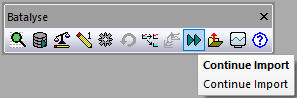
Data Analysis-Continue Import


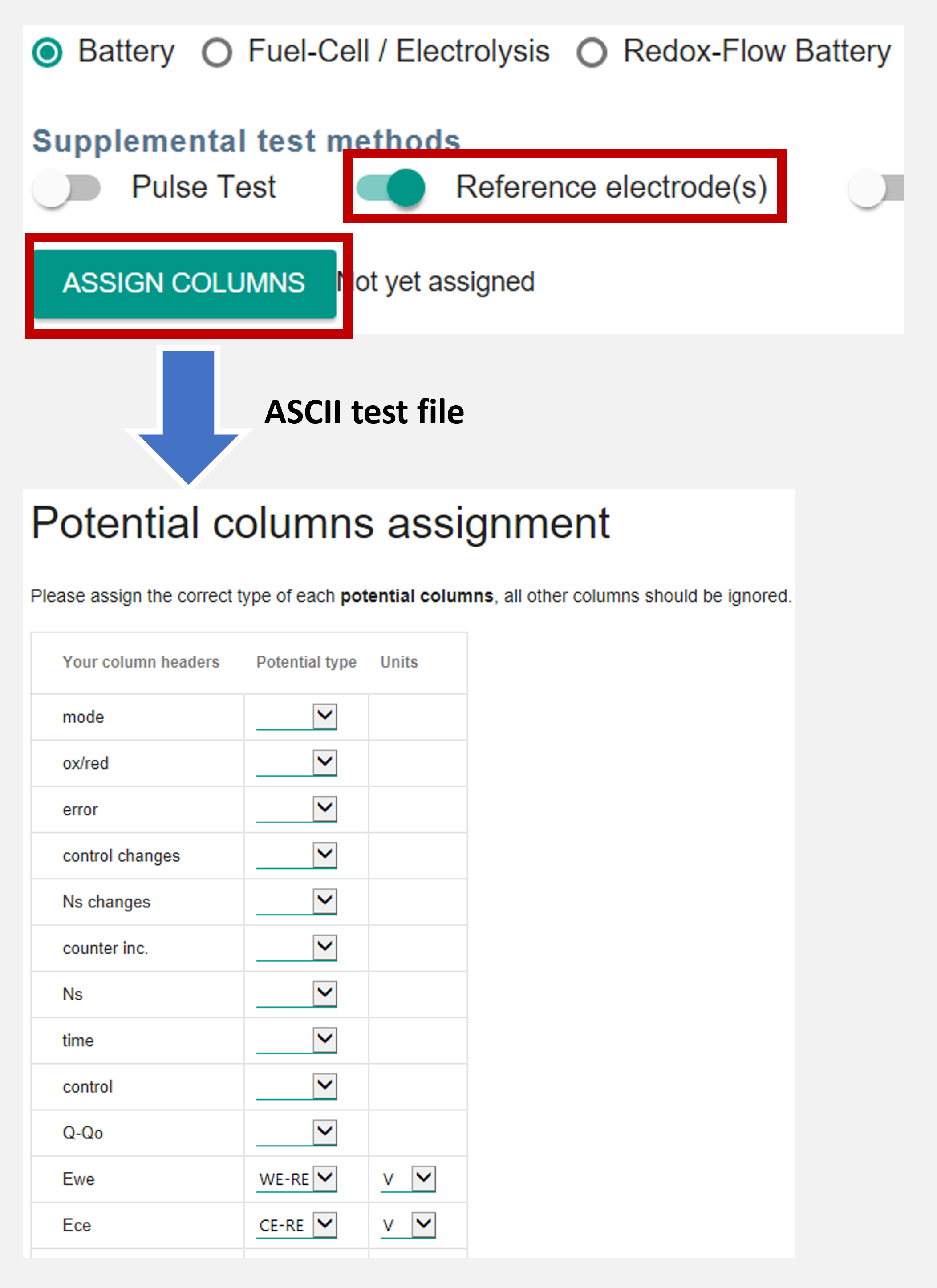
  • Improved support for tests with reference electrode. The new Assign Colums feature allows editing your input in advance and after the evaluation process.
 

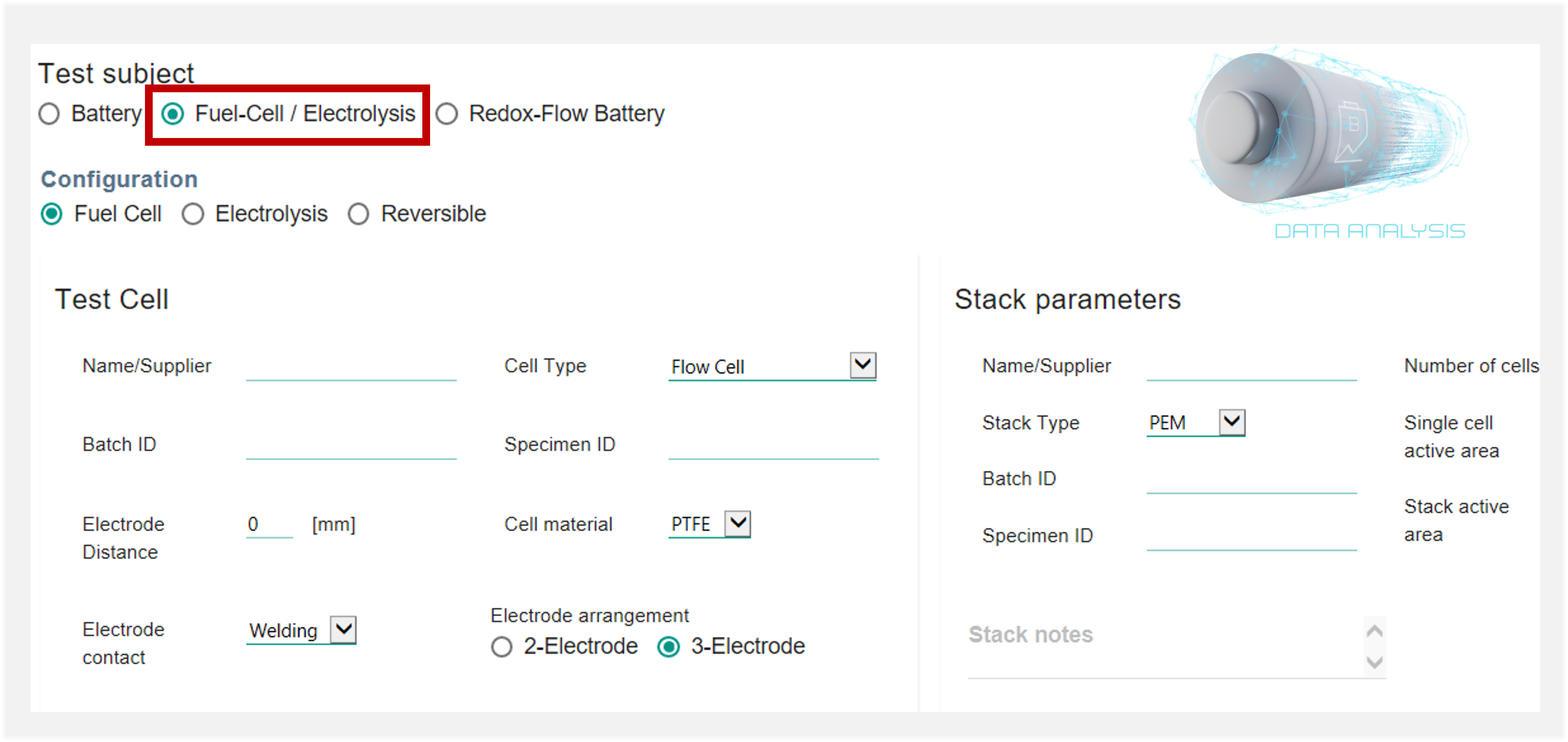
  • New Fuel-cell / Electrolysis specimen dialog and parameters management
  • New Origin connector to work with Lanhe/Landt .cex files. You can now also directly evaluate these .cex files with Data Analysis!
  • Added new volumetric capacity comparison graphs
  • Improved/updated support for many cyclers, multiple bug fixes and support of new file structures


2024.01 (updated 23.01.2024)

  • Added an option for fixed X-axis scale for Capacity Axis
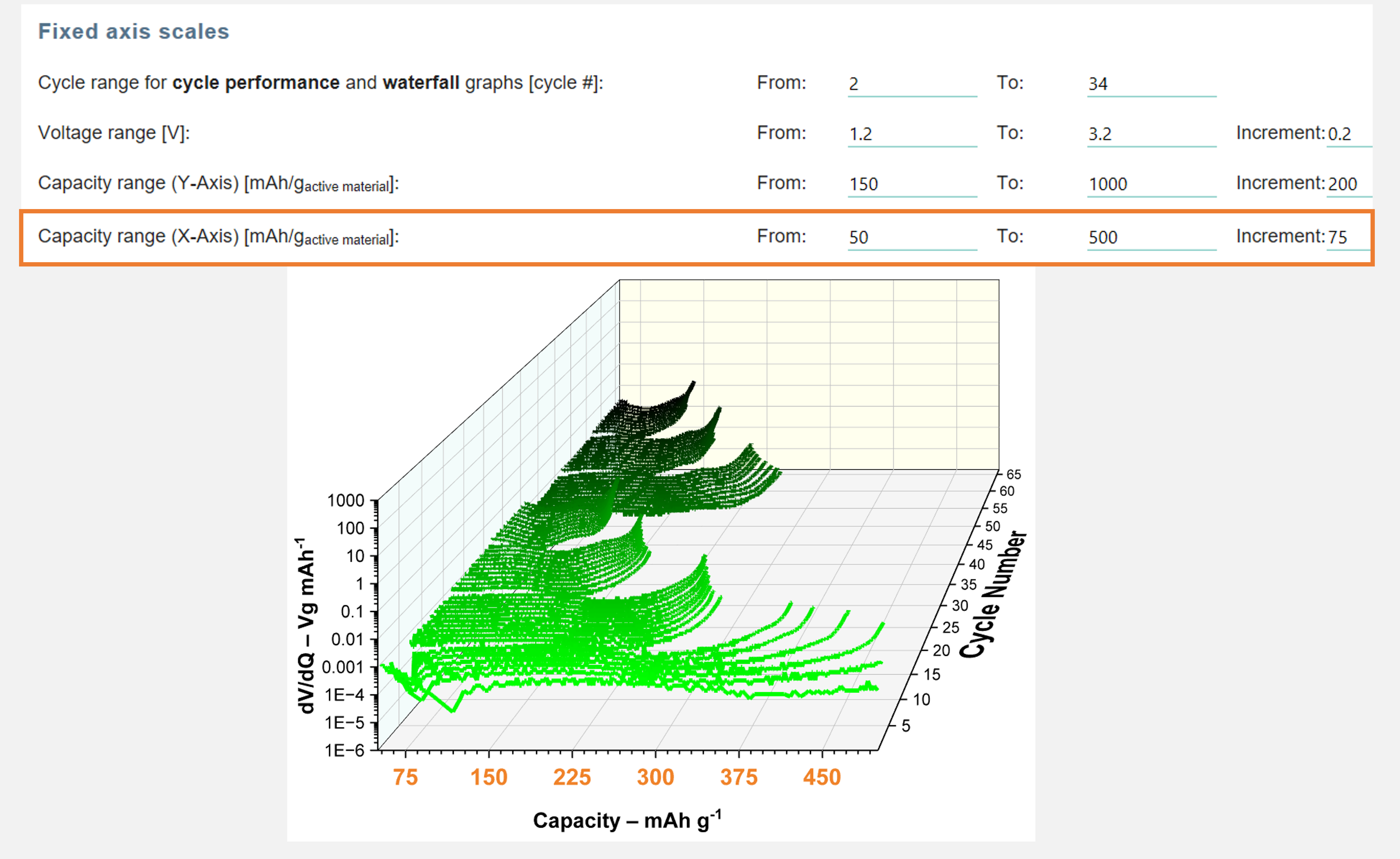
Fixed axis scales settings

  • Added an option for manually specifying axis titles for voltage and capacity axes
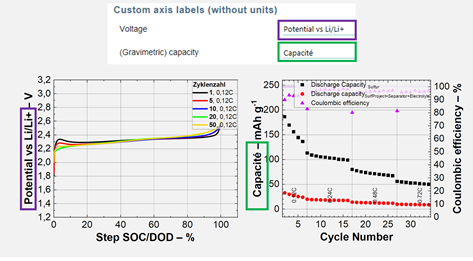
Custom axis labels

  • Improved volumetric capacity graphs
  • Hangke + Multi channel LVDT import support (from Collect)
  • Fix support for capitalized “MPR”, “XLS/S” file extensions
  • Comparison CC-CV graphs
  • Bug fixes


2023.09 (updated 08.11.2023)

  • Added voltage areal capacity comparison graphs
  • Fixed “skip” function for collect-monitor, general improvement to “skip”
  • Prevent some dialogs from opening in the background and halting the process
  • Collect monitor error and progress improvements
  • Improved test type detection
  • Prioritize selected cycle for 100% Capacity and SOC over Nominal-Cap
  • Support Maccor files with Voltage in µV
  • Added axis title units separator and parts selection
  • Coating and stack volumetric capacity comparison
  • Support extracting active material and nominal capacity from some Neware  file formats
  • Added option to separate charge/discharge curves graphs
  • Added option to load graph style from template
  • Added option for fixed capacity/voltage scale ranges
  • Added line thickness and symbol size and color selection
  • Bug fixes


2023.08 (updated 15.09.2023)

  • Added dVA (dV/dQ) graphs
  • Improved merge functionality to allow merging files with different columns, i.e. for different BioLogic methods
  • Improved pulse graphs
  • Added minimal dV ranges for differential graphs smoothing
  • Relative loss + discharge capacity graph
  • New option for selecting cycles to display with offset, i.e. you can enter 2+10 to show cycles 2, 12, 22…
  • Improved waterfall diagrams
  • Improved Ivium and BioLogic support
  • Improved and fixed thickness measurement graphs, ability to merge thickness measurement data
  • Multiple bug fixes


2023.06 (updated 17.07.2023)

  • Added voltage vs. areal capacity graph (single tests)
  • Added end-of-charge/discharge-voltage graphs (single tests + comparison)
  • Improved “Merge” function to support merging of additional file structures
  • Added “Load” and “Export” Buttons to specific components inside the parameters dialog
  • Improved 3-electrode diagrams
  • New entry fields in the parameters dialog – notes, porosity, temperature and pressure
  • Accuracy improvements for step type recognition and average current calculation, especially for steps with few data rows
  • Multiple bug fixes


2023.05 (updated 11.05.2023)

  • Added voltage vs. areal capacity graph (single tests)
  • Added end-of-charge/discharge-voltage graphs (single tests + comparison)
  • Improved “Merge” function to support merging of additional file structures
  • Added “Load” and “Export” Buttons to specific components inside the parameters dialog
  • Improved 3-electrode diagrams
  • New entry fields in the parameters dialog – notes, porosity, temperature and pressure
  • Accuracy improvements for step type recognition and average current calculation, especially for steps with few data rows
  • Multiple bug fixes


2023.03 (updated 21.03.2023)

  • Added voltage vs. areal capacity graph (single tests)
  • Added end-of-charge/discharge-voltage graphs (single tests + comparison)
  • Improved “Merge” function to support merging of additional file structures
  • Added “Load” and “Export” Buttons to specific components inside the parameters dialog
  • Improved 3-electrode diagrams
  • New entry fields in the parameters dialog – notes, porosity, temperature and pressure
  • Accuracy improvements for step type recognition and average current calculation, especially for steps with few data rows
  • Multiple bug fixes


2023.02 (updated 07.02.2023)

  • Added unit selection to the parameters dialog to choose between mg/g/kg and mm/cm/m
  • Added Power vs. Current CV graph
  • Bug fixes


2023.01 (updated 17.01.2023)

  • Automatically detect the test type (Cycling, EIS, CV)
  • Improved DB import table – the first 3 columns are fixed in place for better overview
  • Improved graph-export mechanism and fixes to some graphs not being correctly exported
  • Slight precision improvements for some file structures by utilizing additional columns
  • Auto-fill merge groups for excel files with multiple sheets
  • Support for measurements with reference electrodes: when activating “Reference electrode(s)” under “Supplemental test methods” you will later be prompted to assign the correct electrode type, and new diagrams will be plotted accordingly
    *this method currently doesn’t work when analyzing multiple files in parallel
  • Improved support for Lanhe, Neware and AVL devices
  • Added initial support for Origalys files
  • Bug fixes


2022.09 (updated 25.11.2022)

  • Comparisons which are made during the initial evaluation can now run in parallel for improved performance.
  • Improved connection to Batalyse Collect. All Collect connections are made via the Collect API,
    and the MySQL driver and ODS file are no longer needed
  • New test summary table worksheet, showing the important values with each cycle in a single row
  • Small performance improvements to the Import from Database table
  • Show file/test name during evaluation in the parallel evaluation window
  • Improved MS graphs
  • Improvements to license system
  • Bug fixes


2022.08 (updated 19.10.2022)

  • Added cycle selection for CV and EIS graphs
  • Improved SOC calculation method and graphs, always go from 0-100%
  • Added EIS as an additional test method under Electrochemical Cycling
    (for combined measurement files)
  • The “Split graphs” button has been renamed to “Split graph/table”,
    and can now be used for generating sheets with separated curve data columns (i.e. Capacity vs. Voltage)
  • Bug fixes


2022.07 (updated 30.09.2022)

  • Bug fixes and small improvements to the parameters dialog


2022.06 (updated 22.09.2022)

  • Major improvements to the parameters dialog,
    which allow more detailed description of the cell and its components
  • Added a new feature for parallel processing of tests for better CPU usage,
    leading to significant performance improvement when analyzing multiple files
  • Performance and visual improvements to the “Import from database” table
  • New graphs:
    – Capacity vs. cycle number with differentiation between total capacity and galvanostatic (CC) capacity
    – Voltage vs. capacity curves, with current as right Y axis
  • Differential graphs:  use span instead of points for Loess and Lowess smoothing methods
  • Bug fixes and performance improvements

2022.04 (updated 23.05.2022)

  • Added initial support for Ivium files.
  • Added options for modifying axis units display format,
    e.g. choose between “Capacity / mAh g-1” and “Capacity – mAh/g”
  • Communications between Data Analysis and the Batalyse license server are now encrypted.
  • Bug fixes and performance improvements


2022.03 (updated 12.04.2022)

  • Additional improvements when working with Batalyse Collect
  • Simple comparisons of EIS and CV tests are now possible, showing all curves from the compared tests in one graphs.
  • New graphs: V vs. log(t)
  • Many bug fixes and performance improvements


2022.01 (updated 15.02.2022)

  • You can now try our Collect Demo server directly from Data Analysis! Make sure that the MySQL ODBC driver is installed on your computer, click on “Import from Database” (the second button in the Data Analysis toolbar), select the “Batalyse Collect” database type and check the “Use the public Batalyse-Collect demo server” checkbox.
  • Many bug fixes and performance improvements


2021.17 (updated 14.12.2021)

  • When selecting multiple tests, you can now delete tests from the “Multiple files” dialog without starting again
  • Improved voltage vs. SOC graph
  • Improvements to the “Continue import” function, now also supports Arbin Access files
  • Additional options for Pulse tests (allow detection of relaxation pulses, change Pulse axis units)
  • Added 3D Pulse Ri vs. SOC and cycle graph
  • Added electrode area input for CV tests, which will show the current density as an additional axis
  • Many bug fixes and performance improvements


2021.16 (updated 12.10.2021)

  • Improvements to the “Continue import” function, now also supports Arbin xlsx files
  • Implemented BioLogic mpr file support (requires Origin 2020b or later and the BioLogic connector)
  • Added “Relative Irreversible Capacity” graphs
  • Added an option to not ignore cycles with negligible capacity
  • Added an option to show pause steps in V vs. time graphs
  • Many bug fixes and performance improvements


2021.14 (updated 20.08.2021)

  • Improvements to the “Continue Import” function, allows using the function for merged data.
  • Changed the Graphs overview table to use Bitmap caching, which allows much faster scrolling and tab switching after initially displaying the graphs.
  • Added Turkish language for plotting
  • Bug fixes and performance improvements


2021.13 (updated 20.07.2021)

  • Improved license system, use license server instead of license files
  • Improvements to SOH graphs: the cycle for 100% SOH can be selected with the “Auto-determine full capacity” function.
    Otherwise, the cycle with the highest discharge capacity will be used automatically
  • DCIR: Added option to show Charge DCIR in addition to Discharge DCIR
  • Improved the “Re-open parameters dialog” function to also re-calculate values which weren’t updated in previous versions.
    *Please note that the update function will only work for evaluations made with this and later versions
  • Improved waterfall diagrams
  • Bug fixes
  • Changed the minimal Origin version requirement to 2019b


2021.11 (updated 29.06.2021)

  • New logo, new design for some of the toolbar icons
  • The manual “Compare” Button has been extended to “Compare or edit parameters”,
    which now also allows editing the parameters for multiple previously-evaluated tests at once
  • Due to changes in the license mechanism, Data-Analysis group licenses which were created for v2021.10 won’t work anymore.
    If you are affected by this, please send us a new license request after installing the new version
  • Added a list of open-source modules and their licenses, which are used by Batalyse – Data Analysis (licenses.md)
  • Bug fixes


2021.10 (updated 02.06.2021)

  • Fixed performance issues from version 2021.09
  • Bug fixes


2021.09 (updated 31.05.2021, license file not included)

  • New diagrams: Delta-V, additional pulse measurements diagrams, areal capacity single Y axis
  • Added impedance column type selection to the “column assignment” dialog
  • Better test selection when using the comparison button
  • Default trial license file is removed, and must be requested through the pop up dialog
  • Added product disclaimer
  • Bug fixes


2021.07 (updated 28.04.2021, valid until 31.05.2021)

  • Added comparison bar charts for the first 3 cycles coulomb-efficiency
  • Bug fixes


2021.06 (updated 27.04.2021, valid until 31.05.2021)

  • Comparison of comparison now creates its own comparison sheet, and the same graphs which are created for “normal” comparison
  • Re-open parameters button now works for comparisons too, allowing you to change graph-related parameters and replot the comparison graphs
  • Added comparison bar charts for the first cycle coulomb-efficiency and 100th cycle relative capacity
  • In the comparison data table, you can now directly see the values of each tests for each cycle.
  • The Continue Import button now lets you choose multiple tests to continue at the same time.
  • Added support for CorrWare cyclers, improved Bitrode support
  • Bug fixes and performance improvement


2021.05 (updated 18.03.2021, valid until 30.04.2021)

  • Bug fixes and performance improvement


2021.04 (updated 16.03.2021, valid until 30.04.2021)

  • Added “Continue Import” button, which allows you to continue the analysis of a test file which was already partly analysed
    This function currently doesn’t support Excel files
  • Improved the automatic column recognition algorithm, and added the possibility to manually assign columns to their content type
    This function currently supports electrochemical cycling column types
  • Added a selection for calculating efficiency values also between cycles with different current rates
  • Added an option for emptying the content of raw data columns which are not used in the analysis in order to reduce the total project file size
  • Bug fixes and performance improvement


2021.03 (updated 26.02.2021, valid until 30.04.2021)

  • Bug fixes and performance improvement


2021.02 (updated 23.02.2021, valid until 31.03.2021)

  • Improved support for Digatron import
  • Additional comparison graphs are plotted when comparing sets of comparisons
  • Graph names are now displayed in the overview table when using the “embed graphs” feature
  • New graphs:
    • “Irreversible (capacity) loss” comparison graphs as percentage of theoretical capacity
    • Voltage vs. SOC curve graphs, based on cycle capacity
  • Bug fixes:
    • Fixed a bug which caused wrong axis units factor (i.e. Ah instead of mAh) to be displayed in some graphs
    • Fixed missing current rate display in specific use cases
    • Various other fixes


2021.01 (updated 05.01.2021, valid until 28.02.2021)

  • Option to add names to comparison groups from the multiple files dialog
  • Improved smoothing of dQ/dV graphs with selection of the smoothing function
  • Added EIS support for some ScienLab data formats
  • New graphs:
    •  Relative discharge capacity (%) vs. cycle number – also as comparison graphs
      When using the “Auto determine full capacity cycle” option, the capacity at the given cycle will be used as 100% in this graph.
      This allows for better comparison of tests with varying initial capacity
    • Discharge capacity vs. cycle (Without additional axis)
  • Bug fixes:
    • Fixed error when saving the parameter file to network paths starting with “//”
    • In some cases V/C graphs showed incorrect plots when merging multiple files
    • Comparison grpahs of groups had incorrect colors for the standard deviation curves
    •  Some axis labels sometimes showed incorrect order of magnitude
    • Various other small bugs


2020.17 (updated 01.12.2020, valid until 31.01.2021)

  • Multiple bug fixes and improvements
  • Improved support for some Maccor, Scienlab and Arbin file formats


2020.16 (limited-release beta version, skipped)


2020.15 (updated 09.10.2020, valid until 30.11.2020)

  • Added a new dialog for managing the analysis of multiple files,
    which gives a better overview of the parameters used for each file
    and a more powerful control over comparison and merging
  • Added charge endpoint capacity slippage graphs
  • Added support for Lanhe files
  • Improvements to Pulse-analysis –
    added ability to specify the time-points for Resistance/SOC Analysis,
    added C-rate columns to the pulse statistics table
  • Multiple bug fixes and improvements


2020.14 (updated 27.08.2020, valid until 31.10.2020)

  • Activate the graphs page by default after evaluation
  • Fixed bug which prevented comparison graphs from being plotted


2020.13 (updated 21.08.2020, valid until 31.10.2020)

  • Added single test and comparison “Accumulated Coulomb Inefficiency” graphs
  • Improved graph numbering in the parameters dialog
  • Bug fixes


2020.12 (updated 12.08.2020, valid until 30.09.2020)

  • Added single test and comparison DCIR graphs
  • Bug fixes


2020.11 (updated 30.07.2020, valid until 30.09.2020)

  • Added new potential curves (V cs. C) diagrams which display the charge and discharge together as a single curve per cycle
    (standard and compare diagrams available)
  • Bug fixes


2020.10 (updated 13.07.2020, valid until 31.08.2020)

  • Improved support to some Basytec data formats
  • Added an option to set start and end cycle range for all graphs with cycle number as X axis
  • Improved step time calculation accuracy – in measurements with very low sampling rates or heavily reduced data files,
    the calculation of step time in previous version may have resulted in inaccurate values,
    which in turn were used for calculating values such as averaged current and potential.
    The old calculation method will still be used when using Origin 2020 due to a bug in that version of Origin,
    which was resolved in Origin 2020b.
  • Added links to the Batalyse upload server in the bug report and support windows.
  • Improved Russian diagram translations
  • Bug fixes


2020.09 (updated 03.06.2020, valid until 31.07.2020)

  • To help us stay in contact with you and improve Batalyse, entering an email address is now required
  • Added a progress bar indicator for the import of Excel files
  • Improved diagram translations to French, Portuguese and Japanese
  • Small visual improvements to SQL import table
  • Bug fixes


2020.08 (11.05.2020)

  • Bug fixes


2020.07 (05.05.2020)

  • Added support for Arbin .res/.accdb files under “Import from database”
  • Added filter fields to DB import table selection
  • Added option to cancel evaluation from the parameters dialog (hover on the submit button and click “Cancel all” on top)
  • Improved support for excel files with multiple tests, each test can have separate parameters now
  • Improvements to EIS evaluation
  • Many bug fixes and usability improvements


2020.05

  • New layout for the SQL import table with better filtering and sorting
  • Changes to SQL import parameters input
  • Rearranged toolbar icons and some labels
  • Support import of Basytec and Arbin excel files with multiple tests in a single file
  • Bug fixes and improvements


2020.04

  • Improved support for Arbin excel files
  • Better handling of Maccor exported files with numeric file extensions
  • Improved average current calculation for current/c-rate display
  • New comparison functions:
    • Ability to set name to automatically created comparison
    • Average potential curves graph
    • Potential curves comparison in a single graph
    • Added voltaic efficiency to cycle average potential graph
    • Cycle average potential comparison graph
  • Use test name instead of number when importing from Basytec SQL Server
  • Bug fixes and improvements


2020.03

  • Improved error handling
  • New bug reporting dialog with automatic notification on errors
  • Bug fixes and improvements


2020.02

  • New version numbering scheme


2020-0124

  • Added support for Bitrode cyclers
  • Improved Maccor support
  • Bug fixes and improvements


2020-0122

  • Bug fixes and improvements


2020-0109

  • Small rearrangement to the parameters dialog to improve usability
  • Fixes for pulse tests
  • New graphs: State of Health, Cycle Polarization and Potential vs. total Capacity
  • Bug fixes and improvements


2019-1212

  • Small bug fixes to the comparison function


2019-1211

  • Improvements to the comparison function to allow comparison of comparisons
  • Better naming for the comparison folders and worksheets
  • Improvements to the relative capacity graph
  • Re-changed the weight units to mg when no cell type is selected
  • When active material weight is entered, gravimetric capacity will always be shown as mAh/g
  • bug fixes and improvements


2019-1206

  • Many internal changes to the processing of the user parameters.
    The structure of the parameters file has changed, therefore the information in JSON parameter files from previous Batalyse versions is no longer recognized
    If a bug is encountered when the  parameters dialog is opened, please try deleting the old JSON file and then retry.
  • Added an option to select from an existing cell type to use pre-set cell parameters regarding the volume of the cell and area of the electrodes.
    The pre-set parameters may be further modified by the user
  • Changed the input mass units from milligram to gram, except when Lab / Custom cell type is selected
  • Separated inputs for theoretical capacity (in mAh/g) and nominal capacity (in Ah). Only one of the two is necessary for calculating the C-rate.
  • When a cycling test includes pulse measurements, the pulses will now be ignored by the cycle detection mechanism to make the cycling graphs more useful
  • Many bug fixes and small improvements


2019-1107

  • Rearranged the parameters dialog for better organization and increased user friendliness
  • Added switch for areal weight, automatically convert areal weight to absolute weight if selected
  • Simplified graph legends parameters
  • Improved the processing performance and added a new progress bar
  • Improved Maccor processing
  • Automatic axis unit scaling in most graphs
  • Bug fixes


2019-1029

  • Further improvements to Scienlab support
  • Fixed bugs when running in Origin 2020
  • Bug fixes and improvements to comparison graphs


2019-1023

  • Improved Scienlab support
  • Bug fixes


2019-1021

  • Added support for Neware data files


2019-1018

  • Bug fixes and improvements


2019-1016

  • Bug fixes and improvements


2019-1008

  • Bug fix for certain tests with no full cycles (only charge / discharge)


2019-1007

  • Bug fixes for auto determining full capacity
  • Fix for missing spaces in some graphs between “mAh” and “g⁻¹” when the active material weight is entered


2019-1001

  • Added key figures table to the comparison function


2019-0925

  • Added a parameter under “graph control” for changing the line style of curve graphs (Both discharge and charge as solid, or discharge as solid and charge as dashed)


2019-0918

  • Further improvements to dQ/dV Graphs: For better control, added a parameter for setting the minimal potential interval to be used (dV)
  • New graph: Differential Thermal Voltammetry (DTV – dT/dV)
  • Added comparison graphs for dQ/dV over Capacity and for DTV
  • Improved cycle recognition for Bio-Logic
  • Improved full-capacity auto-determination
  • Bug fixes and improvements


2019-0916

  • dQ/dV Graphs:
    • removed the “# of rows for differentiation calculation” parameter which was previously used to deal with cases where dV = 0. Instead, the differentiation will now use 1 row by default, and automatically use more rows when needed. This results in better accuracy and less “clipped” peaks
    • Added option to automatically mask and hide pause and potentiostatic steps from dQ/dV graphs
  • Prevent plotting of the relative capacity graph when the prediction result is negative
  • Bug fixes and improvements


2019-0902

  • Fixed bug from 2019-0829 which prevented comparison graphs from being plotted


2019-0829

  • Added a feature for setting priorities to the graphs, which determines the order of the embedded graphs in the worksheet created by “embed graphs”.
    • Please note that graph selection from JSON parameter files created with older Batalyse versions won’t be used, therefore if using old parameter files please re-select the relevant graphs for you.
  • From this version onwards the changelog will be available separately on get.batalyse.com
  • Bug fixes and improvements


2019-0826

  • Bug fixes to relative discharge and potential curves graphs


2019-0816

  • Redesign of the parameters input dialog
  • New graphs:
    • Relative capacity loss (in %) over cycle with linear fit and prediction to 80% capacity
    • Cycle resistance curves over Capacity or time
      Improvements to DEMS graphs
  • Starting now, older versions of Batalyse will be available on get.batalyse.com as a temporary “quick fix”, in case that a certain feature is broken in the newest version.


2019-0806

  • Bug fix for some diagrams with missing templates.
  • Made the welcome screen only reappear once a month when “don’t show again” is checked


2019-0805

  • Moved the electrode selection back outside of extended parameters.
  • Bug fix for averaged potentials diagrams when negative electrode is selected.
  • Changes to plot colors in comparison diagrams


2019-0802

  • Changes to plot colors in curves diagrams
  • Improvements to EIS


2019-0731

  • Merged pulse analysis with cycling.
  • Added an option in cycling to determine the nominal capacity automatically, which is then used for calculating the C-rates.
  • Changed step averaged current calculation to exclude potentiostatic steps from the average.
  • Added 100% Coulomb-efficiency lines to additional graphs.
  • Small visual changes to the parameters input dialog.
  • Changed the default colors and turned on antialiasing (for smoother display) in some graphs.
  • Improvements to thickness measurement evaluation.
  • Adjustments to cycle time calculation to include the time of the first row.
  • Basytec SQL Import: Added filtering to system# column, removed the system name column.
  • Various bug fixes.


2019-0716

  • Added an option to set the first cycle as partial (only discharge or charge step),
    such that the following cycles will begin at the next step (i.e. cycles begin with charge after an initial discharge).
  • Bugfix for error while merging specific files.
  • Added a parameter to pulse test for choosing capacity determining step
  • Fix for “Select all” in sql table selection to only affect currently visible rows.
  • Various changes to step detection algorithm to make it less likely to fail in some new situations.
  • Improved support for Biologic


2019-0711

  • Bugfix for error in batch evaluation in specific cases


2019-0708

  • Added Temperature curve to Potential+Current over Time graph when temperature data is available
  • Added initial support for some Graphtec measurements


2019-0704

  • Changed the capacity detection algorithm for Pulse test to use charge capacity instead of discharge when using auto-detect full capacity.
  • Fixed a bug which caused the power and energy densitied per kg active material to show values per gram instead of kg.


2019-0701

  • Bug fixes
  • Changed default selection of “Auto-detect important cycles” to disabled to prevent confusion


2019-0612

  • Fixed bug for files ending with text rows


2019-0606

  • Initial support for graph customization: allows selecting font sizes for various graph elements in the parameters dialog
  • Additional small changes to the parameters dialog
    Bug fixes


2019-0528

  • Fixed bug which caused capacities to be shown as 1000x higher in some systems which use mA for current
  • Fixed possible mismatch between the capacity units on the y-axis and on the legend


2019-0527

  • Moved the electrode selection option to make it more accessible
  • Modified the V and E efficiencies calculations when negative electrode is selected
  • Added an option to set a title for the graphs
  • Improved error messages in some cases
  • Bug fixes


2019-0520

  • Added option to select the tested electrode (positive/negative)
  • Fixes “DISP_FUNCTION” warning messages showing when opening the dialogs
  • Removed the restriction on the precision in some of the column formulas to make the calculations more precise
    Small bug fixes.


2019-0517

  • Fixed bug which caused the comparison function not to work properly


2019-0515

  • Fixes to DB import
  • Increased cycle energy and power calculations accuracy


2019-0513

  • Bugfixes and general improvements
  • Only save the full path for the parameters file if it is different than the path of the test file, otherwise only save the file name without the full path.
  • Changed the Parameters file format from XML to JSON, please note that older parameter files will no longer be recognized.
  • Changed the default behavior to automatically open the parameters dialogs for files without existing dialogs. If a (JSON) parameters file already exists, ask whether to use it as-is or modify it before running.
  • Added “Project Id” field to the SQL import table.
    New App Icon