
Your lab and production, documented and organised in one system
Mind links everything that happens around your work to the test and analysis results in Collect — so you know what was made, from what, on which machine, by whom, and how it performed.
- Lab work documentation
- Process chains & batches
- Chemicals & hazardous substances
- Inventory
- Equipment & maintenance
- Booking
- Instruction & training
- Supplier management
- Purchasing (RfQ)
- Projects
- Reports
- and much more
- Runs on your hardware
- Unlimited users
- Measurement data stays on your server
One record from the chemical shelf to the customer report
Register
Chemicals, materials, machines, labs and suppliers — with PubChem data, safety sheets, maintenance plans and QR labels.
Document
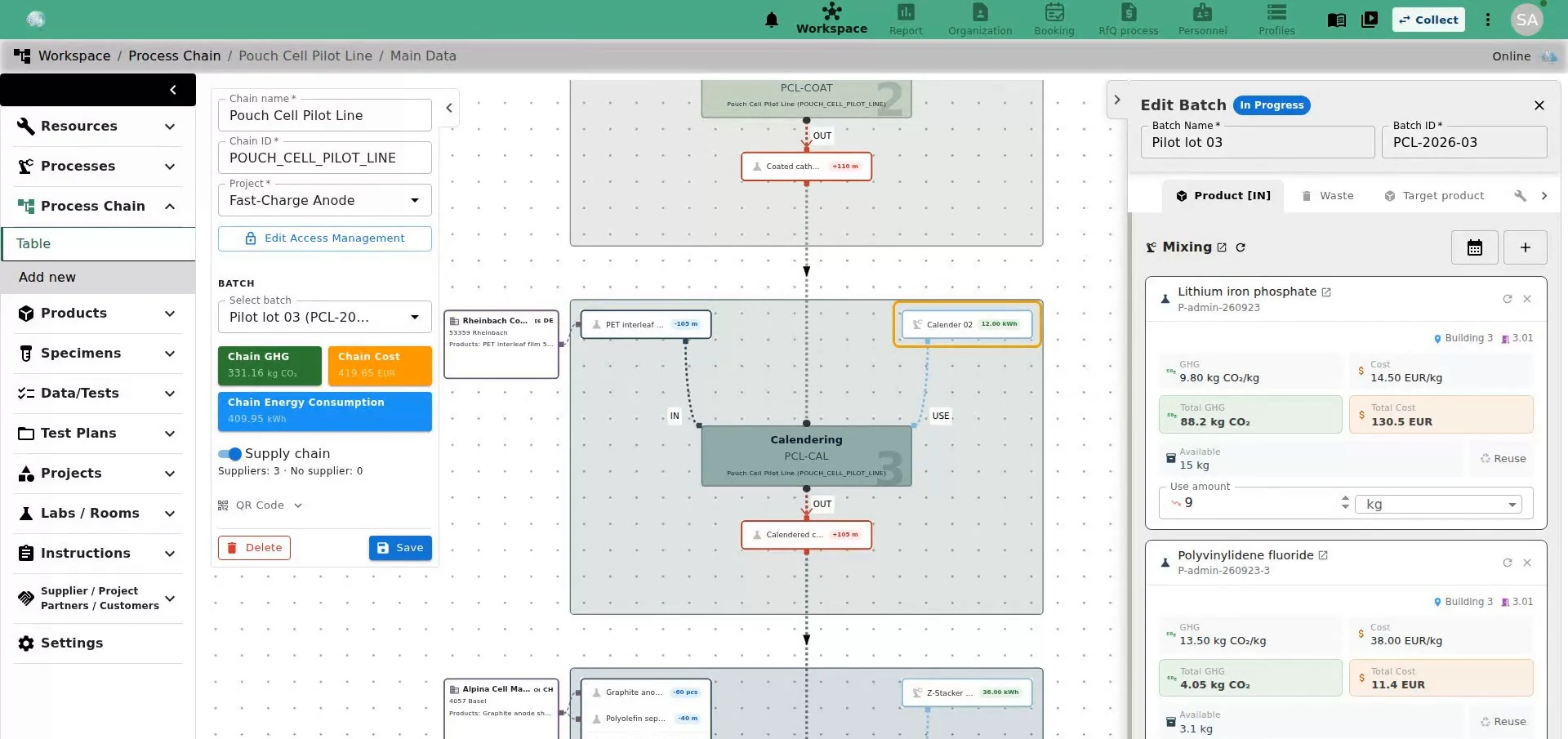
Record lab work and production as process chains. Batches consume stock, reserve machines and record amounts.
Test
Specimens and their test and analysis results synchronise with Collect; evaluations can be queued from Mind.
Organise & report
Instructions, maintenance, bookings and purchasing run in the same system; reports, GHG and cost figures come straight from the documented data.
What Mind does
Grouped by task, with the newest additions marked.
Processes & Projects
Lab work and production you can follow
Whether it is a synthesis at the bench or a production run: classical LIMS show the work as lists and forms, Mind shows it as a chain you can click through.
Process chains are part of the Processes & Projects package.
Canvas editor
Build chains from process nodes, edges and batches; copy a chain or embed an existing one.
Sub-chains New 2026
A product input brings its own source chain along, with deep links between them.
Supply view New 2026
Show the suppliers of a batch on the canvas, with markers for inputs that have none.
GHG and cost per batch New 2026 Processes & Projects
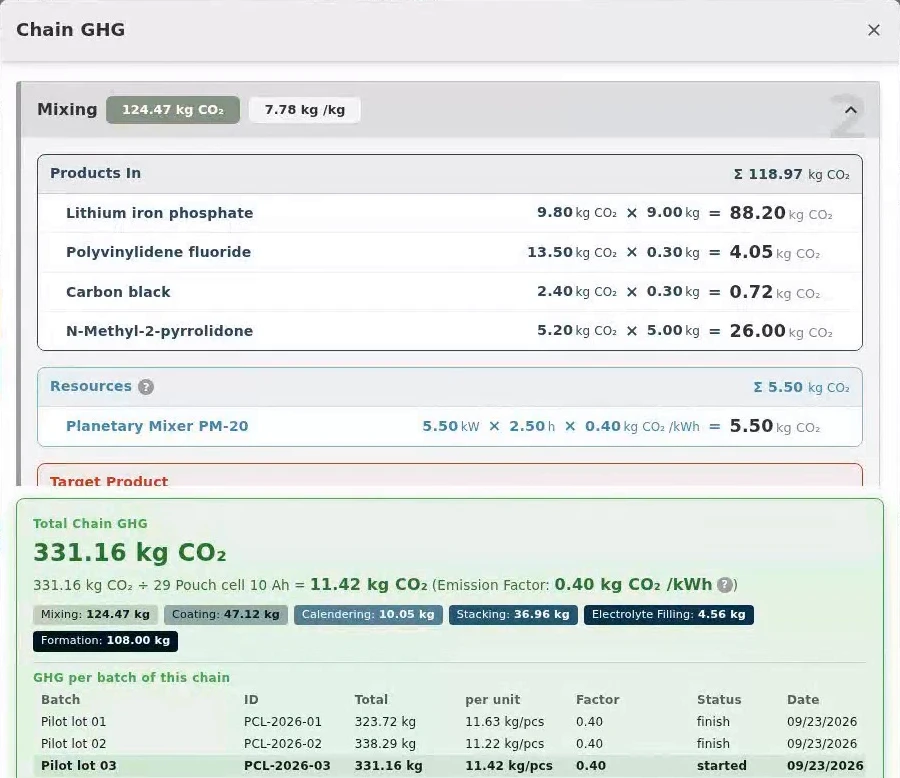
CO₂ and cost per step from emission factors, materials and energy, rolled up across sub-chains and converted across units.
Batch lifecycle New 2026
Status guards, stock check on inputs and frozen snapshots for finished batches.
(Battery) passport Processes & Projects
A passport tab on every product with composition, footprint, circularity, suppliers, process chain and test summary, exported as PDF — e.g. for the EU battery passport.
The hazardous-substances register writes itself
Chemical data is imported once and is then available wherever the substance is used — including at the shelf.
PubChem import
Search by name, CAS number, CID or SID; formula, SMILES, GHS pictograms, H/P statements and physical data are filled in. Attach the safety data sheet.
H/P statements and GHS pictograms New 2026
Stored per substance, shown in tables and exports.
Inventory New 2026
Amounts and units per product, consumption booked when a batch finishes, low-stock alerts.
Labels and QR codes
For chemicals, specimens and equipment, with 2D structures from SMILES.
Batch management
Batches of a product are grouped into one expandable entry.
Labs Processes & Projects
Devices, chemicals, safety sheets and operating instructions per room.
Who may use it, when is it free, when was it serviced
The notice board, the Excel list and the shared calendar in one place.
Training & instruction New 2026 Processes & Projects
General, lab and machine instructions; assign people or whole units; both sides confirm; expiry dates tracked.
Maintenance New 2026
Dates, notes, cost and documents per device, with a “next maintenance due” column.
Scheduler New 2026
Reserve machines per batch or project, with capacity and channels.
Room and vehicle booking New 2026
Rooms and company cars in the same booking hub.
Live machine data
OPC-UA connections with range plots and CSV download.
Reminders and Messenger New 2026
Automatic e-mail and in-app reminders for what is due, plus one-to-one and group chat in the Mind Messenger, shared with Collect.
The organisational side of the lab
Mind takes on ERP tasks for lab and production — next to the technical data they belong to.
Supplier management New 2026
Suppliers, partners and customers each on their own page, with contacts, products, documents such as audits, and a supplier risk score.
Role dashboards New 2026
Every role lands on its own dashboard; tiles show what needs attention.
RfQ process Add-on
Supplier enquiries and procurement records with attachments and e-mails, traceable company-wide.
Personnel and budget planning Add-on
Plan staff and project budgets against project timelines.
Automated reports Add-on
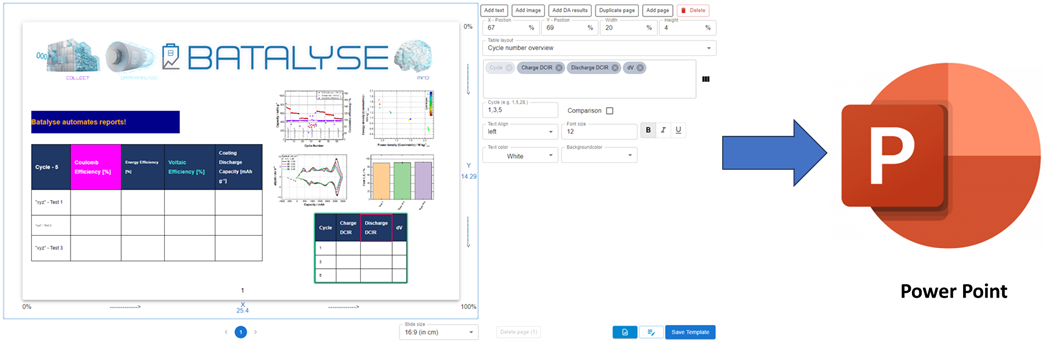
PowerPoint decks with graphs, figures and text from your own templates; needs Collect and Data Analysis.
Projects Processes & Projects
Client, manager, dates, members, funding and documents in one record.
Specimens & Testing
Material and process parameters meet product performance
The link a pure LIMS without its own data evaluation does not have.
Specimens and test results are part of the Specimens & Testing package.
Electronic sign-off New 2026
Sign off a test with a content hash and a fresh login — password, passkey or your organisation’s sign-in.
Lab notebook on every test New 2026
An append-only notebook per test, readable by project members, with change history for tests and specimens.
Shared specimens and tests
Specimens created in either product appear in both; result files and images are served from Collect.
KPI columns in Mind tables
Collect’s result columns can be filtered, sorted and highlighted in Mind.
Data Analysis queue
Schedule evaluations from Mind and follow their status.
Compare tests
Raw and result data of several tests in the browser, independent of the test device.
Test plans
Test plans as step diagrams; view, create and edit them with Specimens & Testing.
KPI Visualizer and Dashboard
Dashboards and saved KPI layouts that combine test KPIs with material and process parameters; uses the KPI Visualizer option of Collect.
Everyone sees what they should — and nothing else
Who sees an entry and who may change it is set per entry, not per module.
Three levels
Grant access per user, per organisational unit and per project.
Access per entry
Grant each entry to employees, units and projects, or change many entries at once.
Roles and delegated rights
Three roles; administrators delegate single capabilities such as purchasing, car pool, HR or access management.
Group administrators
Unit leads manage their own people and data without seeing the rest.
Collect profiles and projects
Decide per user which Collect profiles and projects are visible in Mind.
Controlled tokens
API and AI connector need a token; the administrator decides who may create one.
Structured data for your own tools
What Mind links together is available to code and to AI assistants.
Hosted MCP server New 2026
Connect an AI assistant with a token; query and build process chains in natural language.
External API New 2026
Versioned API with long-lived tokens and an in-app reference.
Connect existing databases
Keep your material or chemical databases and synchronise them with Mind through the REST API.
Exports
Styled Excel exports of product, resource and lab tables, and a PDF of every entry.
Recently added to Mind
Updates are included in the licence. The full list is in the change log.
Electronic sign-off
Sign off tests with a content hash and a fresh login: password, passkey or your organisation’s sign-in.
10.2026Lab notebook on every test
An append-only notebook per test, readable by project members, with change history for tests and specimens.
10.2026Supply view on the process chain
See the suppliers behind a batch on the canvas, including resources and consumables per process.
08–09.2026Carbon footprint and cost from the data you already record
Mind derives CO₂ and cost for each step and batch and rolls them up across the chain, ready for internal reporting and EU sustainability requirements.
- Emission factor per material and energy source
- Totals across sub-chains, switchable
- Cost per batch alongside GHG
- No separate spreadsheet
Fits the lab you already have
What Mind manages
- Chemicals
- Raw materials
- Products
- Batches
- Specimens
- Processes
- Machines & tools
- Labs & rooms
- Suppliers & customers
- Projects
- Staff
- Test data
- Instructions
- Documents
All entries can be linked to each other and carry files, labels, access rights and a change history.
Connects to
- Collect
- Data Analysis
- PubChem
- OPC-UA
- Organisation SSO
- MCP / AI clients
- REST API
- PowerPoint
- Excel / PDF
- QR labels
Your data stays yours
Development and support in Germany, German law, direct contact with the developers.
Installed on your hardware
Installed on your hardware or your cloud, with online or offline licences. Measurement data stays there; diagnostic logs are sent to Batalyse by default and can be switched off.
Roles and project access
Three roles with delegable capabilities; each entry is granted to employees, units and projects.
Modern sign-in
Organisation SSO and passkeys alongside passwords. Sessions end after 12 hours.
Change history and undo
Every change is recorded per field and can be rolled back; deleted entries can be restored.
Source-code escrow
The source code can be deposited with an escrow agent.
Read-only after expiry
Your data stays accessible when a licence ends.
Licences and packages
One base licence and two packages that build on each other. Every licence is annual, with unlimited users, support and updates.
| Basis | + Specimens & Testing | + Processes & Projectsboth packages | |
|---|---|---|---|
| Everything in Mind BasisListed below | |||
| Specimens and cell buildsSpecimen library from your materials and components, with electrochemical parameters synced with Collect | — | ||
| Test resultsComparisons, KPI Visualizer and Dashboard (with Collect’s KPI Visualizer option), saved KPI layouts | — | ||
| Battery-cycler test plansAs step diagrams; view, create and edit | — | ||
| Process chains and production batchesNested chains and variants; batches with inputs, outputs, waste, work plan, machine reservation and stock check | — | — | |
| ProjectsClient, manager, dates, members, funding and documents | — | — | |
| Labs and rooms | — | — | |
| Work instructions and trainingSOPs and safety instructions with confirmation and expiry tracking | — | — | |
| Costs, GHG and energyMaterial, product and energy costs and CO₂ per batch | — | — | |
| (Battery) PassportPassport tab per product with composition, footprint, circularity, suppliers, chain and test summary; PDF export | — | — | |
| Requests for quotation (RfQ)Specification, award criteria, deadlines, quotes and approval, archived as one file | Add-on | Add-on | Add-on |
| PowerPoint reportsFrom your own templates, filled with Collect and Data Analysis results; needs Collect and Data Analysis | Add-on | Add-on | Add-on |
| Personnel PlanningStaff planning, project allocation and time tracking, project budgets, and financial performance per organisational unit. Available for Collect, Mind or both. | Add-on | Add-on | Add-on |
Processes & Projects requires Specimens & Testing.
Included in Mind Basis
- Inventory of chemicals, materials and components: stock, supplier, purity, opening and expiry dates
- Hazard and safety data imported from PubChem by name or CAS number
- Container batches: every bottle of a delivery tracked under one batch ID; expiring stock flagged
- QR codes and labels (A4 to A9) for bottles, boxes and devices
- Machine register with documents, operating instructions, location and responsible person
- Maintenance log for inspections, calibrations and repairs, with costs and due-date reminders
- Booking calendar for machines and multi-channel testers; rooms with Processes & Projects
- Company car pool with approval step
- Live machine data from Collect and OPC-UA
- Supplier, partner and customer database with documents such as audits, and a supplier risk score
- Unlimited users, no per-user fees
- Dashboard with deadlines, due maintenance, expiring stock and pending confirmations
- Notifications in the app and by e-mail; search and PDF export on every item
- Mind Messenger: one-to-one and group chat
- Change history: see who changed what, and revert it
- AI connector (MCP) and API
- Access management on three levels: user, organisation unit and project, with roles and delegated rights
- API and AI connector need an API token; the administrator decides who may create one
- Sign-in with organisation account (SSO), two-factor login or passkeys
- Your own numbering rules and label templates; English and German interface; switch to Collect without logging in again
Services and licence options
Reduced rates apply for research institutes, universities, start-ups and SMEs, for several modules and for multi-year licences. The licence calculator gives you an estimate; your quote states the price.
Three ways to start
Online demo server
We set up a demo server with your own password.
- Ready within days
- Batalyse can see data you upload
On your own hardware
We help you install Mind locally.
- All features
- Batalyse has no access to your data
Hardware requirements
Modest — a small server or VM is enough.
- Docker on Linux or Windows; cloud on request
- CPU: 4 cores or more
- RAM: 8 GB or more
- Disk: depends on your data
Continuously updated
The newest version is open; every entry opens its detail.
08.-09.2026
- Sign in with your organisation account (SSO)
- Sign in through your organisation's identity provider alongside password and passkey
- Approved new users are created automatically
- Linking is protected by the existing second factor
- Administrators manage linked identities in the application
- New External Login guide in all 14 languages
- Dashboard
- Every role lands on its dashboard after sign-in
- Tiles can be switched on and off per user
- Rows open the item that needs attention
- Project deadline bars show progress within each project's timeline
- Numbers, links and charts now agree
- Process-chain supply view
- A batch can show its suppliers directly on the canvas
- Supplier cards and markers for inputs without a supplier
- Resources and consumables used by each process included
- Companies & projects
- Companies open on their own page with Main Data, Products and Access tabs
- Projects can link several organisations and contacts
- Deleting an item still in use is refused, with links to the records that refer to it
- "Related Items" replaces the former reverse-reference name
- Administration
- Workspace access chosen during user creation
- Clear licence seat-limit messages
- Setup banner for fresh installations
- Test plans: Mind and Collect share one test-plan step and loop editor, so plans reopen intact in either product
- Fixes
- Saving a record keeps linked information the editor cannot see
- Merge works again
- Product amounts and unit changes behave consistently
- Month-end instruction expiry dates are correct
- The administrator password-reset command works again
- Security
- Hidden records stay hidden
- Permissions are enforced consistently
- Revoked tokens stop working on every route
- Sessions last at most 12 hours
- Sign-in attempts are rate-limited
- Uploads are limited to 100 MB per file
05.-07.2026
- Training & Instruction: New section to create general, lab and machine instructions and instruction events; assign instructed persons by individual, employee or whole organisational unit (auto fan-out) and track instructor + instructee confirmation. Redesigned event-detail page with participation stats, external (third-party) instructor support, sortable expiration dates, a unified PDF/XLSX export, and a dedicated guide.
- Process chains, sub-chains & GHG/cost: productIn-driven sub-chains that auto-embed a product input's source sub-chain with deep-linking badges, a cumulative sub-chain GHG & cost toggle across the modals, KPI cards and totals, a read-only process-chain tab reusing the flow editor, and related chains via a shared chain ID.
- Resources – maintenance & scheduler: New Maintenance menu (dates, notes, cost with currency, multi-document upload, history table) with a "next maintenance due" column, plus a repaired and enhanced resource scheduler (capacity/channels, batch-optional scheduling, project selector, cross-source sharing, reservations persisted to a batch) and new resource fields for weight, dimensions and machine cost.
- Batches & inventory: GHG and cost now derived server-side on batch save, and transactional inventory management with atomic consumption at finish, frozen snapshots for finished batches, and guarded backward status transitions.
- MCP server & external API: Hosted MCP server at /api/mcp with token-paste auth and a /mindmcp setup page, plus an expanded v1 external API for MCP-driven chain building and a Swagger UI /api page with long-lived token management.
- Products, specimen & search: Products gain a CAS Nr field and Hazard / Precautionary statements with embedded GHS pictograms (table and Excel export), styled XLSX view exports, a hardened PubChem exact-match search, an inline "+ New product" create-and-link flow, and global workspace search across name, category and ID.
- Tables & workspace: Data/Test tables now match Collect's grey column names, order and values and show project names, with persisted column-visibility settings and localized date display.
- Guides, tutorials & localization: Guides and Video Tutorials buttons in the Appbar, and guide pages translated into Portuguese, Japanese, Chinese, Korean, Hindi and Italian.
- Auth & navigation: Single-use SSO code for Mind → Collect (replacing a replayable token, rate-limited per user) and a Collect switcher button in the header.
- Fixes: Timezone-safe bare calendar dates (no more day-shifts) unified to Collect's YYYY-MM-DD format, blank values sorting last with case-insensitive column filters, Collect-imported specimens appearing in the product and test views, and repaired report templates with embedded Collect graph images.
02.2025-05.2026
- Collect integration: Test Plans synced live from Collect and auto-linked to the tests they were applied to, sending Mind result/raw files to Collect, a Data Analysis Queue in Mind, and Collect's DA-parameter columns merged into Mind tables with filtering, sorting and highlighting.
- Authentication & login: Unified SSO between Mind and Collect with a shared session and profile switching, WebAuthn / passkey login, and a redesigned login page.
- Users, roles & access: New role-based permission system, project-based access control for specimens, tests and process chains, group-admin scoping, an inline access editor with batch edit, and admin profile management ("Collect Schema" renamed to "Profile").
- Process Chain: A full process-chain editor — build chains on a canvas with process nodes, edges and batches, scheduling and status guards; a Process Detail modal; Copy Chain; embed existing chains as read-only nodes; GHG / cost / consumption dialogs; and product-flow propagation with amount history.
- Change history & rollback: Item change-history and rollback across all sections, with per-field highlighting, old-value display and restore of prior values.
- Specimen, test & Collect-backed data: Mind-created specimens visible in Collect, result files and images backed by Collect (image carousel, downloadable cards), Collect import-status polling, and DA parameter columns in the test section.
- Charts, reports & labels: Charts with dynamic full-resolution zoom (and an out-of-memory fix), PPTX report fixes and templates, a Product Passport PDF embedding the process chain and DA results, and configurable Labels with SMILES chemical structures and QR codes.
- Machine data (OPC-UA): OPC-UA connections for live machine data with range plots and CSV download, and "compare test from triggers".
- Files, recovery & queue: A dedicated Restore / Recovery File page with column filters and multi-sort, and a Data Analysis Queue management modal.
- Settings, UI & performance: Redesigned settings with sidebar navigation, a sticky SectionActionBar replacing the floating action button, and large performance wins (initial load cut from ~4.8 s to ~1 s) following the underlying MongoDB → PostgreSQL migration.

10.2024-02.2025
- Seamless Integration with PubChem: Automatically import supporting information from PubChem when adding chemicals—now with CID and SID search options included!

- Easily visualize 2D structures using SMILES

- Expanded Information Sharing Options: You now have more options for sharing information on labels for chemicals, specimens, and resources, as well as through the QR code feature for externals without 'Mind' access.


07.2024-10.2024
- 3D diagrams are live! Select any parameter of your specimen such as binder content, active material loading, electrolyte additive, etc., and correlate it with an electrochemical KPI of your choice. With a single click, the displayed information can be quickly and easily changed, allowing you to see at a glance how the electrochemical performance varies with your material parameter variations. Discover how the 3D graph feature works: 3D graphs-video

- Green House Gas (GHG) emission is a 'hot' topic. Overview your GHG in Mind (in development).

- Improvements for your supplier management are on the way. Manage supplier (and client) related documents.

03.2024-07.2024
- 3D diagrams - initial support added: Visualize test series data: Select a cycle range, a material property of your cell (e.g. binder fraction in working electrode) and an electrochemical performance parameter (e.g. Discharge capacity).
- Manage your inventory by adding the amount of a product and by selecting a unit.


- The "Products" table now displays hazard symbols, and you can directly access both your individual supplier's and PubChem's safety data sheets via your web browser.

- Enter the amount of a product you used/produced in a process

- Selection of a product in a process (chain) is now done via a table with many filtering options

- Track Green House Gas emission - initial features added.
Older versions
- Instruction Management - Document effortlessly who was trained to use a machine or device. Both the instructor and the instructed person confirm the training with just one click. Mind-Instruction
- New "Labs" category - Manage all lab relevant documents and information for every lab individually. Get a fast overview of devices and chemicals stored in the lab and directly access their safety data sheets. Manage who is trained to work in the lab and access all operating instructions easily.
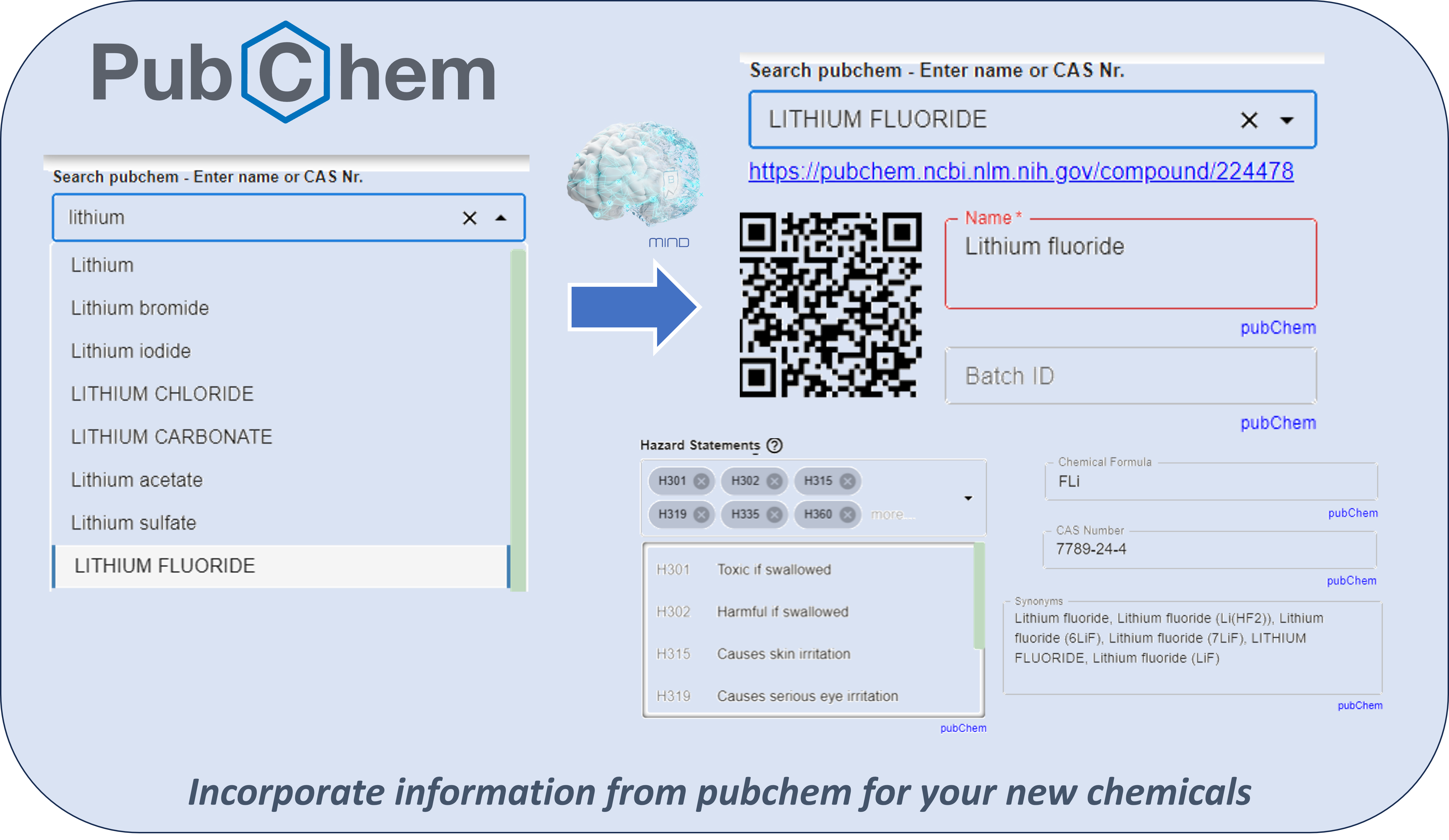
- Download supporting information for your chemicals and hazardous substances automatically from "pubchem" - Improved.
- Physical data like density, melting point etc. are addtionally imported
- Safety datasheet is linked automatically
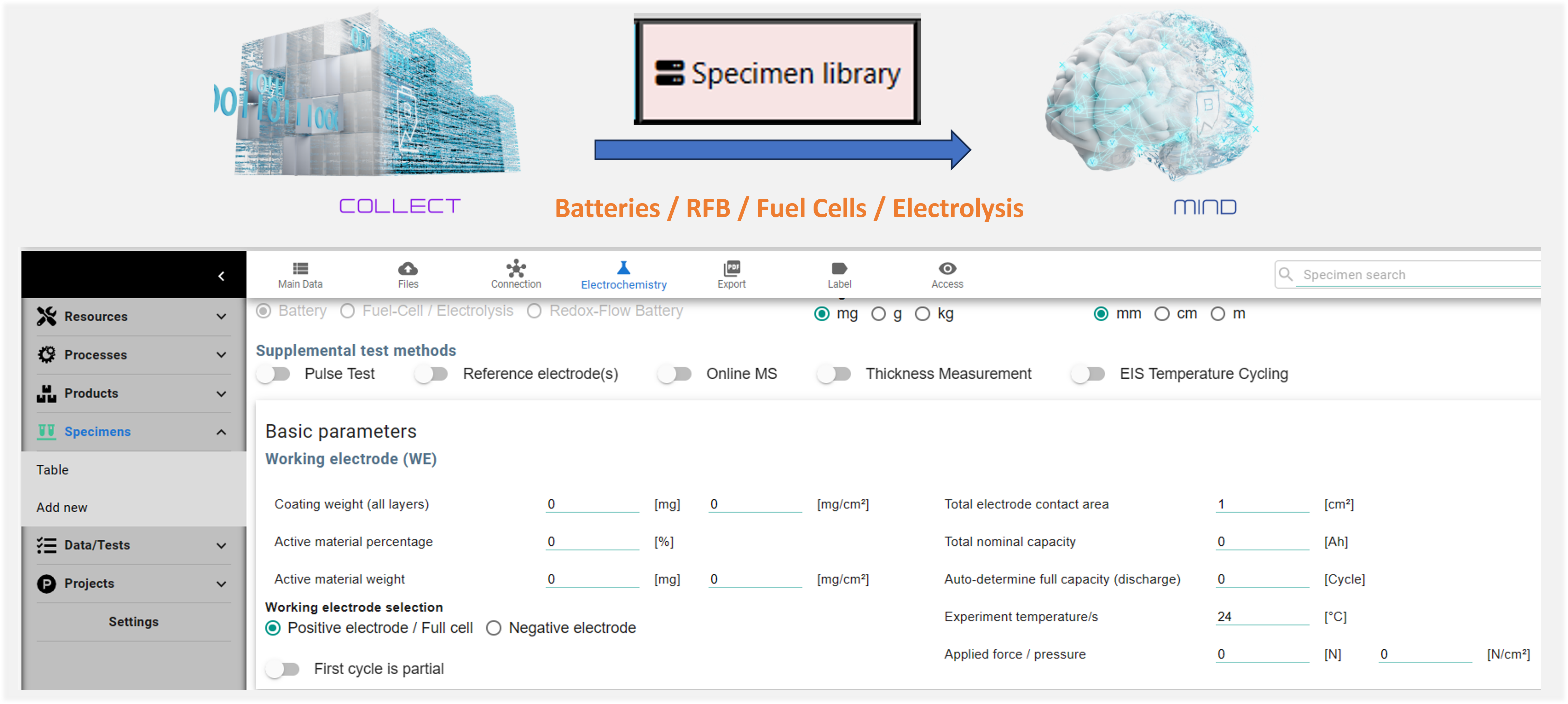
- Mind already synchronizes all test/result data and graphs from Collect. Now, Mind also synchronizes the specimen library. We are on the way to link your storage/chemical database with your specimen to enable track and trace!
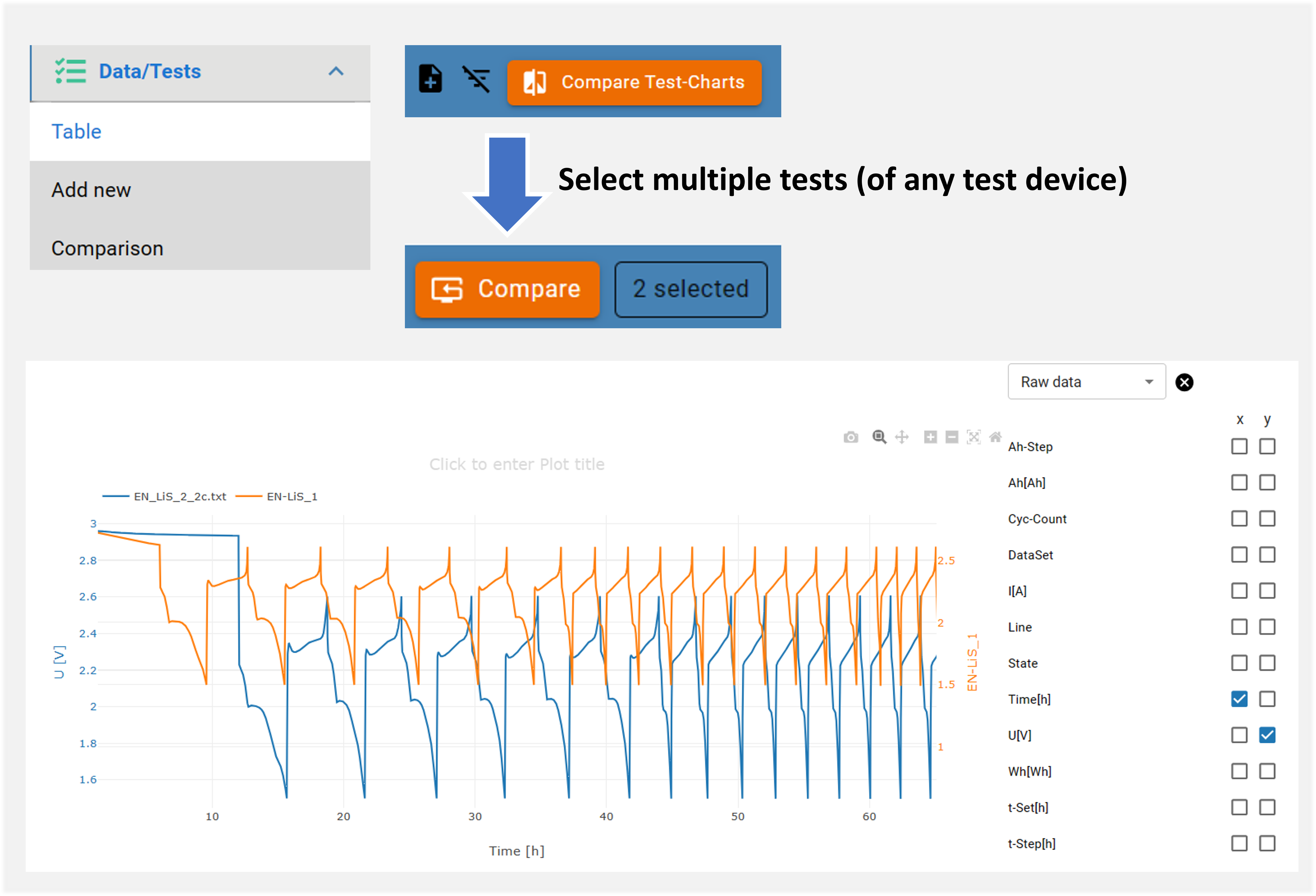
- Compare raw and result data of multiple tests, independent of the test device and file structure
 01.2024
- Download supporting information for your chemicals and hazardous substances automatically from “pubchem”. Search for a chemical name or CAS nr. and have information like hazard/precautionary statements, chemical formula, synonyms, hazard symbols and more filled in automatically in Mind: Batalyse-Mind-PubChem
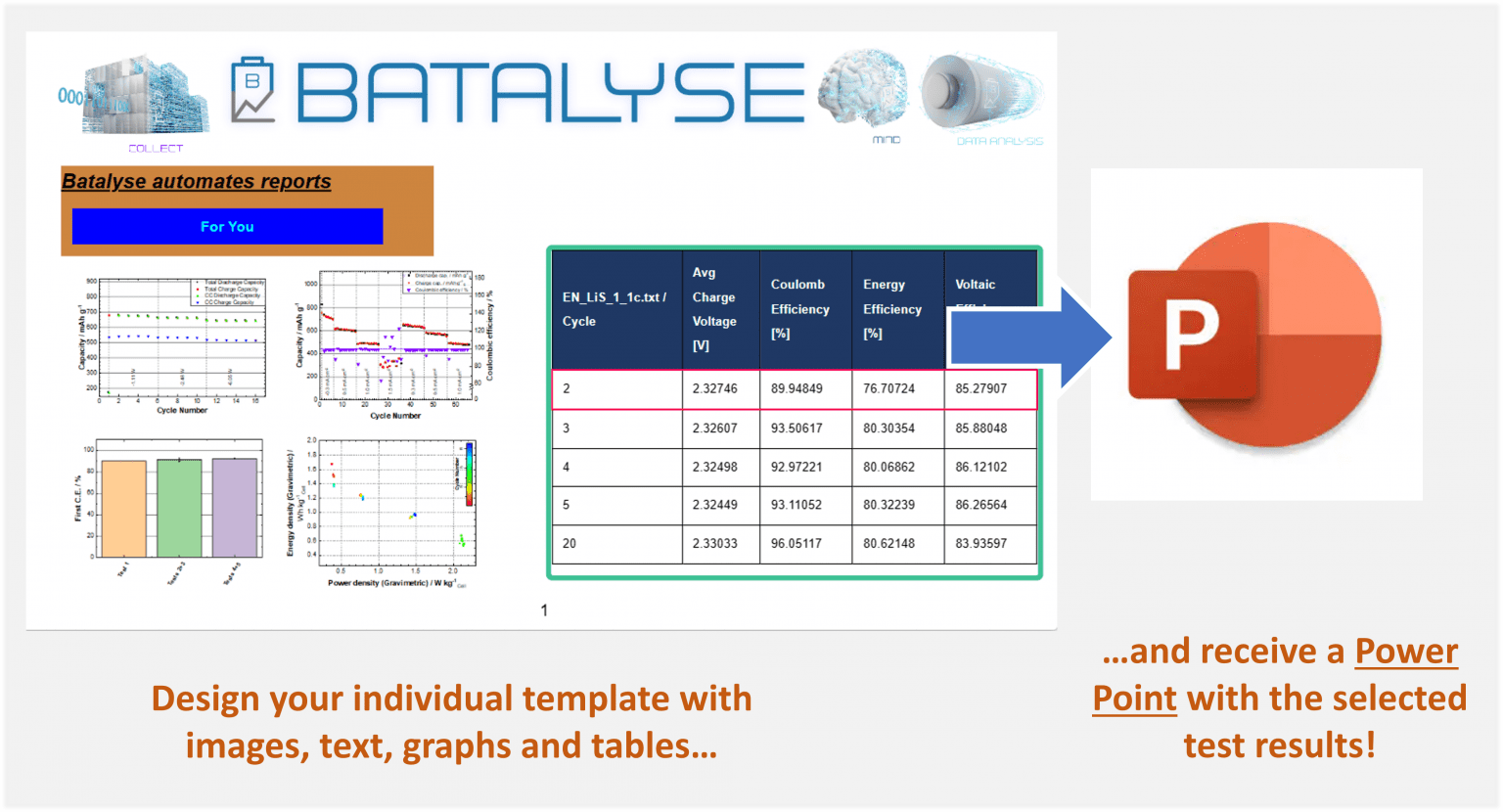
- Improved automated reports: Receive a power point based on your individual template. Create reports by one click: Mind-Report-OneClick
- New “reactivate” user option: Reactivate users that were previously deactivated by a Mind-admin
- Improved support for OPC-UA connections
- Improved automated reports: Receive a power point based on your individual template. Now also place your diagrams, text and tables by “drag and drop”.Mind-Report
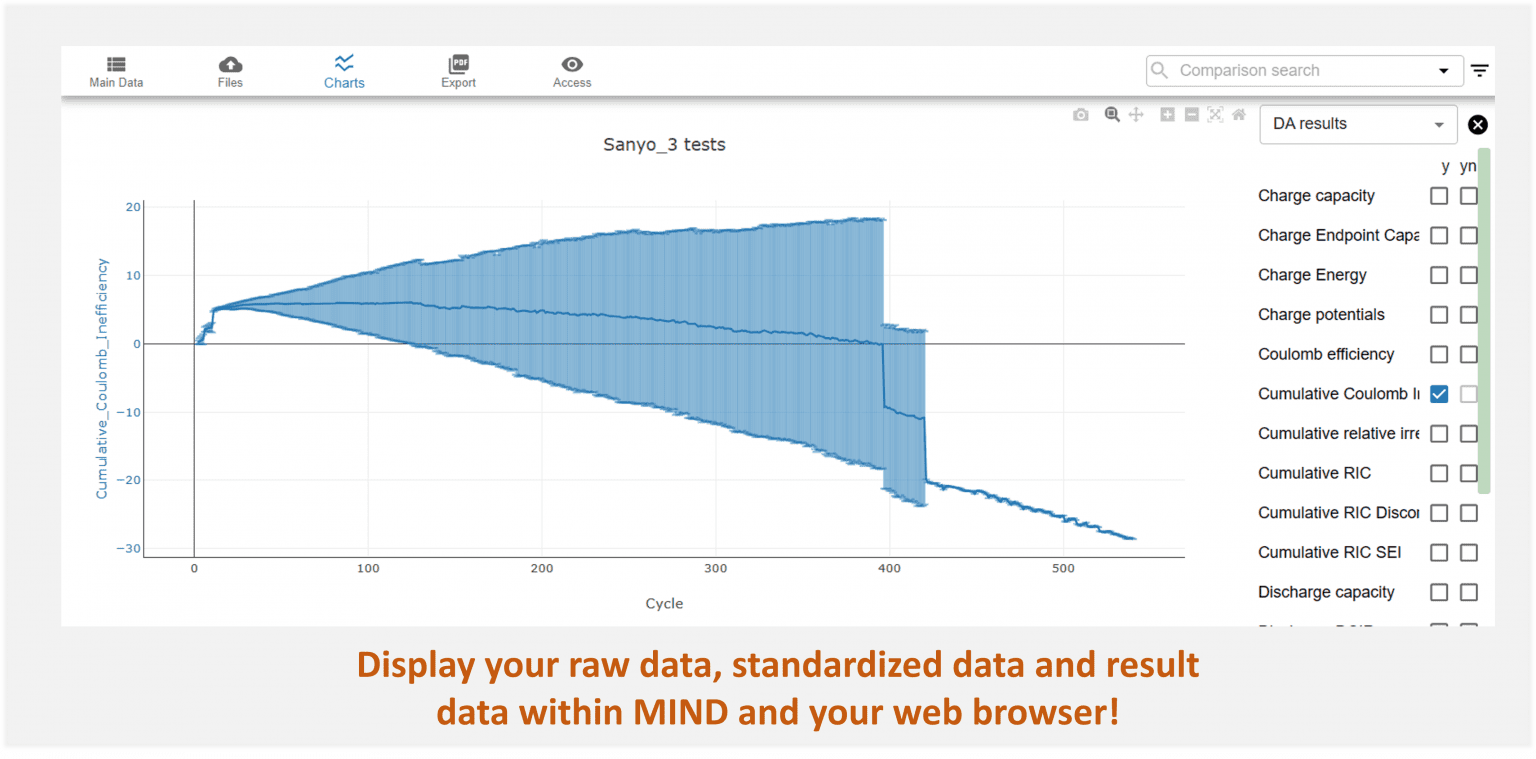
- Display data which was standardized in Collect by you
- Improved support for OPC-UA connections
- Create automated Power Point presentations based on your individual templates – New data tables types, improved sort and filter functions: Mind-Report
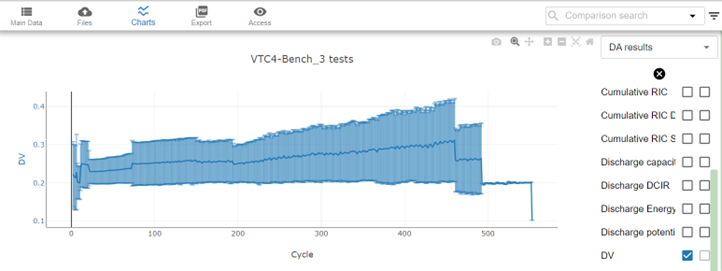
- Display benchmark data of multiple cells and tests within your web browser and Mind
- Added support for OPC-UA connections (in work)
Make up your Mind with a free demo
Book a 30-minute call. Try Mind on a demo server or install it on your hardware — free and without obligation.