Batalyse Mind and Collect now speak MCP. Connect your AI assistant to your LIMS and your R&D management system through the Model Context Protocol. Describe a process the way you would explain it to a new colleague, and the agent enters it into the software for you — steps, materials, machines and the parameters each step records.
Batalyse GmbH · Walzbachtal · Developed in the BMFTR project BaetterAI
From a chat message to a process chain
“Our line starts with dry mixing of active material, carbon black and binder, then coating on the pilot coater, calendering, stacking, electrolyte filling and formation. Set that up as a process chain and add the parameters we record at each step.”
What the agent creates in Mind:
- Dry mixing — active material, carbon black, binder · mixing time, speed, batch mass
- Coating — pilot coater · gap, web speed, drying temperature, areal loading
- Calendering — line load, roll temperature, resulting porosity
- Stacking — layer count, separator type, alignment tolerance
- Electrolyte filling — electrolyte, fill volume, wetting and rest time
- Formation — cycler, current profile, voltage limits, temperature
Describing your work is entering it
Structuring a production line or a test campaign in software is a long job. Dozens of steps in the right order, each with its own materials, machines and the parameters you need to log — and until now, all of it typed in by hand, form after form. It is the part of the work that gets postponed.
MCP, the Model Context Protocol, is an open standard for connecting AI assistants to software systems. With MCP support in Batalyse Mind and Collect, your assistant no longer works on an exported copy of your data. It works on your live database: it can create process chains, materials, devices and entries, and it can read what is already there. You review what it proposes before it is saved.
No integration project, no intermediate files, and no code to write on your side.
What you can do from the chat
- Production — map a full production chain. Describe the line once. The agent creates every step in order, links the materials and machines involved, and attaches the parameters recorded at each stage.
- Laboratory — document lab work and devices. The same applies to experiments. Describe a cell build or a test series and the agent documents it, including the lab devices used and the parameters they deliver.
- Inventory — keep the inventory current. Add chemicals, electrode materials and consumables to your inventory as you go, without leaving the conversation to fill in a separate form.
- Analysis — ask about your results. Which batches used this material, and what came out? The answer is drawn from your database as it stands right now, not from a spreadsheet exported last week.
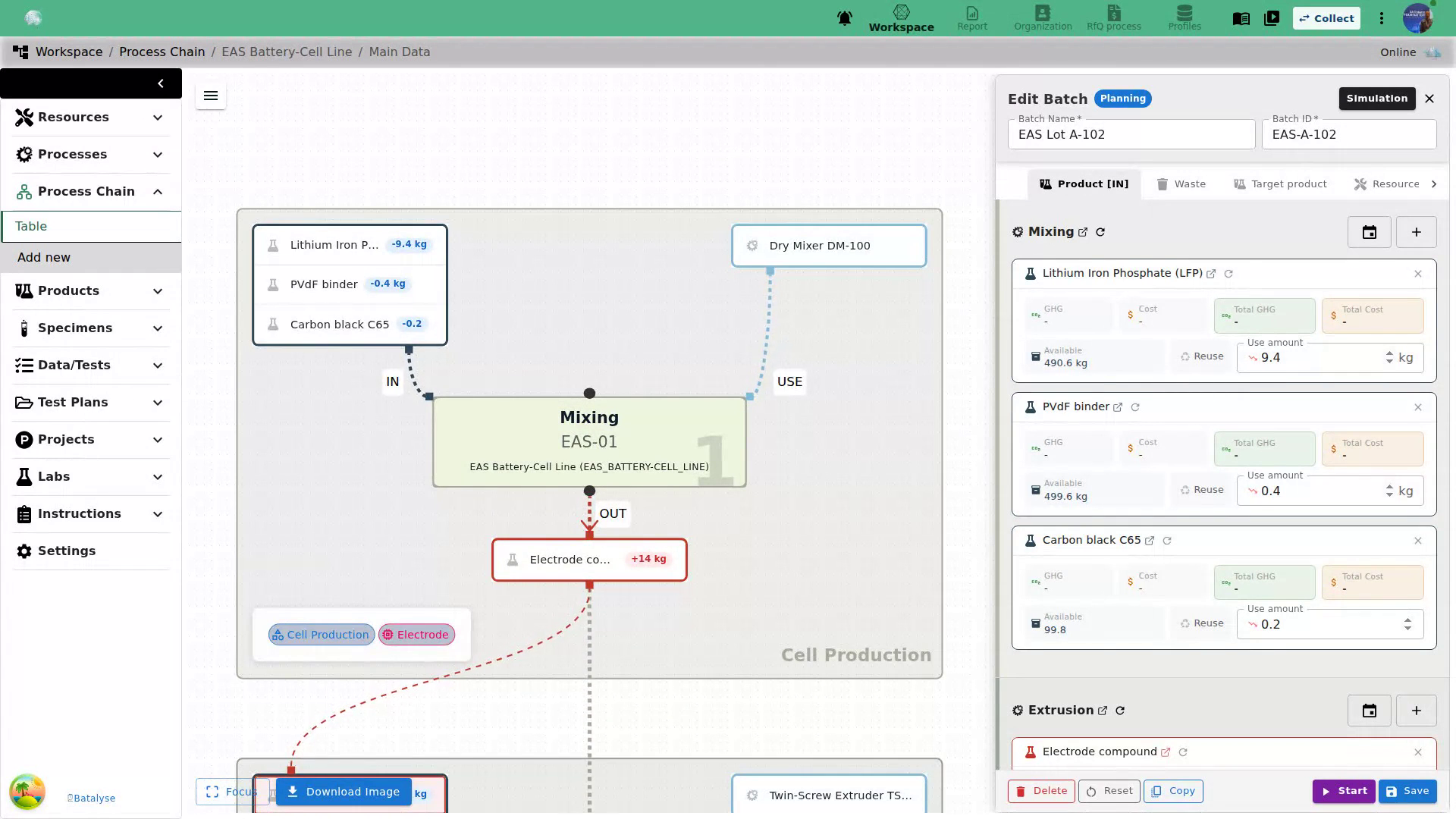
Case study: the EAS Batteries cell production, mapped in a conversation
Together with EAS Batteries we mapped their cell production into Mind using the MCP integration — including their (almost) dry electrode processing, which largely avoids the use of harmful NMP. Structuring a real production line at this level of detail normally costs days of clicking. Here it was a conversation.
Your model, and your rules on where data goes
MCP is model-independent. You connect the assistant your organisation already uses or trusts — Claude, ChatGPT, Mistral, Aleph Alpha — or a model running on your own hardware. That choice also decides where your data is processed, which in industrial R&D is usually more important than a benchmark score.
- Locally hosted LLM — the model runs on your own hardware, inside your network. Fully on-premise. Process and measurement data never leaves your systems.
- External model provider — the model runs at the provider you choose. The content you send in the chat is processed by that provider, under their terms. Mind and Collect stay where they are; Batalyse has no access to your data either way.
Where Mind and Collect run. Both are available as on-premise installations in your own infrastructure. The MCP connection does not change that — it adds an interface to the system you already host.
What comes next: towards a product passport for every cell
A fully structured production chain is the groundwork for something more useful than documentation for its own sake: a product passport per cell, in which every step, material and parameter is already connected to the individual cell it produced. That is what we are working towards in the newly started BMFTR project KiBaPro.
More AI-based features will follow, and we are glad for feedback from anyone testing this in their own lab. Write to us at contact@batalyse.com.
Funding
The MCP integration in Mind and Collect was developed in the project BaetterAI, together with our partners Fraunhofer IFAM, Batene, Heimdalytic and MAP-Test. The work towards a per-cell product passport continues in the project KiBaPro.
Both projects are funded by the German Federal Ministry of Research, Technology and Space (BMFTR) and managed by Projektträger Jülich.
BaetterAI — FKZ 03XPB020A · KiBaPro — FKZ 03XPB069B