

Rohdaten, Parameter, Testpläne und Ergebnisse aller Messgeräte – an einem Ort
Collect übernimmt Dateien automatisch von Messgeräten, Netzwerkordnern, Datenbanken und Maschinen, standardisiert sie auf Ihrem eigenen Server und verknüpft jede mit ihrer Probe, ihrem Testplan und ihren Ergebnissen – bereit für Ihren eigenen Code, einen KI-Assistenten oder Data Analysis.
- Läuft auf Ihrer Hardware
- Unbegrenzt viele Nutzer
- Messdaten bleiben auf Ihrem Server
Automatisierte Datenpipeline – vom Prüfstand bis zum Dashboard

Erfassen
Collect überwacht Ihre Netzwerkordner, Datenbanken, Datenlogger und OPC-UA-Maschinen und importiert neue Dateien, sobald sie entstehen.
Kategorisieren & standardisieren
Dateinamen-Nomenklatur, Header-Daten und Proben-IDs ordnen jede Datei Ihren Datenkategorien zu. Ein einheitliches Schema macht Messgeräte vergleichbar.
Auswerten
Ihr eigener Code sowie Open-Source- oder Drittanbieter-Tools werten jeden Dateityp aus; Data Analysis und der EIS Analyzer decken elektrochemische Tests ab. Ergebnisse kommen als sortierbare Spalten zurück.
Vergleichen & teilen
Nach Ergebnissen filtern, Kennzahlen plotten, Datensätze per DOI importieren und Daten mit NOMAD Oasis, Kadi4Mat oder dem Collect eines Partners austauschen.
Das kann Collect
Daten kommen von selbst
Von Prüfständen, Analysegeräten und Produktionsmaschinen. Keine manuellen Exporte, keine verlorenen Dateien bei Personalwechsel – und Altdaten bleiben lesbar, auch wenn Gerät oder Software längst ausgemustert sind.
Netzwerküberwachung
Die Überwachung pro Ordner erfasst neue und noch laufende Tests und zeigt den Importstatus jeder Datei.
Jede Datei, jede Struktur
Tabellen, Bilder, Dokumente und proprietäre Dateien werden gespeichert und verknüpft. Binärformate elektrochemischer Testgeräte (.mpr, .nda/.ndax, .res, .pssession, Maccor-Rohdateien u. a.) werden direkt eingelesen, ohne CSV-Export.
OPC-UA und Datenlogger Automation
Maschinen- und Loggerdaten als Quelle; aus Loggertabellen wird nur der Abschnitt extrahiert, der zu einem Test gehört.
Bestehende SQL-Datenbanken
Import aus einer bereits betriebenen Messdatenbank, live oder als einmalige Übernahme.
Fortsetzbare Uploads
Große manuelle Uploads setzen dort fort, wo sie unterbrochen wurden. Fehlgeschlagene Importe nennen ihren Grund.
Zusammenführen und trennen Neu 2026
Unterbrochene Tests oder Mehrdatei-Methoden zusammenführen; die Originale bleiben erhalten und lassen sich wiederherstellen.
Eine Struktur für jedes Labor
IDs, Nomenklatur und Bibliotheken sorgen dafür, dass eine Datei schon beim Eintreffen mit der richtigen Probe, dem richtigen Plan und Projekt verknüpft ist – in jedem Forschungsgebiet.
Test & ID Manager Neu 2026
Testkampagnen planen und Zell-IDs nach Ihren eigenen Nomenklaturregeln erzeugen, mit Elektrodenpaarung und Stack-Vorschau.
Workflows je Technologie Neu 2026
Eigene Kampagnen-Workflows für Batterien, Redox-Flow-Batterien und Brennstoffzellen / Elektrolyse.
Probenbibliothek
Komponenten, Rezepturen und Zellformate mit einer Herkunftsansicht, die zeigt, woher jeder Wert stammt.
Testplan-Bibliothek Neu 2026
Ein gemeinsamer Schritt-und-Schleifen-Editor mit Mind, sodass Pläne in beiden Produkten unverändert wieder geöffnet werden.
Testpläne für Ihre Testgeräte Neu 2026
Testpläne in die Formate von BioLogic, BaSyTec, Maccor, Neware und Gamry exportieren und aus Arbin importieren; C-Raten werden aus der Nennkapazität in Ströme umgerechnet.
Automatische Verknüpfung
Proben-IDs im Dateinamen legen den Parametersatz an, verknüpfen den Testplan und starten die Auswertung.
Eigene Datenkategorien Standard +
Kalorimetrie, Chromatografie, Mikroskopie, Spektrometrie, mechanische oder Sicherheitstests, Produktionsdaten – Haupttypen, Untertypen und Probenfelder legen Sie selbst fest.
Professional +
Vergleichbar über Geräte hinweg
Spaltennamen, Einheiten und Zeitbasen verschiedener Messgeräte werden in ein einheitliches Schema überführt, für jede Datenkategorie – das Regelwerk stammt aus jahrelanger Laborpraxis.
Die gesamte Standardisierung ist Teil von Collect Professional und Automation.
Standards per Klick Neu 2026
Den Batalyse-, BDF- oder BEEP-Standard für alle Elektrochemie-Dateien eines Profils in einem Schritt übernehmen.
Bearbeitbares Regelraster Neu 2026
Alle Definitionen in einem Raster mit automatischer Spaltenkopf-Zuordnung, Vorlagen-Import/-Export und Funktionsmenü.
Nachvollziehbare Formeln
Standardisierte Dateien zeigen, welcher Standard und welche Formeln sie erzeugt haben.
Eigene Berechnungen
Wenden Sie Ihre Formeln auf Rohdaten an und speichern Sie das Ergebnis neben dem Original.
Ergebnisse als Spalten, nicht in Ordnern
Jeder Ergebniswert kann zur Spalte werden, nach der Sie filtern und sortieren. „Welche Proben haben den Grenzwert eingehalten?“ wird zur Filterabfrage, unabhängig von der Messmethode.
Automatisierte Auswertung Automation
Für elektrochemische Tests führt ein eigener Auswerte-PC Data Analysis für das ganze Team aus; Diagramme, Origin-Projekt und Kennzahlen kommen zurück in Collect.
Ergebnisbasierte Spalten Standard +
Kennzahlen jeder Methode – von Kapazität und Widerstand bis zu Partikelgröße oder Onset-Temperatur – als sortierbare Spalten, gespeichert als benannte Ansichten.
KPI Visualizer und Dashboard Neu 2026 Professional +
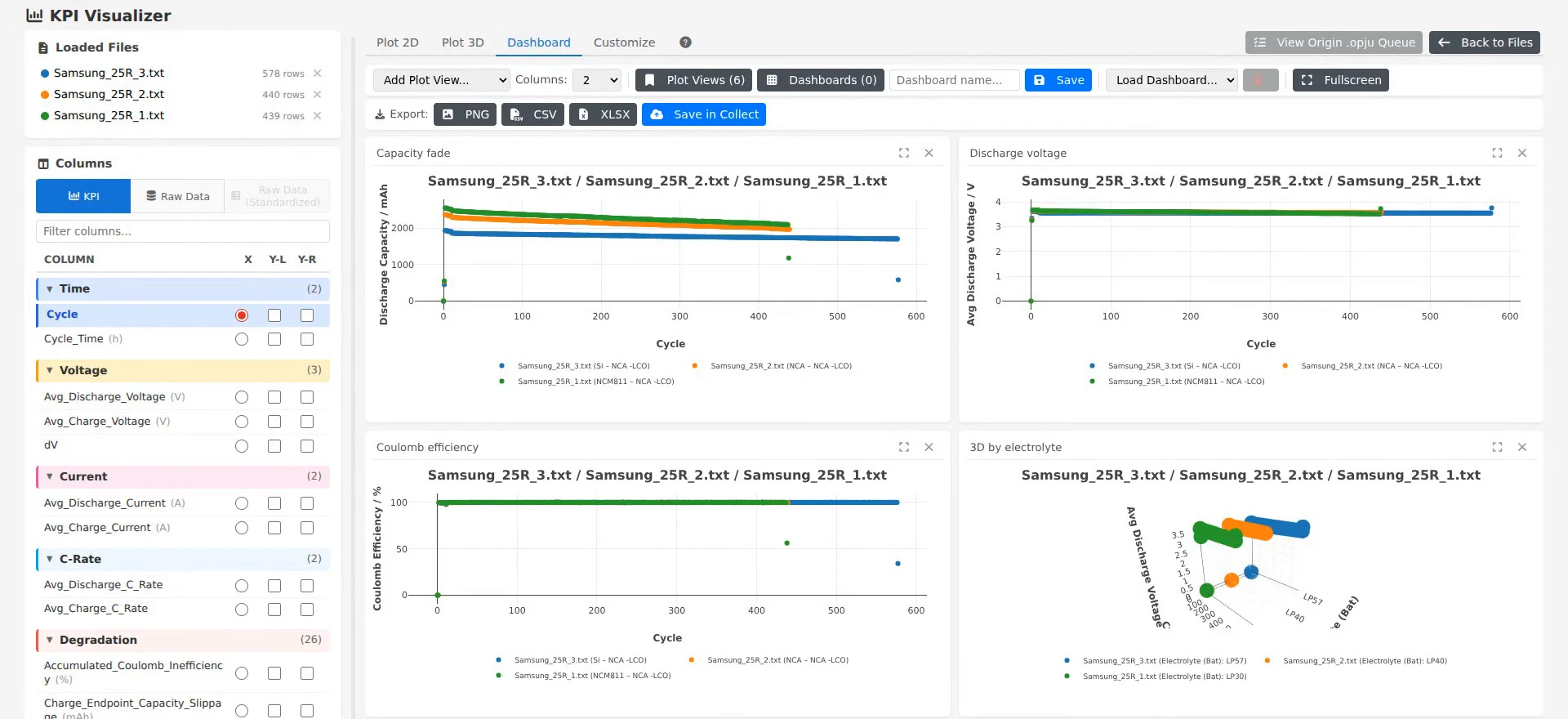
Dashboards aus den Kennzahlen Ihrer Tests erstellen: 2D- und 3D-Diagramme, Statistikmodus und gespeicherte KPI-Layouts zum Teilen, mit Export nach Origin.
Eigener Auswertecode
Skripte und Drittanbieter-Tools lesen jede Datei über die API und laden ihre Ergebnisse hoch, die dann neben den Rohdaten erscheinen.
Integrierter EIS Analyzer Professional +
Ersatzschaltbild-Fitting, DRT, Kramers-Kronig, Dynamic EIS und Arrhenius-Analyse; die Fit-Ergebnisse bleiben bei der Zelle.
Alterungsprognose und Simulation In Entwicklung
Vorhersage der Zyklenlebensdauer aus Ihren Testdaten und physikbasierte Batteriesimulation direkt in Collect; Probendaten lassen sich auch mit Cidetec Proteo teilen.
Alerts und Messenger Neu 2026
Benachrichtigung in Microsoft Teams, per E-Mail oder im integrierten Messenger, sobald ein laufender Test Ihre Kriterien erfüllt – und direkt dort besprechen, im Einzel- oder Gruppenchat, gemeinsam mit Mind. Alerts setzen ergebnisbasierte Spalten voraus.
Vollständige Pakete statt loser Dateien
Messungen reisen mit ihren Probendaten, ihrem Testplan und ihrer Verarbeitungshistorie – zu Partnern, zu anderen Collect-Installationen und in FuE-Repositorien, wie es geförderte Projekte für FAIR-Daten verlangen.
Collect-zu-Collect-Austausch Neu 2026
Mit der Installation eines Partners verbinden, die freigegebenen Profile durchsuchen und Dateien importieren oder senden. Beide Seiten müssen die Verbindung aktivieren.
Import per DOI Neu 2026
DOI eingeben, und der Datensatz aus Zenodo, Dataverse, Figshare, Dryad, OSF oder DataCite landet neben Ihren eigenen Messungen, bereit zum Vergleich.
NOMAD Oasis und Kadi4Mat Neu 2026
Daten in beide Richtungen mit dem Forschungsrepositorium Ihres Instituts austauschen. Der Administrator schaltet jede Verbindung frei und vergibt sie pro Nutzer, Abteilung oder Projekt. Weitere Repositorien folgen.
Projekte Neu 2026
Projekt-Tab mit Status, verknüpften Partnern und Kunden sowie einem gemeinsamen Dateien-Tab für Anträge und Berichte.
Graph Customization Library Neu 2026
Diagrammformatierungen speichern, wiederverwenden und austauschen, damit jede Abbildung gleich aussieht.
ZIP-Archiv
Eine Testserie als ein Archiv teilen, z. B. als Supporting Information zu einer Veröffentlichung.
Allotrope-Export Neu 2026
Ausgewählte Dateien aus der Dateiliste als Allotrope Simple Model (JSON) exportieren.
Jeder sieht, was er sehen soll – und nichts sonst
Standardmäßig wird nichts mit allen geteilt. Die Rechte folgen Ihrer Organisation, nicht der Ordnerstruktur eines Fileservers.
Drei Ebenen
Zugriff pro Nutzer, pro Organisationseinheit und pro Projekt vergeben – für Abteilungen, Institute und Standorte ebenso wie für übergreifende Projekte.
Bis zur einzelnen Datei
Der Zugriff wird für jede Datei, jedes Ergebnis, jeden Testplan und jeden Vergleich geprüft; für viele Einträge auf einmal änderbar.
Rollen und delegierte Rechte
Administratoren, Gruppenadmins und Nutzer, mit Berechtigungen pro Nutzer, etwa zum Löschen von Dateien, für Anzeigeeinstellungen, Zugriffsverwaltung, Projektverwaltung und API-Tokens.
Datenprofile
Getrennte, isolierte Profile halten die Daten von Teams, Kunden oder Projekten auseinander.
Teilen mit Partnern
Projektpartnern oder Kunden nur Zugriff auf ausgewählte Datensätze geben oder diese zwischen Collect-Installationen austauschen.
Kontrollierte Tokens
API, KI-Connector und Partneraustausch benötigen ein Token; der Administrator aktiviert die API pro Profil und legt fest, wer eines erstellen darf.
Ihre Daten sind nie eingesperrt
Alles, was Collect speichert, können Ihre eigenen Tools lesen und schreiben.
MCP-Server für KI-Assistenten Neu 2026
Stellen Sie Fragen zu Ihren Tests in natürlicher Sprache; die Daten bleiben in Ihrer Infrastruktur.
Offene API
Gefilterte Dateilisten, Roh- und Ergebnisdaten sowie Upload eigener Ergebnisse und Parameter – mit interaktiver Referenz.
Persönliche Tokens Neu 2026
Mehrere benannte Tokens pro Nutzer, jedes auf das beschränkt, was sein Besitzer sehen darf.
Python, MATLAB, Excel
Nutzen Sie die standardisierte Struktur direkt aus den Tools, mit denen Sie bereits arbeiten.
Neu in Collect
Updates sind in der Lizenz enthalten. Die vollständige Liste steht im Änderungsprotokoll.
Standards in einem Schritt
Alle Elektrochemie-Dateien eines Profils übernehmen Batalyse, BDF oder BEEP in einem Schritt; sechs unbemerkte Einheitenfehler behoben.
08–09.2026Collect-zu-Collect-Austausch
Die freigegebenen Profile eines Partners durchsuchen und Messungen mit Ergebnissen, Testplan und KPI-Tabelle austauschen.
08–09.2026Anmeldung über Ihre Organisation
Anmeldung über Ihren Identity Provider. Passkeys und Zwei-Faktor-Anmeldung bleiben bestehen.
08–09.2026Eine Dateitabelle, die weiß, was in den Dateien steckt
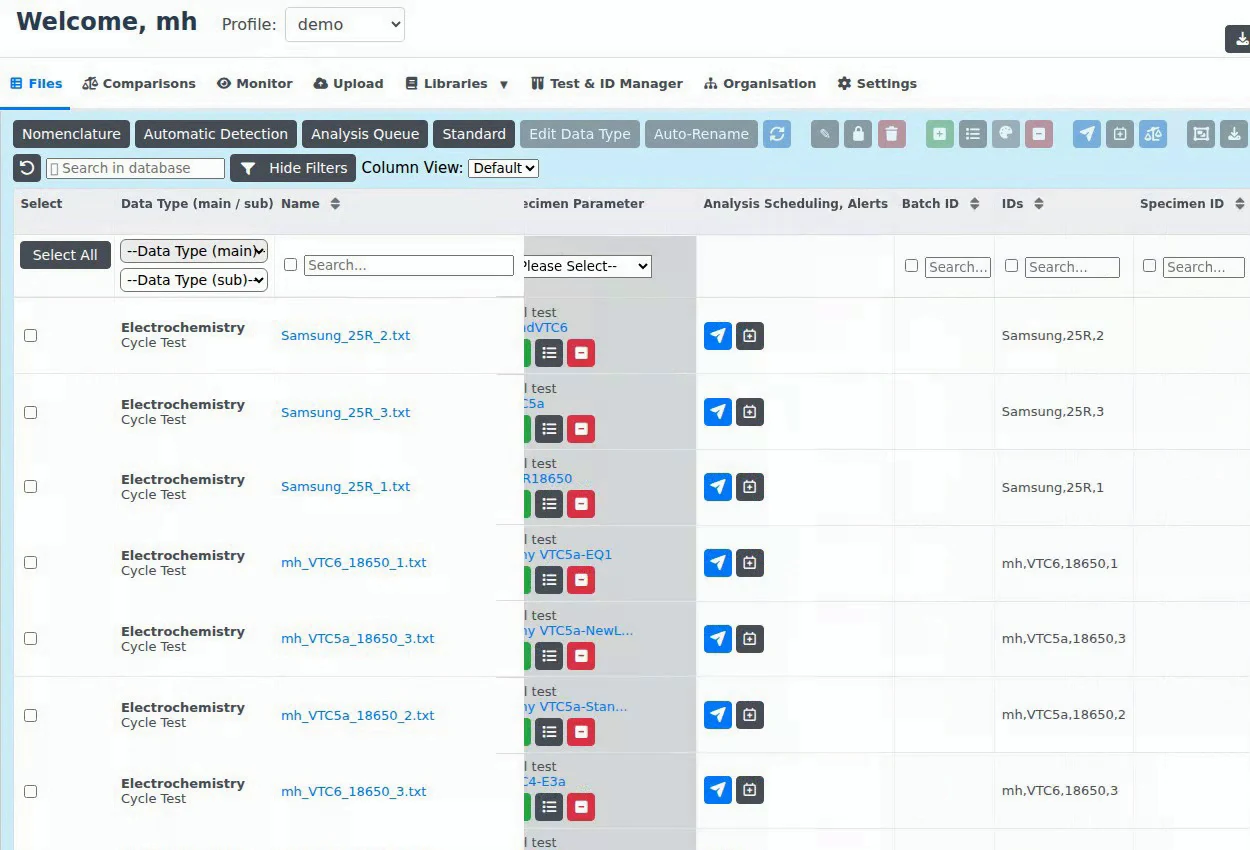
Jede Zeile ist eine Messdatei, beschrieben durch Datentyp, Messgerät, Probe, Zugriffsrechte und – nach der Auswertung – ihre Ergebnisse. Wählen Sie eine Funktion, um sie zu sehen.
Dutzende Spalten zum Eingrenzen der Ansicht, in beliebiger Kombination.
- Filter nach Haupt- und Unterdatentyp, mit Dateianzahl je Kategorie
- Suchfeld unter fast jeder Spalte, mit Option für exakte Treffer
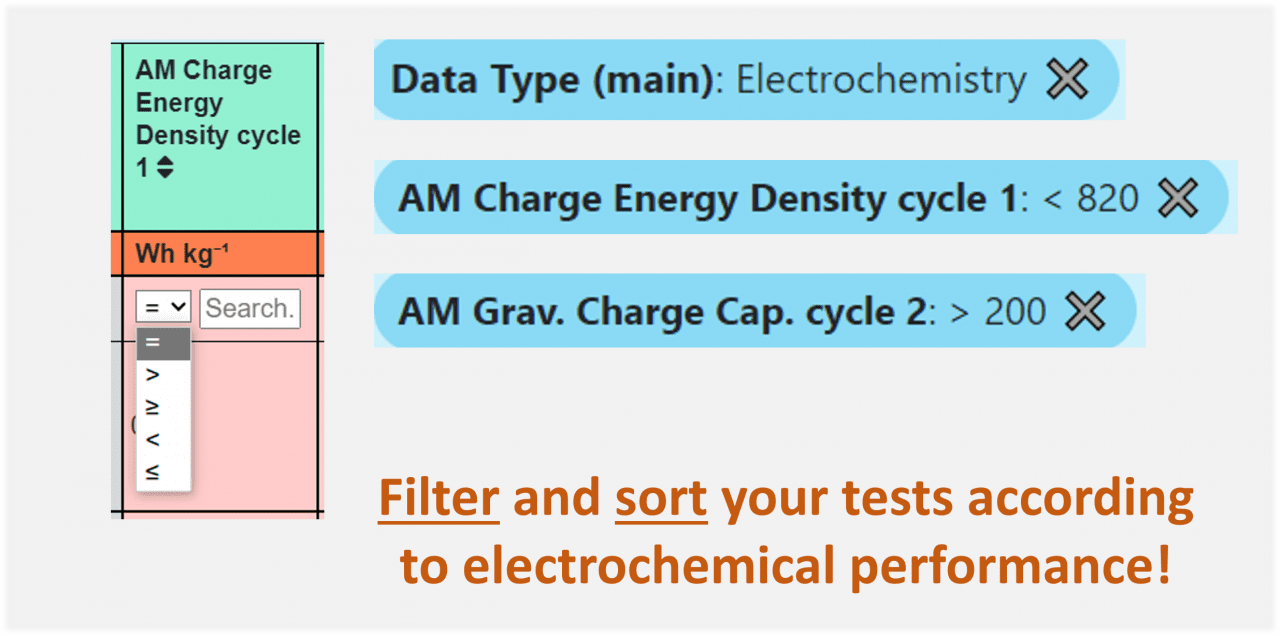
- Operatoren (=, >, <, ≥, ≤) für Ergebnisspalten
- Globale Suche über das gesamte Profil
- Aktive Filter als Chips; einzeln entfernen oder alle löschen
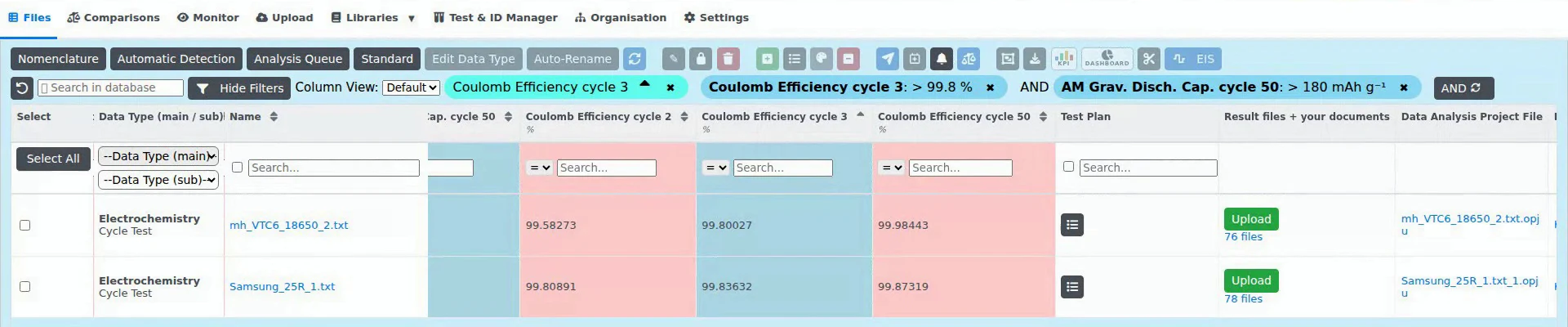
Zeigen Sie, was Ihre Arbeit braucht, und speichern Sie es unter einem Namen. Hier: Ergebnisspalten für ausgewählte Zyklen, sortiert nach Coulomb-Effizienz.
- Fünf Spaltengruppen: Allgemein, Probenparameter, Probenbibliothek, KPI-Tabelle, Vergleichs-KPI-Tabelle
- Dateinamen-Segmente aus Ihrer Nomenklatur werden zu Spalten
- Probenparameter aus der Bibliothek stehen neben jeder Datei
- Spaltensatz als Ansicht speichern und zwischen Ansichten wechseln
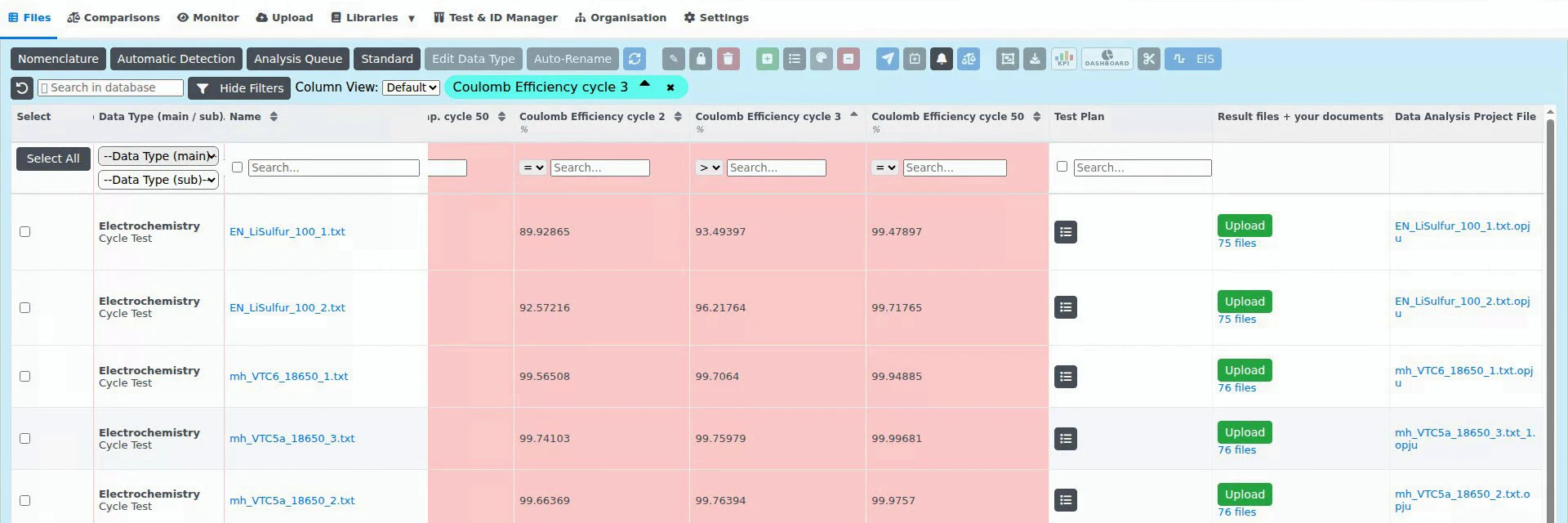
Die Spalte Zugriffsverwaltung zeigt, wer jede Zeile sehen darf. Eine leere Liste bedeutet: nur der Ersteller und die Profiladmins, niemals alle.
- Drei Ebenen: Nutzer, Organisationseinheiten, Projekte
- Info-Popover mit Ersteller, berechtigten Nutzern, Einheiten und Projekten
- Zugriff für viele Dateien auf einmal ändern
- Ein Nutzer braucht zuerst Zugriff auf das Datenprofil; über den Rest entscheidet der Dateizugriff
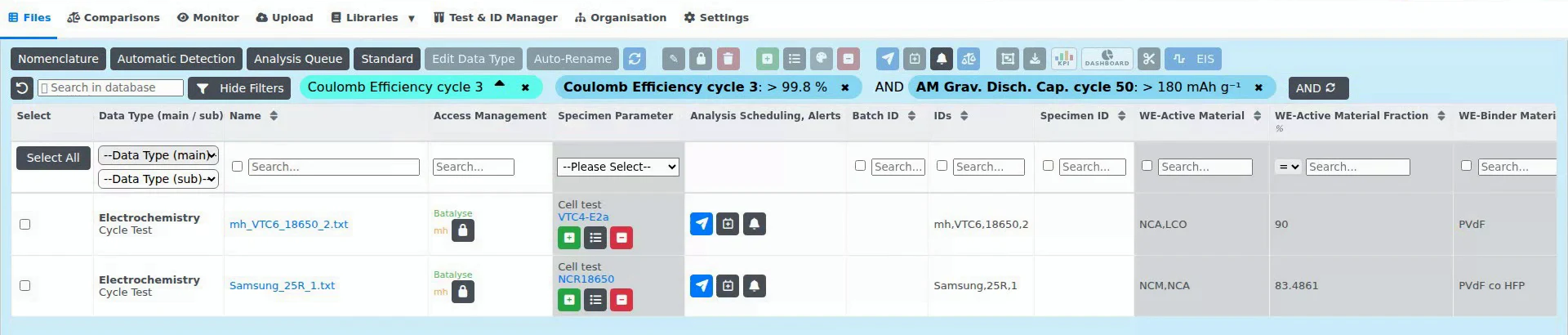
Eine oder viele Dateien auswählen, auch seitenübergreifend, und bearbeiten.
- Probenparameter verknüpfen, ersetzen oder entfernen; Testplan verknüpfen
- An die Auswertungswarteschlange senden oder die Auswertung laufender Tests planen
- Alerts anlegen, Tests vergleichen, Dateien zusammenführen
- ZIP-Archiv herunterladen oder einen Datenlogger-Abschnitt extrahieren
- Rohdaten und Datei-Header im Browser öffnen; eigene Ergebnisse, Dokumente und Bilder anhängen
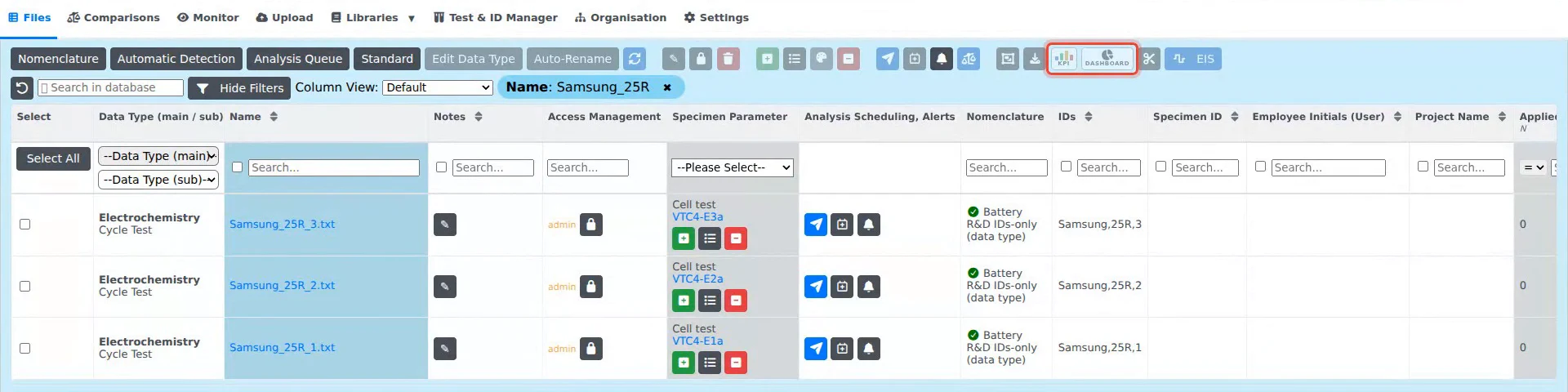
Von Ergebnisspalten zu Dashboards
Dateien aus der Liste laden, Kennzahlen auswählen und die Diagramme als Dashboard anordnen: 2D, 3D gegen Materialparameter und Statistik über Testserien hinweg. Speichern, aus der Dateiliste wieder laden, nach Origin exportieren.
Liest über 20 Testgeräte-Marken und jedes andere Messgerät
Elektrochemische Testgeräte, direkt eingelesen
- Arbin
- Astrol
- AVL
- Basytec
- Bio-Logic
- Bitrode
- CH Instruments
- Digatron
- El-Cell
- FuelCon
- Gamry
- Ivium
- Keysight / Scienlab
- Lanhe / Landt
- Maccor
- Metrohm Autolab
- Neware
- Origalys
- PalmSens
- PEC
- Solartron
- thyssenkrupp
- Zahner
Und alle anderen Daten
- Mikroskopie (REM-/EDX-Bilder)
- Röntgendiffraktometrie
- Kalorimetrie
- Chromatografie
- Massenspektrometrie
- Mechanische Prüfungen
- Sicherheitstests
- Produktions- und Maschinendaten
- Datenlogger-Tabellen
- Bilder und Dokumente
- Eigene Kategorien
Neue Geräte und Dateistrukturen werden kostenlos ergänzt. Jeder Dateityp lässt sich speichern, kategorisieren und auswerten.
Verbindet sich mit
- Netzwerkfreigaben
- OPC-UA
- Datenlogger
- SQL-Datenbanken
- Data Analysis
- Mind
- Cidetec Proteo
- NOMAD Oasis
- Kadi4Mat
- Zenodo und weitere DOI-Repositorien
- Microsoft Teams
- MCP / KI-Clients
- REST API
Collect läuft auf Ihrem Server
Entwicklung und Support in Deutschland, deutsches Recht, direkter Kontakt zu den Entwicklern.
Auf Ihrer Hardware
Docker auf Ihrem Linux- oder Windows-Server; Offline-Lizenzen benötigen keine Internetverbindung. Die Messdaten bleiben dort; Diagnoseprotokolle gehen standardmäßig an Batalyse und lassen sich abschalten.
Zugriff und Anmeldung
Rechte pro Nutzer, Organisationseinheit, Projekt und Datei. SSO über Ihre Organisation, Passkeys und Zwei-Faktor-Anmeldung; Sitzungen enden nach 12 Stunden.
Bereit für den Einkauf
EULA, AGB, Datenschutzerklärung und Auftragsverarbeitungsvertrag (Art. 28 DSGVO) vorab; Quellcode-Hinterlegung (Escrow); Lesezugriff, falls eine Lizenz ausläuft.
Editionen
Vier Editionen. Jede Edition ist eine jährliche Serverlizenz mit unbegrenzt vielen Nutzern, Support und Updates.
| Starterkleine Gruppen | Standard | Professional | Automationinkl. Data Analysis | |
|---|---|---|---|---|
| Funktionen aller EditionenSiehe unten | ||||
| Anzahl der Dateien | begrenzt | unbegrenzt | unbegrenzt | unbegrenzt |
| Verwaltung von Datentypen und Proben | — | |||
| Ergebnisbasierte Spalten (KPI-Spalten) | — | |||
| Datenstandardisierung und Berechnungen | — | — | ||
| Datenprofile | 1 | 1 | 3 | 3 |
| KPI Visualizer und Dashboard | — | — | ||
| EIS Analyzer, unbegrenzt viele Nutzer an Ihrer Einrichtung | — | Add-on | ||
| OPC-UA-Anbindung und Datenlogger | — | — | — | |
| Automatisierte Auswertung mit Data AnalysisNeue Dateien werden auf einem eigenen Auswerte-PC automatisch ausgewertet; erfordert eine Data-Analysis-Lizenz. | — | Add-on | — | |
| Data-Analysis-Lizenz, unbegrenzte AuswertungenDer Auswerte-PC benötigt OriginLab Origin. | — | — | — | |
| Personnel PlanningPersonalplanung, Zeiterfassung und Projektbudgets pro Organisationseinheit; für Collect, Mind oder beide. | Add-on | Add-on | Add-on | Add-on |
Empfehlung für Arbeitsgruppen: Collect + Data Analysis Unlimited – Collect Standard mit automatisierter Auswertung und einem eigenen Auswerte-PC mit unbegrenzten Data-Analysis-Auswertungen.
In jeder Edition enthalten, Services und Dauerlizenzen
In jeder Edition enthalten
- Automatische Datenerfassung von Testgeräten über Netzwerkfreigaben
- Jedes Testgerät und jedes nicht proprietäre Dateiformat; proprietäre Dateien wie .mpr, .nda/.ndax und .res werden direkt eingelesen, neue Formate kostenlos ergänzt
- Dateien werden nach Ihren Regeln erkannt und kategorisiert; sortieren, suchen und filtern
- Metadaten zu jedem Test; Upload von Ergebnisdateien, Dokumentation und Bildern
- Proben- und Testplan-Bibliotheken für Batterien, Brennstoffzellen, Redox-Flow und Elektrolyse
- Zugriffsverwaltung auf drei Ebenen: Nutzer, Organisationseinheit und Projekt; standardmäßig wird nichts mit allen geteilt
- Anmeldung mit dem Konto Ihrer Organisation (SSO); Zwei-Faktor-Anmeldung, die der Administrator verpflichtend machen kann
- API, KI-Connector und Collect-zu-Collect-Austausch benötigen ein API-Token; der Administrator legt fest, wer eines erstellen darf
- Docker-Installation auf Ihrem eigenen Server
- Vollständige API für Python, KI-Tools und Drittanbieter-Software, einschließlich Upload von Ergebnissen
- KI-Connector (MCP) für den KI-Assistenten Ihrer Wahl; der Connector weist Ihren Assistenten an, vor jeder Änderung oder Löschung bei Ihnen nachzufragen
- Datensätze per DOI aus Zenodo, Dataverse, Figshare, Dryad, OSF und DataCite importieren; Austausch mit NOMAD Oasis und Kadi4Mat
- Collect-zu-Collect-Austausch zwischen Installationen
- Alerts in Microsoft Teams, sobald ein laufender Test Ihre Kriterien erfüllt (setzt ergebnisbasierte Spalten voraus)
- Eine Testserie als ZIP-Archiv teilen
Services und Lizenzoptionen
Reduzierte Preise für Forschungseinrichtungen, Hochschulen, Start-ups und KMU, für mehrere Module und mehrjährige Lizenzen. Der Lizenzrechner liefert eine Schätzung, den Preis nennt Ihr Angebot.
Testen Sie Collect auf einem Demo-Server oder Ihrer eigenen Hardware
Online-Demoserver
Wir richten Ihnen einen Demoserver mit eigenem Passwort ein.
- In wenigen Tagen bereit
- Batalyse kann hochgeladene Daten sehen
- Ohne Admin-Funktionen
Auf Ihrer eigenen Hardware
Wir helfen Ihnen, Collect lokal zu installieren.
- Alle Funktionen, einschließlich Admin
- Batalyse hat keinen Zugriff auf Ihre Daten
Hardware-Anforderungen
Gering: Ein kleiner Server oder eine VM genügt.
- Docker unter Linux oder Windows; Cloud auf Anfrage
- CPU: 4 Kerne oder mehr (2 für Collect allein)
- RAM: 16 GB oder mehr
- Festplatte: ca. 5 GB für die Anwendung plus das Dreifache Ihrer Rohdaten
Versionshistorie von Collect
Die Versionshinweise sind auf Englisch.
08.-09.2026
- Data standardization
- A whole workspace can adopt Batalyse, BDF or BEEP standardization in one click
- One editable grid for all definitions, with automatic heading matching, template import/export and a new Insert function menu
- Standardized files show which standard produced them
- Six silent unit errors (time, charge, impedance, EIS phase) fixed
- Imports no longer fail because of a single faulty rule
- Collect-to-Collect data exchange
- Connect directly to a partner's Collect installation to browse an allowed remote workspace and import or send measurement files
- Optionally include results, documents, Origin project, KPI table, test plan, ageing prognosis and simulation
- Both sides must enable the link
- All equipment, database and partner connections now live on one page
- Test Manager
- Dedicated workflows for Redox Flow Battery and Fuel Cell / Electrolysis batches
- Externally issued specimen IDs can be edited or pasted from a spreadsheet
- One material number per workspace
- "Cell Batch No." replaces "series number"
- Test-plan editor shared with Mind
- Projects
- Own Projects tab with a status column
- Multiple linked suppliers, partners and customers, with contacts from Mind's register
- Shared Files tab for proposals, reports and instructions
- Fix: project status saved on the user Projects page is no longer lost
- Sign in with your organisation account (SSO)
- Sign in through your identity provider
- Approved new users are created automatically
- Administrators manage identity links in the application
- Existing second factors are required before linking
- EIS analysis
- New Arrhenius analysis: activation energy from multi-temperature spectra in kJ/mol and eV with 95% confidence interval, VTF comparison and conductivity, included in all exports
- EIS and Dynamic EIS respect per-file access
- Administration
- Outgoing email configurable and testable from System Settings
- Setup banner guiding fresh installations
- Members dialog for profile access
- Workspace access assigned during user creation
- Clear licence and seat-limit messages
- Imports & feedback
- Failed imports show their reason and open a pre-filled Send Feedback dialog
- The import monitor no longer stalls
- Arbin Access start times no longer shift with the server timezone
- A single unreadable date cell no longer fails the import
- Security
- Access checked for every individual file, result, test plan and comparison
- API and Data Analysis tokens limited to their owner's records; revoked tokens stop working everywhere
- Sign-in rate limiting and a 12-hour session limit
- Hardened software base
06.-07.2026
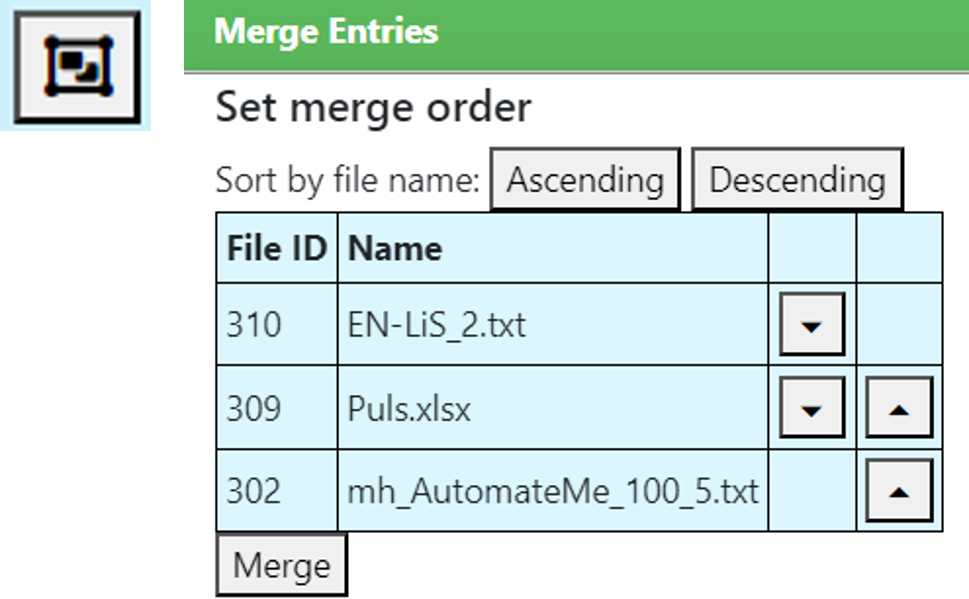
- Merge enhancements: Choose the merged file's data type directly in the merge form, and merge source-file headers into the result (deduplicated). New explicit Unmerge action, a filter to reveal hidden merged sources, and automatic non-destructive restore of the original sources when a merged entry is deleted. Correct per-file physical-time handling and a union of source columns on same-device merges mean no columns are dropped.
- Test Manager – electrode stacking: New Current Collector Thickness column with current-collector-aware derivation, per-role coating and whole-stack totals in the positioning strip, and post-calender porosity that accounts for both coated sides and the current collector. Asymmetric-electrode porosity/density is mirrored in the backend, with tooltips on non-obvious fields.
- Specimens & libraries: Recipe-based live composition banner and fully clickable rows in the specimen picker, a new specimen provenance modal tracing each field's value back to its origin, and an admin toggle to disable automatic specimen creation on import. Grand totals and entity-access-aware counts across the Specimen and Test-Plan libraries, with breakdowns kept across pagination.
- Imports, parsing & metadata: Surface BioLogic device / channel / software and the full acquisition time in the file header, map the OCV technique to a data type, and manually re-parse binary-only files.
- EIS: File-less preset editor plus graph-customization library columns, and the parser timeout raised to 180 s.
- Uploads, KPI Table & result files: Ordered file table with a persistent defaults header, in-scope project attachment for non-manager uploaders, per-entry delete buttons on the KPI Table, and cleanup of orphaned result files on failed saves.
- Access control & security: Per-row file access control enforced on all file-list write actions, cryptographically secure password generation, and profile-override identity resolution fixed.
- Reliability & data integrity: Exponential backoff for database reconnects so transient outages no longer crash Collect, downloads that fast-fail with a clear error instead of hanging, and timezone-independent date-only writes (no more day-shifting).
- Data Analysis integration: DA-token → session-cookie exchange enables native save and session upgrade from the Data Analysis webview.
- Guides: In-app guides translated into Portuguese, Japanese, Chinese, Korean, Hindi and Italian, with linked EIS / KPI / Offline tutorial videos.
02.2025-05.2026
- Authentication & users: Passkey / WebAuthn sign-in and single sign-on (SSO) between Collect and Mind, a redesigned admin login, multiple labelled API/DA tokens per user, and a new role system with per-user permission toggles, profile switching and inactive-profile management.
- Access control, projects & organisation: Project-based access control scoping files, parameters and specimens to projects, with file-access management and bulk edit access across libraries, plus projects administration, project members and organisational-unit management.
- EIS Analyzer: Integrated EIS Analyzer 2.0 with DRT and Kramers-Kronig analysis, DEIS (distributed EIS) support, a guided TLM Wizard, and a project-scoped ML Model Library.
- IDs, naming & test campaigns: Test & ID Manager generating test campaigns and cell IDs from configurable nomenclature rules with live preview, reusable presets and styled XLSX export, Auto-Name for files, and automatic linking to Test Plan IDs, specimens and organisational units.
- Specimens, data display & filtering: Specimen Parameter Library and picker with load-from-library and batch parameter creation, saveable Display Views, a Notes column, the renamed KPI Table, and operator-based date/KPI filtering.
- Imports, merge & machine data: OPC-UA machine data integration and many new formats (Neware, El-Cell, Basytec, BioLogic BCS, USB data loggers, JSON…), resumable TUS uploads, Battery Safety Test results, and a reworked merge workflow that keeps originals as segments.
- Export, integrations & Mind: Graph Customization Library to save, reuse and export/import styling, polished CSV/XLSX export and .batalyse bundles, Sync to Mind, and external upload/retrieve APIs.
- Languages, settings & performance: Multi-language support (German, Spanish, French, Portuguese, Japanese, Chinese, Korean, Hindi) with an in-app switcher, System Settings with overrides, per-folder monitoring controls, offline license validation, and broad performance gains on file lists, large imports and EIS grouping.


Ältere Versionen
- Add individual components—such as cells, electrolytes, electrodes, separators, and cell formats—to your Collect specimen library and assign them a unique Specimen ID.
- Use a file name nomenclature that includes Specimen IDs.
- Upload test files containing one or more Specimen IDs.
- Collect automatically creates and links a parameter file, using all IDs found in the file name that match entries in the specimen library.
- Collect automatically triggers the evaluation.

- Standardization: Transform raw data from various test devices into your customized target structure effortlessly.

- The Collect admin can now edit user (group) names

- Enhanced File Management for Collect Admins: Admins can now better control which files are accessible to employees. New filtering options allow you to sort files by project number and PSP-Element (if integrated with SAP).

- Fully Customize Your File Name Nomenclature: Take advantage of new pre-defined 'descriptions' and a brand-new feature to create your own custom 'descriptions' for your file name segments. Easily add or edit your personalized 'descriptions' to tailor your file name nomenclature exactly to your needs.

- Auto-update of benchmarks: If a single test is updated or reevaluated, all connected comparisons involving that test will be automatically updated as well..
- Manage battery safety test data in Collect. Save information like 'on-set temperature', 'thermal runaway temperature' and emitted gas volume and correlate them with cell and material parameters.

- Data loggers generate data tables that include multiple tests as well as irrelevant data from test breaks. You can now connect your data loggers to Collect and extract the relevant data for a specific test from these tables.

- Fix: We observed an issue where the web browser could block communication and up-/downloads to Collect, preventing test data from being analyzed. To resolve this, we replaced that communication with the Collect API.
- Some menu names, tooltips, and help buttons have been renamed or updated.

- Receive alerts in Microsoft Teams if a (running) test meets your individual criteria. For general information, please watch the basics video, and for detailed instructions, refer to our tutorial video.

- Specimen library: New export / import feature for your specimimen paramaters json

- Specimen libary: Component composition and name are now also displayed for flow batterie and fuel cell/electrolysis

- Manage specimen parameters columns for both single tests and comparisons via 'Settings' menu

- Raw data standardization has been improved: the applied formulas are now displayed, and you can manage which data should be standardized after formula changes are made
- User interface (UI) improvements
- Collect data from machine control by OPC-UA: various improvements
- Improved file monitoring (import from your local network)
- Tests that are still running are better recognized.
- Improved file monitoring (import from your local network)
- Extended support to import new file formats, including very large test files > 100 MB
- Collect now standardizes all date and time information for any test device to this format to improve your sorting and filtering options. This also includes updating the date format for existing files in Collect.

- New quick filter bars added for Specimen and Test/process plan libraries.

- Want to share test series information or provide supporting information for a publication? Use this new feature to create a zip archive! Please check this video for more information: Collect-Share Zip

- The new Import Specimen feature allows you to easily upload your local Data Analysis JSON specimen parameter files to Collect, eliminating the need to reenter them manually. (JSON supported from Data Analysis version 2023-01)

- We have improved the schedule evaluation feature.

- Previously, selecting multiple tests from different Collect pages was not possible. Now it is!

- The test file name is now displayed when you view the raw data.

- By selecting the respective button in the Standardized Data column, you can now view the standardized data table along with the formulas you used.

- Units of your specimen parameters are now displayed

- Bug fixes
- Missing entry in column „Project name“ fixed
- Bug fixes
- Automated test file evaluations - Extract cell parameters from the test file header and use your individual evaluation settings from the specimen library
- Test cell parameters are extracted from the file header (e.g. Biologic, Neware) directly after upload
- If the file name includes a batch ID with a match in your specimen library the settings of the corresponding entry are used
- A new specimen entry that both includes the input from 1. and 2. is created and linked with the uploaded test file automatically
- The test file is evaluated automatically by Data Analysis when you activate the "Collect monitor" feature
- New Fuel cells / electrolysis specimen dialog and parameters management
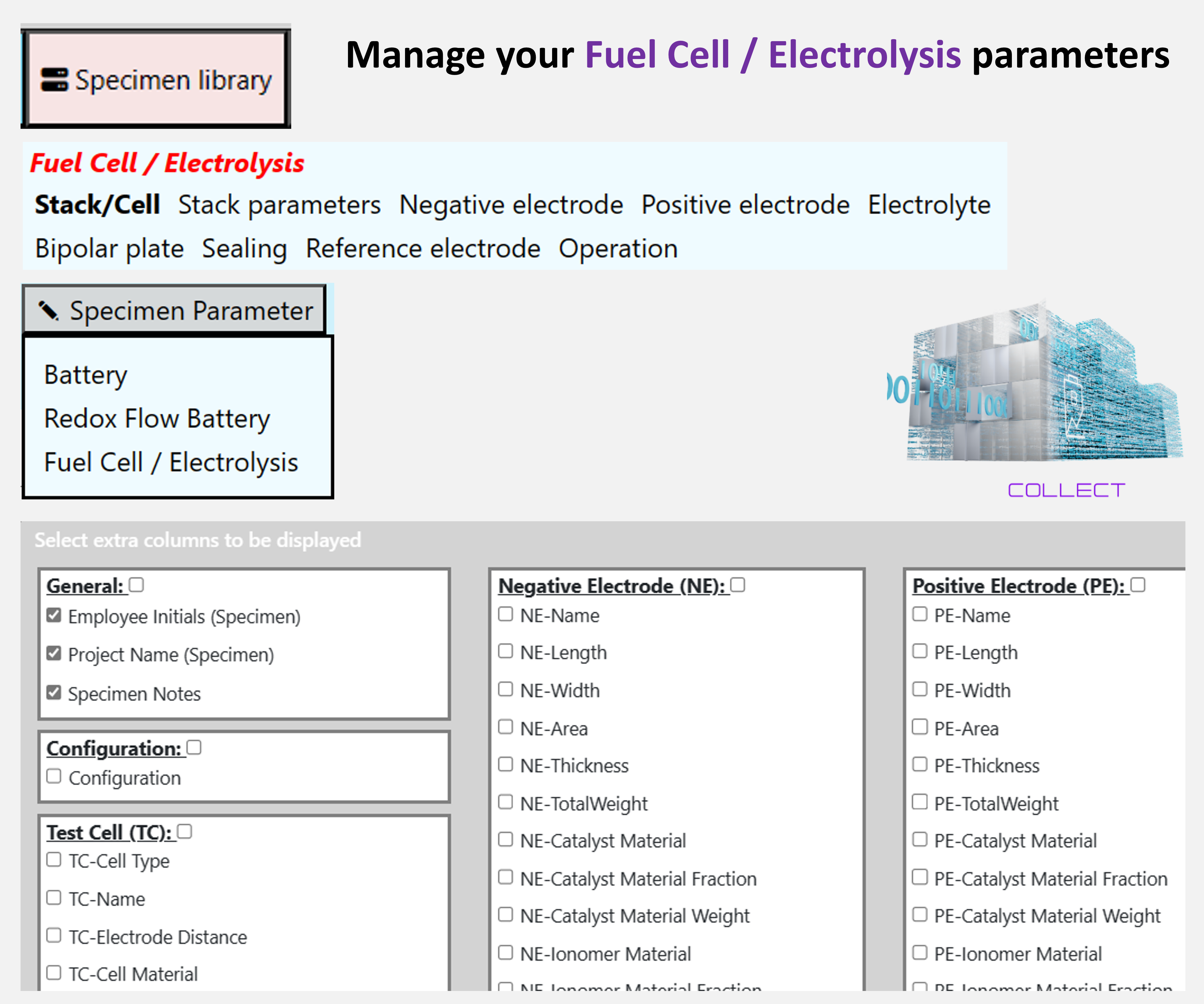
- Improved support for test files including mutliple tests e.g. formation or grading for Hangke cyclers.
Network monitor and file upload improvements
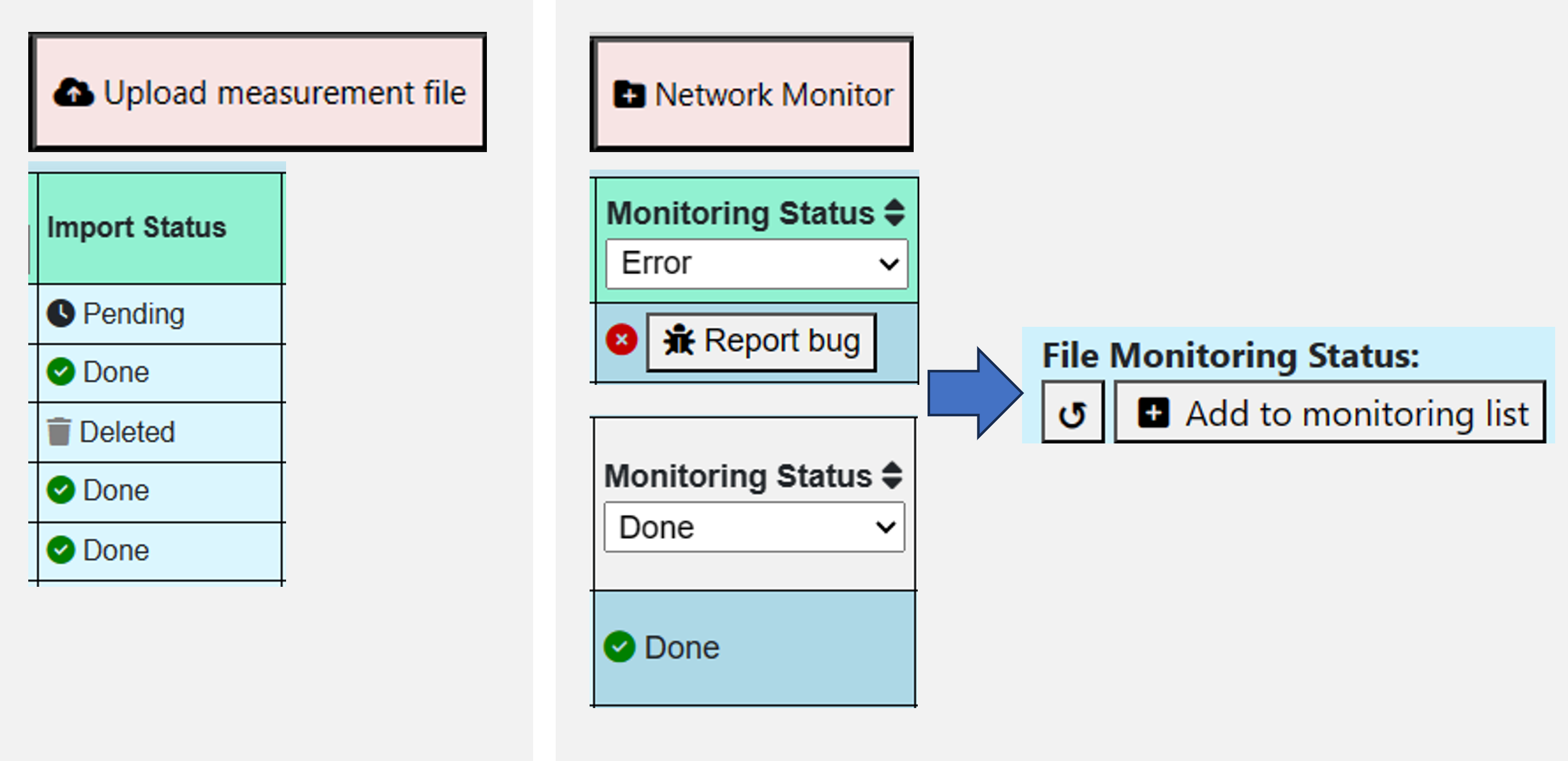
- The status of an upload is now displayed for both your manual uploads and your network monitor menu and can be filtered: pending/importing/deleted/done.
- Deleted files no longer lead to empty entries in the network monitor.
- You can easily restart the file import by Add to monitoring list e.g. if there was an error or if the test file is still running.
- Performance improvements: Jumping from one menu or page to another will be smoother and faster.
- The number of your selected files is now displayed in every menu.
- Active filters are now displayed in the specimen library
 01.2024
- Improved file monitoring – automatically gather your test and analysis files.
- After updating Collect, files being in monitoring process don’t get lost
- Fixed a double import issue
- Improved identification of files
- Fixed an issue that files from newly added monitoring folders were not uploaded to Collect immediately
- New Redox-Flow Battery specimen dialog and parameters management
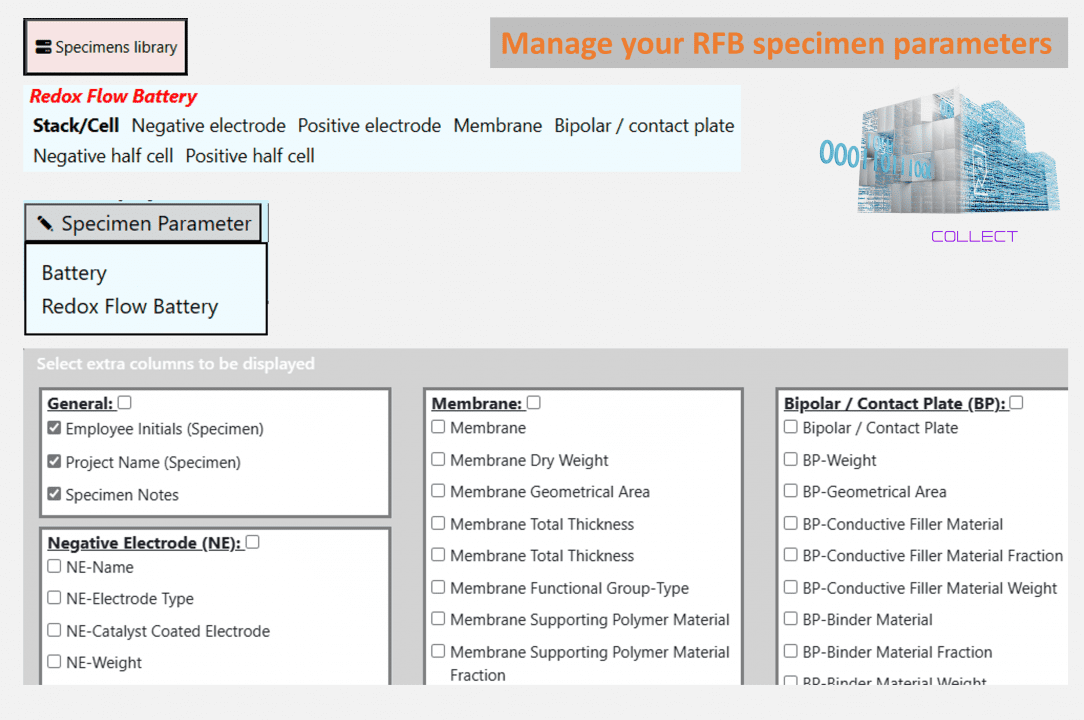 File name nomenclatures
- Option to add and to manage multiple file name nomenclatures to categorize your files automatically.
- Improved display of applied nomenclature (see which nomenclature is being applied)
- Significantly improved performance when deleting files
- Newly added support for test files including mutliple tests e.g. formation or grading for Hangke cyclers.
- Improved support for OPC-UA connections
- Improved data standardization features (available for testing) – Standardize your test data to receive a uniform file structure independent of the cyclers and test devices you are using.
- Fixed an issue that files were not displayed correctly in the “network monitor”.
- Improved support for many new file structures, test devices and for OPC-UA connections
- User group management (available) – Create individual users or user groups with individual log-in passwords and rights. Manage file view and delete and access to settings permissions. – Take care that interns have no delete permissions and can only see their own tests: Collect-User Management
- Improved filter options – now also added for your comparisons
- Data standardization features (available for testing) – Standardize your test data to receive a uniform file structure independent of the cyclers and test devices you are using
- Calculator: Add your own formulas to perform calculations with your raw data
- Improved merge feature to reduce database entries
- Improved filter options – add multiple files and sort your tests with “><=” operators
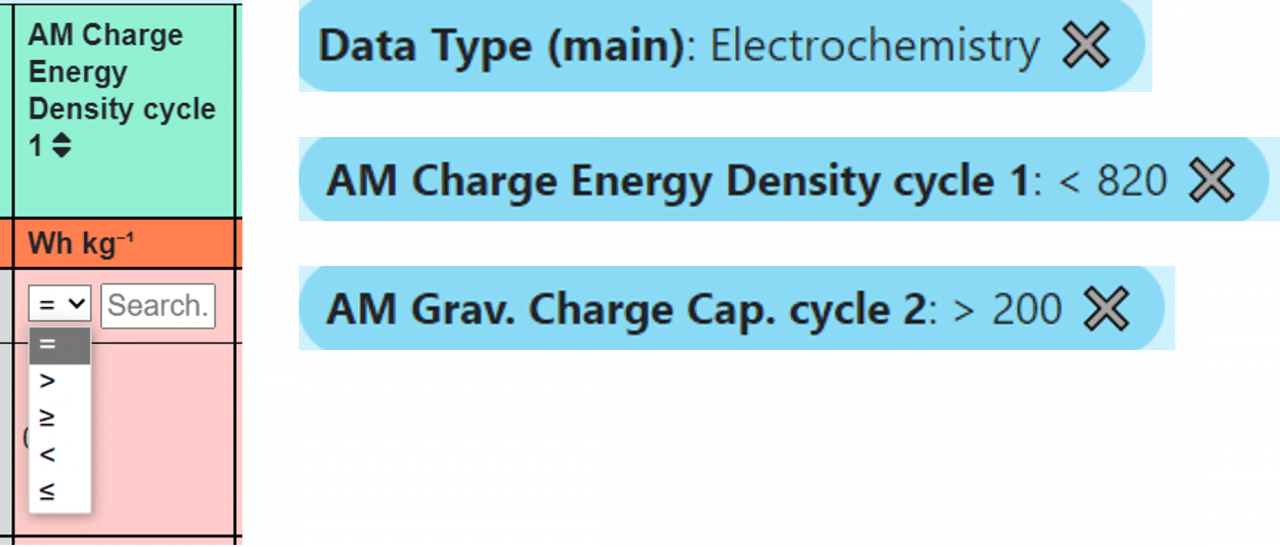
- Data standardization features (in work) – Standardize your test data to receive a uniform file structure independent of the cyclers you are using
- User group management (in work) – Create user groups with individual rights. Add/remove users to these groups to manage their rights comfortably.
- Added support for OPC-UA connections (in work)
- A lot of work and development... Please ask for a demo to see yourself :)
Erleben Sie Collect mit Ihren eigenen Dateien
Senden Sie uns einige Ihrer Dateien oder buchen Sie ein 30-minütiges Gespräch. Testen Sie Collect auf einem Demo-Server oder installieren Sie es auf Ihrer Hardware – kostenlos und unverbindlich.
 Mind →
 Data Analysis →
 EIS Analyzer →