
EIS Analyzer - Professional Impedance Analysis
Electrochemical impedance spectroscopy (EIS) analysis software for battery impedance testing, fuel cell diagnostics, and electrochemical R&D. Features automated circuit fitting, DRT analysis, Kramers-Kronig validation, and Batalyse Collect integration. Free for Data Analysis customers.
EIS Analyzer


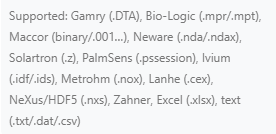
Multiple File Formats & Data Sources
Import EIS data from Gamry (.DTA), Solartron (.z), Bio-Logic (.mpr / GEIS), PalmSens (.pssession), Maccor (EIS text and V2 binary FRA, incl. .001 / .002), SAFION IE10522 (multi-section EIS_DATA_CH*.csv), or generic text and CSV (.txt, .dat, .csv, .mpt). GEIS files keep every sweep, and three-electrode data gets correct sign-correction and per-electrode output. Connect directly to MySQL / SQL Server or the Batalyse Collect cloud.
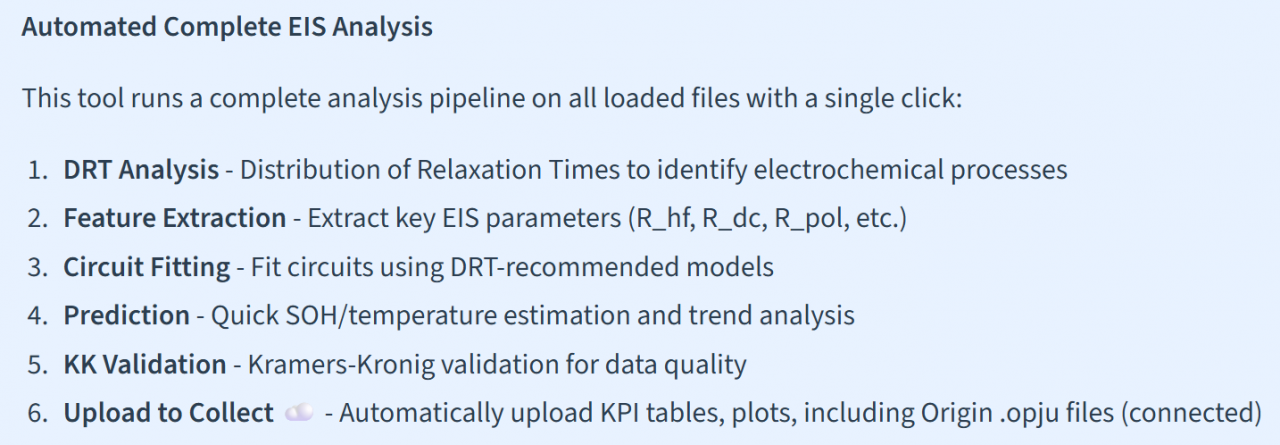
One-Click Automated Analysis
Run DRT analysis, circuit fitting, validation, and predictions simultaneously with the auto-analysis pipeline. Export results as JSON, CSV, or PNG – or upload directly to Collect with KPI tables.
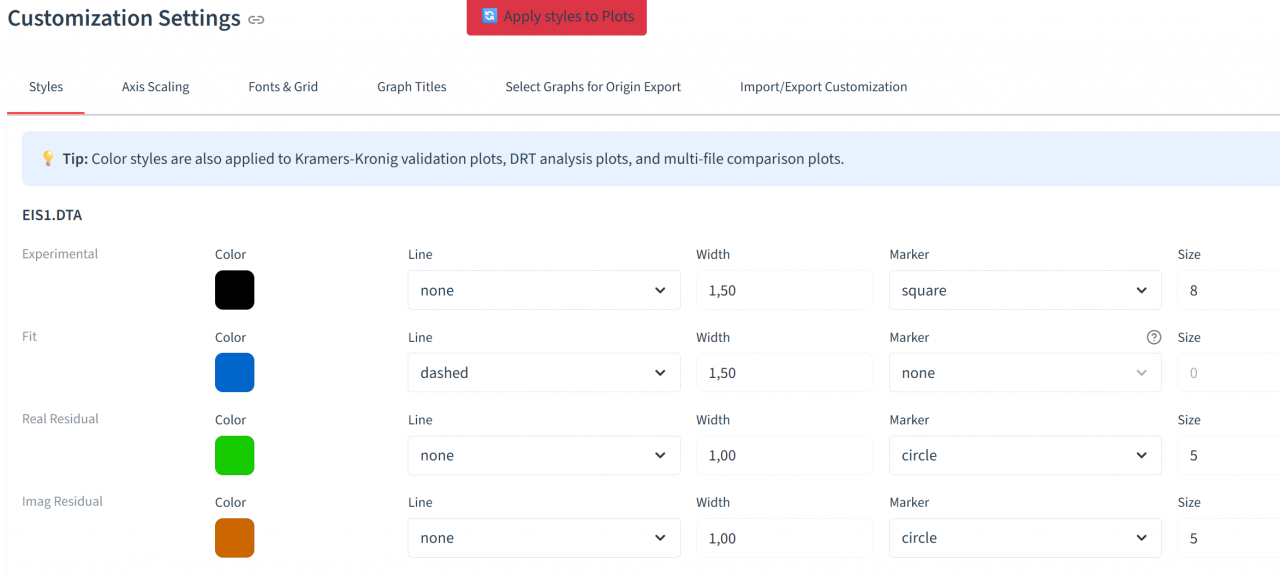
Customization
Fine-tune every graph export in the Customize Graphs tab: per-file colors, markers and line widths; bold/italic fonts for titles, axes and legends; axis scaling, gridlines and plot selection. Save and share your styling presets via JSON export/import.
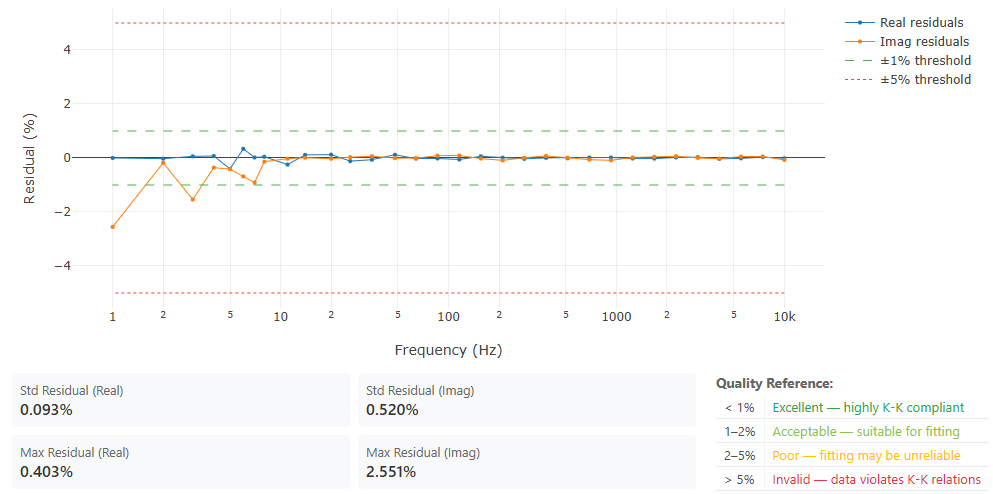
Kramers-Kronig Validation
Verify the quality of your EIS measurements with Kramers-Kronig transformation. Detect drift, noise, or non-linear behavior in your data before analysis. The validation highlights problematic frequency ranges and helps ensure reliable circuit fitting results.
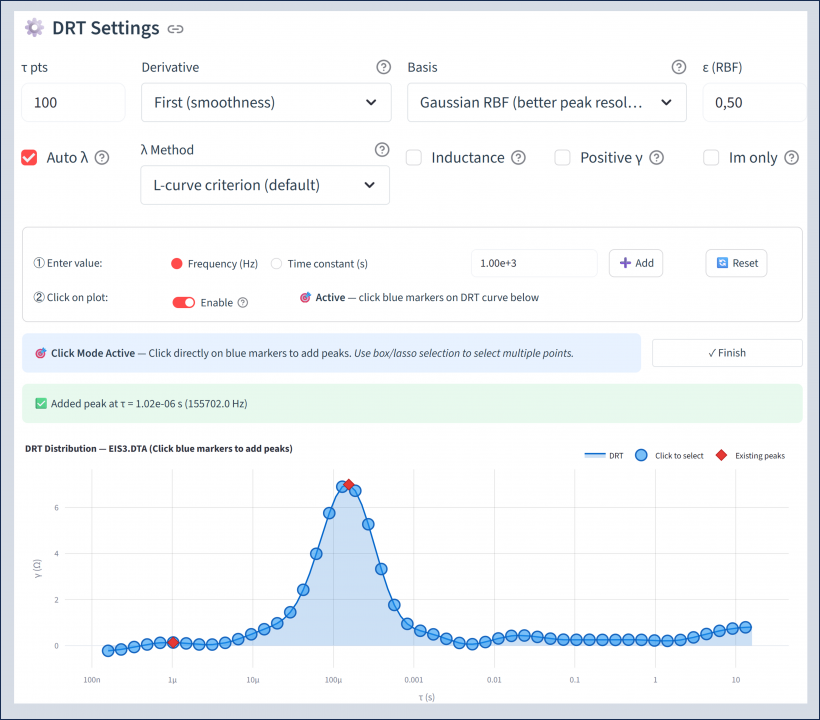
Distribution of Relaxation Times
Identify electrochemical processes and their time constants with Distribution of Relaxation Times. Fine-tune regularization, frequency range and peak sensitivity, add peaks by clicking the DRT graph or let the algorithm auto-detect them, and get suggested equivalent-circuit models for the fit that follows.
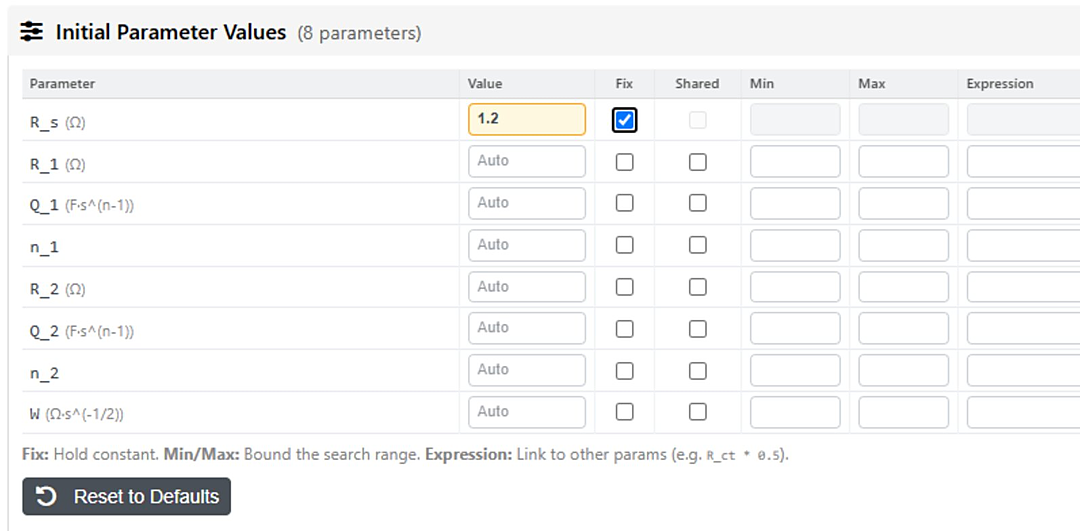
Equivalent Circuit Modeling
Fit your EIS data to 14+ built-in circuits — R, R-C, R-RC, R-RQ, R-RC-RC, R-RQ-RQ, Randles and Warburg-diffusion models — plus 14 Transmission Line Models for porous electrodes, or enter your own circuit string. One unified table puts every control in one place: fix or free each parameter, bound its range, share values across sweeps, or link them by expression. DRT-guided initial guesses and multi-start optimization find good fits fast, and a Fit-Quality preset (Fast / Balanced / High precision) trades speed for rigour without touching solver internals.
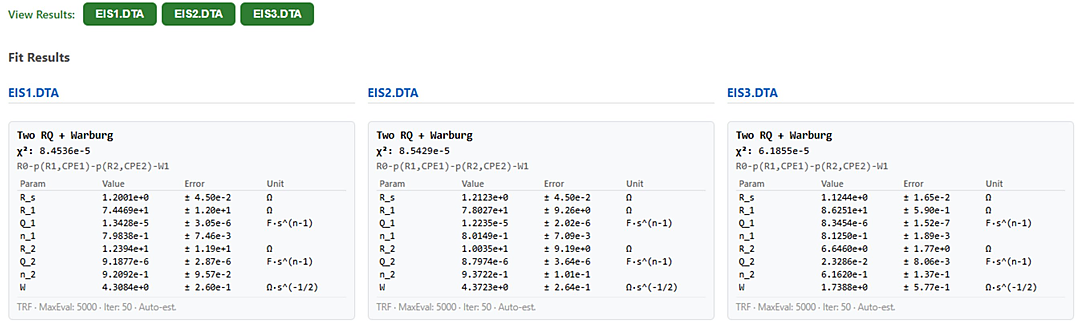
Compare fits side by side
Toggleable View / Select Results chips display and compare several files or sweeps at once, each with its χ² and per-parameter errors. Your selection persists across re-fits, and a mirrored picker sits in the fit-versus-data plot header — so you can line up results from EIS1 to EIS3 and keep your place while you iterate.
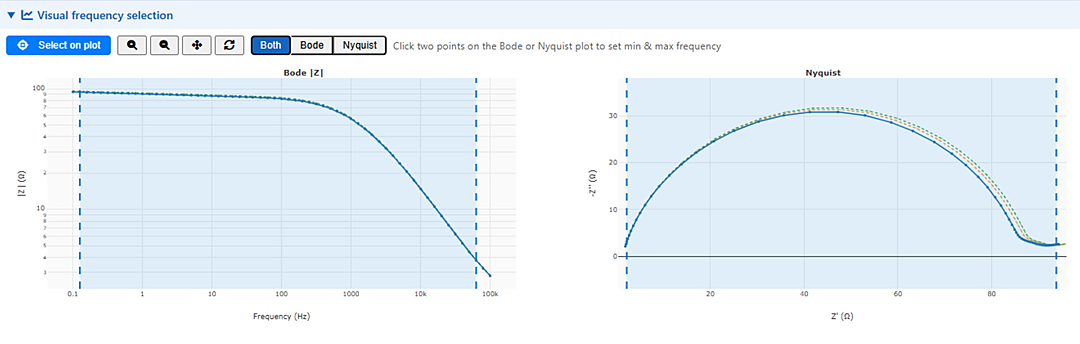
Visual frequency selection
Pick your fitting range by clicking directly on the spectrum. Free-click with log-space snapping on a full-width Bode or Nyquist picker: click two points to set the minimum and maximum fitting frequency. The same picker is available inside the DEIS Fit-all dialog.
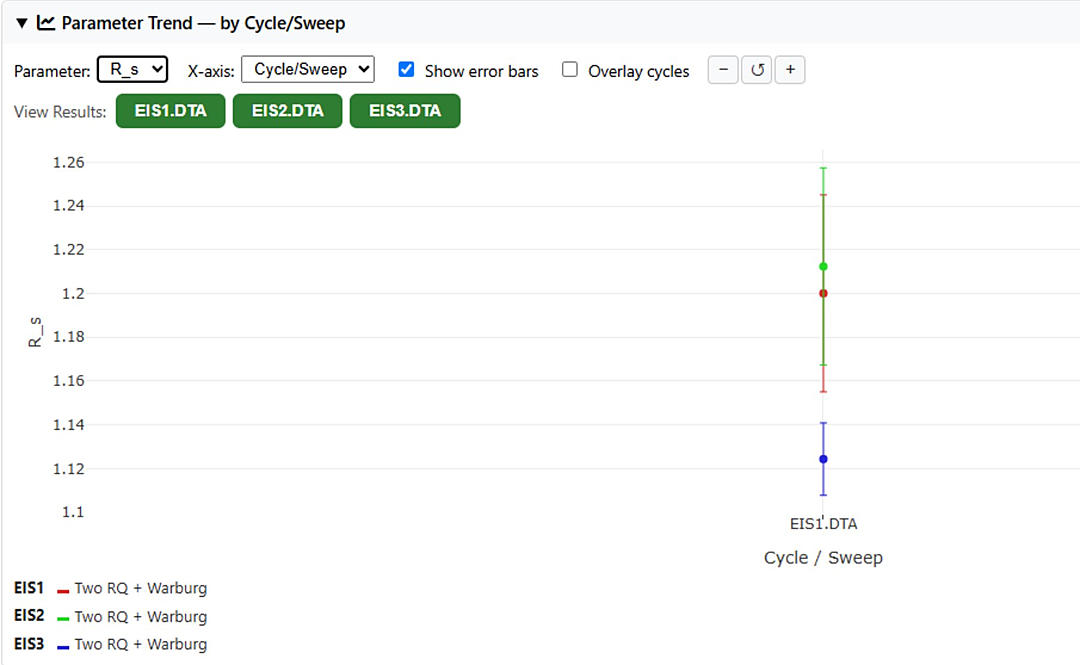
Parameter Trend across sweeps
Plot any fitted parameter — or χ² — across all your sweeps, with error bars, per-model curves and cycle-compare overlays. A cycle-aware x-axis and a voltage x-axis mode put every result where it belongs, and the same trend travels straight into the Origin export.
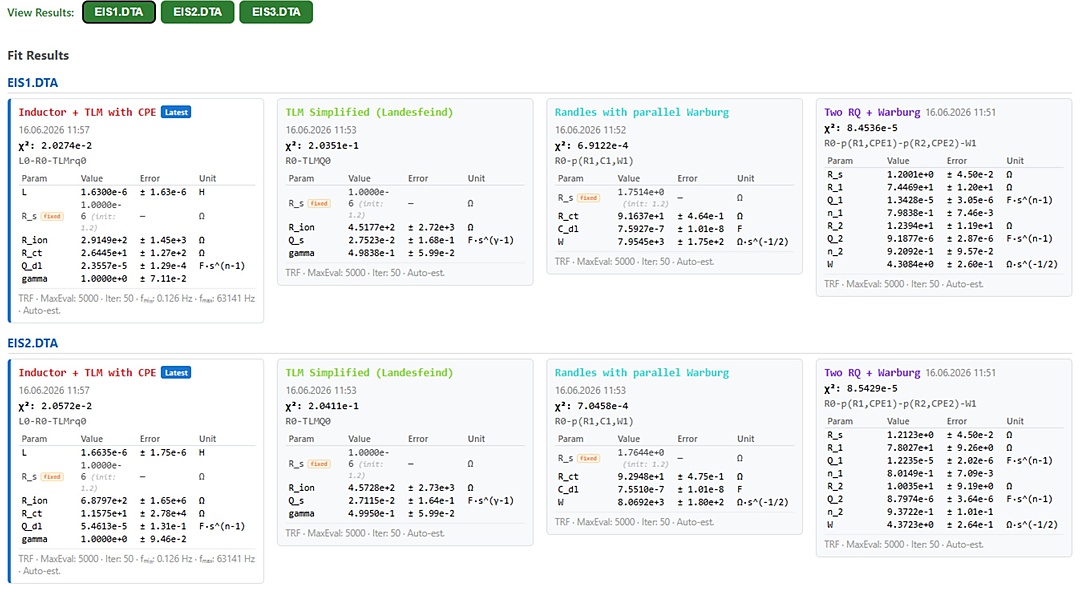
Fit Results grid with full history
Every fit lands in a cycle × model grid: one card per fit, with the latest flagged and the complete per-sweep history retained across reloads. Each card carries its fit date and time and can be renamed in place, with a “Show all” for runs beyond 20 cycles.
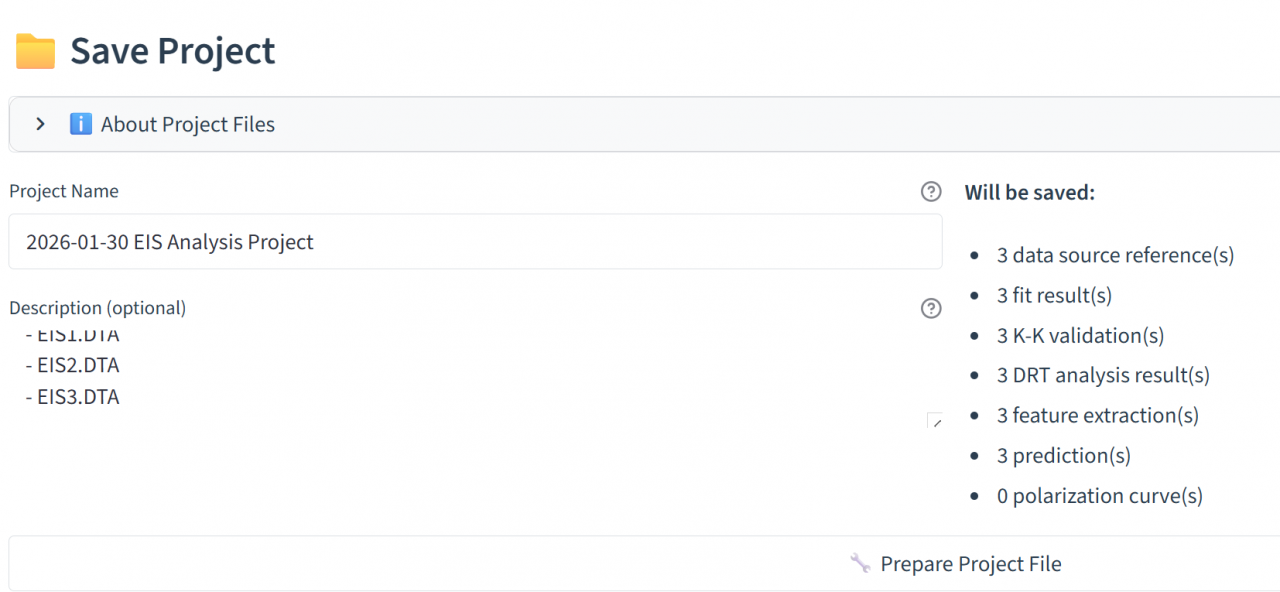
Save and manage projects
Save complete analysis sessions as projects to preserve all settings, fitted parameters, and results. Reopen projects anytime to continue your work or compare results across different measurements.
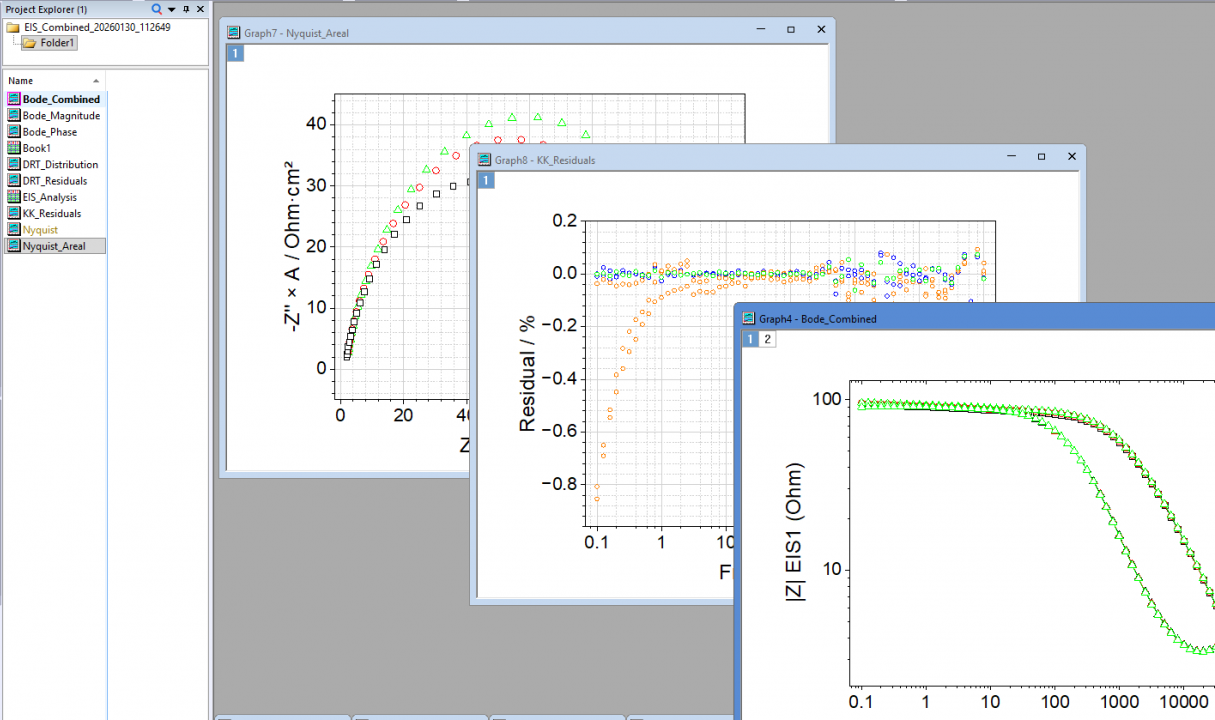
Flexible Export Options
Export as JSON, CSV or XLSX, publication-ready PNG, or an editable OriginLab .opju project. Origin bundles carry every fit (current and history) with matching colors and model labels, Bode plots that overlay the fit curves, a Kramers-Kronig Nyquist graph, and Parameter Trend against the real trajectory coordinate — one point per sweep. CSV and XLSX add per-parameter errors and units, SOC / voltage / cycle / current / time columns, dated filenames and per-sweep graphs. Or upload straight to Batalyse Collect for team-wide data management.
Work in your own language
The in-app user guide is fully translated into ten languages — English, German, Spanish, French, Italian, Portuguese, Japanese, Korean, Chinese and Hindi — including a step-by-step Dynamic EIS chapter and the references behind the new diagnostics.
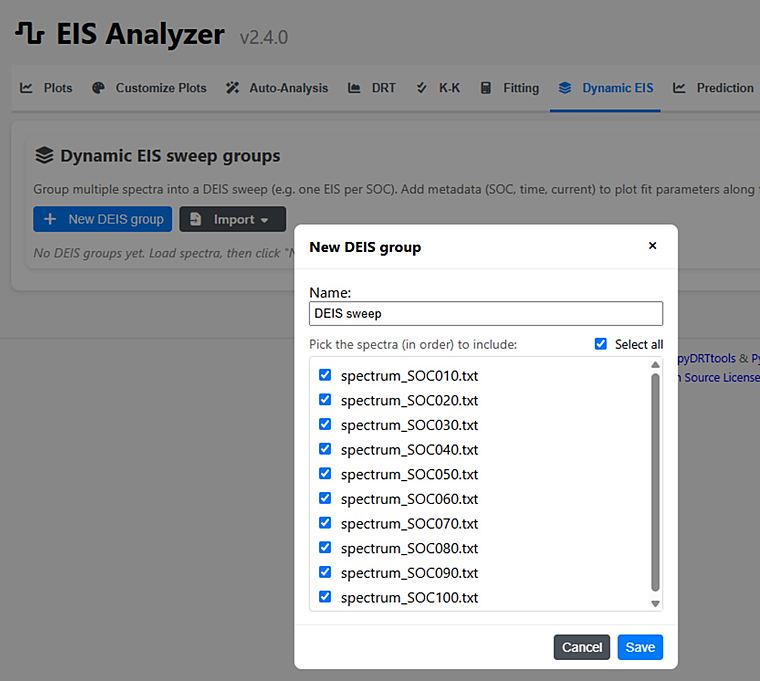
Dynamic EIS: watch impedance evolve as the cell works
Dynamic EIS (DEIS) is a dedicated new workspace — in active development — for operando impedance. Group a series of sweeps and watch every fitted circuit parameter evolve across state of charge, cycle, voltage and time. One-click Auto-Analyze runs DRT, fitting, Kramers-Kronig and feature extraction on every member with a live, cancellable progress overlay, stationarity checks grade each spectrum, and a whole sweep group saves to a single self-contained .batalyse bundle you can reopen or share.
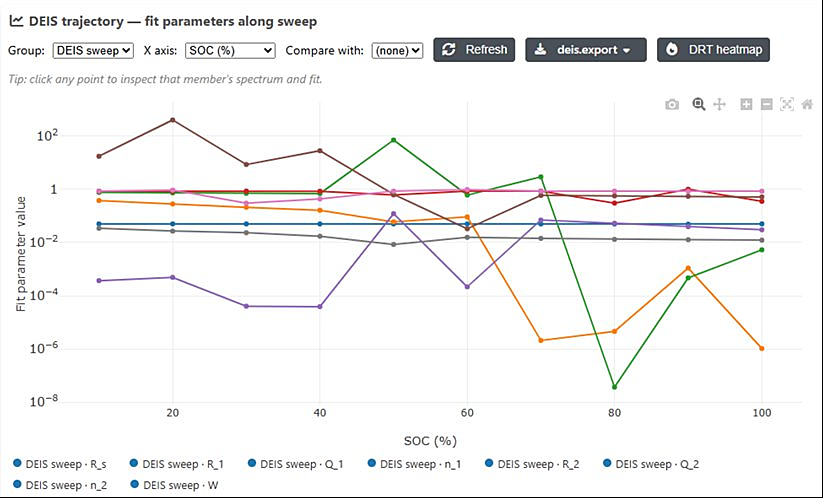
Parameter trajectories vs SOC, time and cycle
Track any fitted parameter — charge-transfer resistance, series resistance, capacitance and more — along the sweep against SOC, time or cycle number. One plot shows how the interface changes through a charge or discharge. Click any point on the trajectory to drill into that member’s spectrum, fit and residuals, and a DRT-evolution heatmap shows SEI, charge-transfer and diffusion processes shifting as the cell cycles.
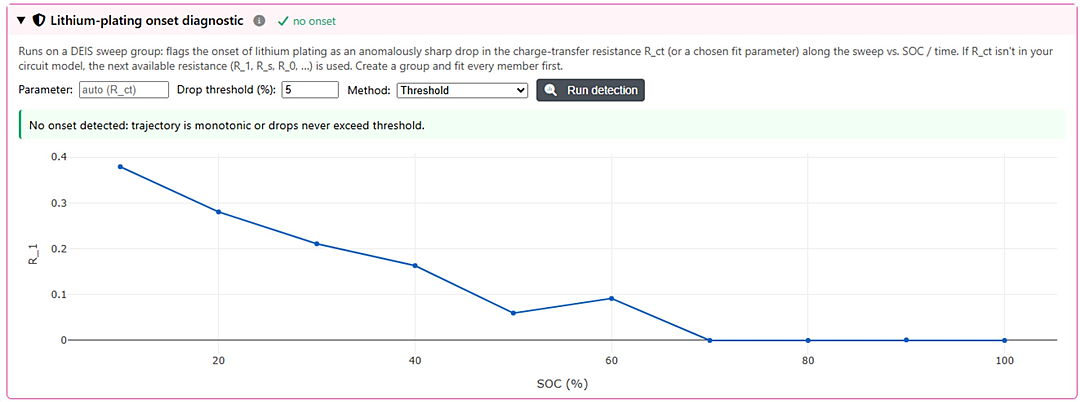
Lithium-plating onset detection
Flag the onset of lithium plating as an anomalously sharp drop in the charge-transfer resistance — or a parameter you choose — along the sweep versus SOC or time, with a configurable threshold and a clear pass/fail readout. A fast operando screen when you are pushing fast-charge protocols.
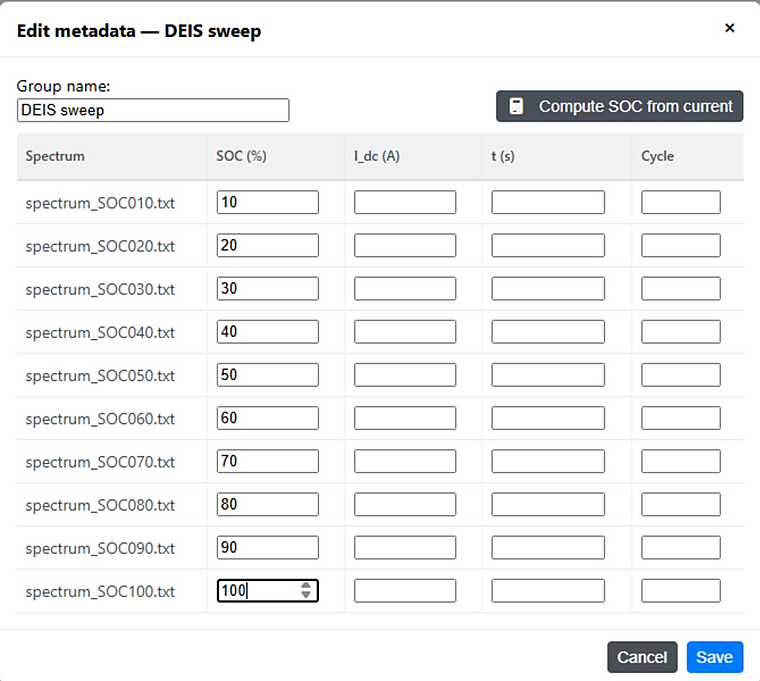
Per-spectrum metadata and automatic SOC
Enter SOC, current, time and cycle for each spectrum, or let the Analyzer compute SOC from current by coulomb counting. Raw time-series from custom potentiostats import directly: a drift-corrected FFT recovers Z(ω) at the excitation frequencies, coherent averaging over repeated cycles suppresses noise (∝ √N), and signal-quality checks flag non-linear distortion and residual drift before they can corrupt a fit.
New analysis panels
The newest DEIS additions, also in development: a derived-kinetics panel reporting exchange current density i₀, the voltage-dependent rate coefficient k(E), the standard rate constant k₀ with Tafel slope α, and inhibitor efficiency IE % (kinetic forms after Pajkossy 2021). A charge-versus-discharge split overlays charge-transfer resistance by direction, and an SOH / aging curve tracks a fitted parameter against cycle at a fixed reference SOC.
Temperature, mapping and quality
Estimate and calibrate temperature from a linear high-frequency-resistance-versus-temperature fit, then apply it along the trajectory and pool the circuit parameters into a 2-D SOC × temperature heatmap. A per-member quasi-stationarity traffic-light grades how far SOC drifts within one lowest-frequency period, and Dynamic Multi-Frequency Analysis (DMFA) recovers time-resolved impedance Z(ω,τ) from a single record (after Scarpioni 2026; Battistel & La Mantia 2019).
Free for Data Analysis Customers
Changelog
New Arrhenius analysis
- Activation energy from multi-temperature EIS in kJ/mol and eV with a 95% confidence interval
- All available resistances fitted side by side
- ln(1/R) or ln(T/R) forms
- Optional conductivity in S/cm
- Activation energy per DRT peak
- Built-in plausibility checks
- Noisy data and a wrong physical model are reported separately
- VTF comparison for polymer electrolytes
- Sweeps with drifting temperature are flagged
- Temperatures read per sweep from Gamry, Solartron and other supported files, so temperature ramps can be analysed as measured
Exports and interface
- Arrhenius results in every export
- KPI table, CSV/JSON and saved results
- Origin projects with a dedicated worksheet and graphs
- CSV fallback for users without Origin
- Fully translated, with the user guide covering the Arrhenius workflow in all 14 languages
Fixes
- Improved Origin legends and plot customization
- Faster switching between resistances
- Correct electrode area in current-density calculations
- Several table and export fixes
Version 2.6.1 was an internal build and was not released.
- Kramers-Kronig validation is now a full test bench: choose which components the model is fitted to (complex, real or imaginary), how many RC elements it uses, whether a series capacitance is added, and whether all points or only the capacitive ones are fitted — with one frequency window shared with Fitting and Auto-Analysis, so a fit and its validation can no longer describe two different parts of the same spectrum
- Exclude single bad points by clicking them on the residual plot — removing one mains-pickup point at 50 or 100 Hz can rescue a spectrum that looked poor across a whole decade; new diagnostics report low-frequency bias, how systematic the residuals are, the model order actually used and how many points were dropped, and every file can be validated at once with the results kept per file and per sweep
- Electrode geometry per file: enter an electrode area and thickness and every result follows the geometry — including a new areal Nyquist plot in Ω·cm² and a resistivity Nyquist plot in Ω·cm for homogeneous through-plane layers such as solid electrolytes, separators, pellets and coatings, so samples of different geometry can be compared on one plot
- Choose the equivalent circuit for Auto-Analysis instead of always inheriting the one DRT suggests — including your own circuit, which is checked before the run rather than failing part-way through — and every fit of a sweep is now kept, with the newest marked as the latest by its own date
- Where each extremum sits, not only how large it is: the frequencies at which the real part, the imaginary part, the magnitude and the phase reach their extremes, plus the arc peaks
- Train a model on your own results and export it for use elsewhere, with the preprocessing included in the exported file; new temperature-prediction transform and cross-validation that sizes itself to how much data you actually have
- Novocontrol WinDETA exports open directly; Novocontrol files no longer read the imaginary part as the real one, and Neware NDA v8 files are read correctly including previously misaligned values
- Saving to Collect now writes the areal and resistivity plots too, and the save dialog lists the images each file will produce and states plainly that overwriting removes everything already stored against that test
- EIS result columns show the last evaluation of each sweep and mark a cell when a newer evaluation left it empty, so one column no longer means two different things across rows
- Operando measurement files open in the EIS Analyzer, including very large ones, which are now prepared in the background instead of holding up the page
- The licence window fits on one screen — request form and activation field side by side — and the request form explains what is expected of it, in particular that the email address should be your organisation’s
- Polish and Ukrainian join the interface languages and the user guide is available in Arabic and Turkish again; tooltips now read as words in every language, where German, Japanese, Chinese, Korean, Hindi and Ukrainian previously showed raw character codes in around ninety labels each
- Installing and updating: the application reports its version in Windows’ own file properties, upgrading from 2.3.x or older no longer leaves the previous program file behind, a licence can require a minimum application version, and the installer packs everything needed for model export
- Further fixes: spectra without a low-frequency intercept (blocking electrodes, coatings, separators) now validate, the quality score no longer comes out blank after an Auto-Analysis run, model inputs are matched by name rather than by position, a comparison receives the Origin file its own export produced, and the Origin project contains the resistivity plot when a thickness is known
- SAFION IE10522 support: the multi-section EIS_DATA_CH*.csv exports from the SAFION cycler now load directly (frequency, real and imaginary impedance)
- In-app updater fixed: it now runs the downloaded installer instead of silently doing nothing, so updates actually apply and relaunch the app — no admin rights needed
- “The control does nothing” bugs fixed across DRT, fitting, auto-analysis and Customize: DRT now honors every advanced option (enforce-positive, basis, regularization order, RBF shape, inductance handling, imaginary-only — positivity on by default), the differential-evolution fit method works, and Customize controls (stationarity v_ref, areal-Nyquist export, legend label, DRT fill opacity, electrode area, legend/title previews) all take effect
- More robust parsing: Bio-Logic .mpr (empty / TCUS / Rdc files, VMP3 structural headers, duplicate column IDs, LOG device/channel metadata) and Maccor V1/V2 binary, with clearer “insufficient data” messages for non-EIS files
- PalmSens .pssession import restored in Batalyse Collect — now byte-identical to the standalone app
- Unified the non-EIS rejection message and tidied preset save/library handling
- In-app user guide updated and translated across all 10 languages (EN/DE/ES/FR/IT/PT/JA/KO/ZH/HI), including the new Fit Quality presets and SAFION support
Version 2.4.1
- New Fit Quality preset (Fast / Balanced / High precision) across the Fitting, Auto-Analysis and DEIS Fit-all menus; High precision adds a multi-start rescue for tricky fits
- Dynamic EIS: two new derived trajectory quantities — effective double-layer capacitance C_dl (Brug) and the kinetic ratio H = σ_W/R_ct — selectable and included in exports
- Fixes: grouped Fit Results after multi-file fits; Parameter Trend stays visible on the Voltage x-axis without metadata; Compute SOC from current reads header metadata; manual fits converge to full precision again
Version 2.4.0
- New dedicated Dynamic EIS (DEIS) tab — sweep groups, trajectory plots, stationarity checks, DRT-evolution heatmap, and lithium-plating onset all in one place
- DEIS Auto-analyze: full analysis pipeline (DRT, fit, K-K, features) on every sweep with a live progress overlay — results populate all views in one click
- Parameter Trend analysis: track fitted circuit parameters across cycles/sweeps with error bars, per-model curves, cycle-compare overlays, and a cycle-aware x-axis
- Maccor support: parses both Maccor EIS text and V2 binary FRA spectra, accepts numeric extensions (.001, .002, …)
- Origin export: Parameter Trend graphs now plot against real trajectory coordinates (SOC %, voltage, or cycle) instead of a bare sweep counter
- Save and reload DEIS sweep groups as self-contained .batalyse bundles (spectra + fits + metadata)
- New Fit Results grid: one card per cycle/model, per-sweep fit history, fit timestamps
- Unified Export dropdown with Parameter Trend in Origin .opju, per-parameter errors + units in CSV, dated filenames
- Cancellable Auto-Analysis and Fitting with a live progress overlay
- Bio-Logic GEIS: auto-import preserves all sweeps; cycling rows feed the Non-EIS tab and Polarization auto-analysis
- Three-electrode handling: correct Im(Z) sign-correction for normalized columns and per-curve output
- Stationarity grading now aligns with the K-K Quality Reference (mean-residual grade)
- In-app user guide expanded and fully translated into 10 languages (EN/DE/ES/FR/IT/PT/JA/KO/ZH/HI), including a Dynamic EIS chapter
- Much faster Auto-Analysis on difficult spectra, more reliable online-license check, and numerous stability fixes
Version 2.3.6
- Standalone and Collect builds merged into a single unified codebase
Version 2.3.5
- Drift-FFT waveform inspector — visualize the drift that was removed — and coherent averaging for multisine waveforms (√N noise suppression)
- Per-member inspector and DRT evolution heatmap across a DEIS sweep
Version 2.3.4
- DEIS group auto-analyze: full pipeline across every member with one click
- Fit-all progress streaming via SSE — live per-member feedback
- Export a single group as a .batalyse bundle for sharing
Version 2.3.3
- Linearity (odd-multisine) + LF-noise-floor checks on drift-FFT imports
- SOC coulomb-counting sanity warnings (sign flips, duplicates, out-of-range)
- Plating detector: CUSUM change-point method alongside threshold
- Trajectory overlay: compare two DEIS groups on one plot
- CSV and XLSX export of DEIS trajectory data
Version 2.3.2
- Lithium-plating onset detector on DEIS trajectories
- Raw time-series import with drift-corrected FFT (Hann window, polynomial detrend)
Version 2.3.1
- DEIS: batch ‘Fit all’ for every group member with one circuit model
- DEIS: automatic SOC fill via coulomb counting
Version 2.3.0
- Dynamic EIS sweep groups: trajectory plots and stationarity checks across multiple spectra
- Auto-import multi-curve files (Bio-Logic .mpr multi-loop) as a DEIS group
- K-K tab: per-member traffic-light stationarity summary for DEIS groups
- Project files (.batalyse) preserve DEIS groups on save/load
Version 2.2.4
- New in-app License Key field for offline activation — paste the key sent alongside your .lic file to unlock AES-encrypted machine files
- Bundle licenses now work with the new offline activation flow
- Updated offline activation guide and diagnostic messages
Version 2.2.3
- Origin .opju export: all fits (current + history) exported with matching colors and circuit-model labels
- Origin .opju export: Bode plots now overlay fit curves; new KK_Nyquist graph added
- Fit result cards show Fix / Shared / Min / Max / Expression badges per parameter
- Silent update check on startup with ‘New version available’ banner
Version 2.2.2
- Unified Initial Parameter Values and Advanced Constraints into a single table
- K-K Validation: unified quality scoring — eliminates contradictory results
- Fitting: DRT-guided initial guesses, half-circle C_dl estimation, multi-start TRF optimization
Version 2.1.1
- Fixed missing fit residuals graph when frequency range is filtered
- Fixed untranslated DRT / K-K / Export content on language switch
- Improved custom circuit validation and auto-estimation
Version 2.1.0
- Added 14 Transmission Line Models (TLM) for porous electrode analysis
- Added constrained fitting with parameter bounds, fix/free, and expressions
- Added multi-language support (9 languages)
- Improved visual frequency selection with multi-sweep overlay
Version 2.0.x
- Complete rewrite: new FastAPI + TypeScript web architecture (replaces Streamlit)
- Native desktop window via pywebview with browser fallback
- DRT Analysis with circuit model recommendation, SOH and temperature estimation
- Auto-Analysis pipeline, graph customization presets, project import/export
- SQL database connectivity, PalmSens .pssession support, Origin .opju export
- Automatic update checking with rollback support
Version 1.x
- Customization Library for graph presets, DRT peak extraction in Auto Analysis
- Customize Graphs tab with per-file styling, fonts, and export selection
- Origin export with KK_Nyquist graph and multi-file comparison plots
- Offline license activation, SQL injection protection, startup-directory fixes
Credits

- EIS-Data-Analytics
https://github.com/isea-rwth-aachen/EIS-Data-Analytics
Blömeke, A., Kappelhoff, O., & Sauer, D. U. (2024). EIS Data Analytics. - PyEIS
https://github.com/kbknudsen/PyEIS
Knudsen, K. B. - impedance.py
https://github.com/ECSHackWeek/impedance.py
Murbach, M. D., Gerwe, B., Dawson-Elli, N., & Tsui, L. - pyDRTtools
https://github.com/ciuccislab/pyDRTtools
Ciucci, F., Chen, C., Effat, M. B., Liu, J., Maradesa, A., Py, B., Saccoccio, M., & Wan, T. H.